


Remote work doesn’t scale by talent alone; it scales by systems. When information is scattered across chat, email, and a dozen apps, remote teams lose time to multitasking, redundant work, and repeated explanations. That’s overwhelming.
The antidote is not more willpower; it’s a set of repeatable, low-friction productivity systems for remote workers that remove ambiguity and create focused time for actual output.
This article presents seven practical productivity systems tailored for remote workers and distributed teams. Each section breaks down the ‘what,’ ‘why,’ and ‘how,’ providing step-by-step implementation guides and recommended tools with direct links.
The goal is to offer an actionable path from chaotic days to predictable weeks without requiring a massive overhaul. These systems are designed to boost remote work productivity, streamline collaboration, and minimise overwhelm while working from home.
Table of Contents
Asynchronous-first communication system
This is a communication approach that defaults to asynchronous methods (posts, docs, recorded video) and reserves synchronous meetings for strategic alignment or complex problem solving.
Meetings and reactive chat fragment attention. Asynchronous communication reduces interruptions, improves thoughtfulness, and gives teammates predictable windows of focus. It also scales better across time zones, enhancing overall remote work productivity and reducing meeting fatigue.
How to implement
- Create a Communication Playbook. Draft a one-page guide that defines the purpose of each channel. Include expected response times, such as four business hours for non-urgent Slack messages, and clear rules for when to escalate an issue. Store this guide in your team’s knowledge base.
- Swap meetings for updates. Replace at least one recurring status meeting with a simple asynchronous update template. Ask team members to list what they did yesterday, what they are doing today, and any obstacles in their way. Require project leads to post these updates by a fixed time each day.
- Use the right tools. Use short recorded demos for complex topics and use written documents for decisions that people need to refer to later.
- Improve message quality. Train your team to write better messages. Each post should have a short subject line, a few bullet points for context, a clear request, and links to any helpful resources.
Tools
Slack – https://slack.com/
Microsoft Teams – https://www.microsoft.com/microsoft-teams
Notion – https://www.notion.so/
Loom – https://www.loom.com/
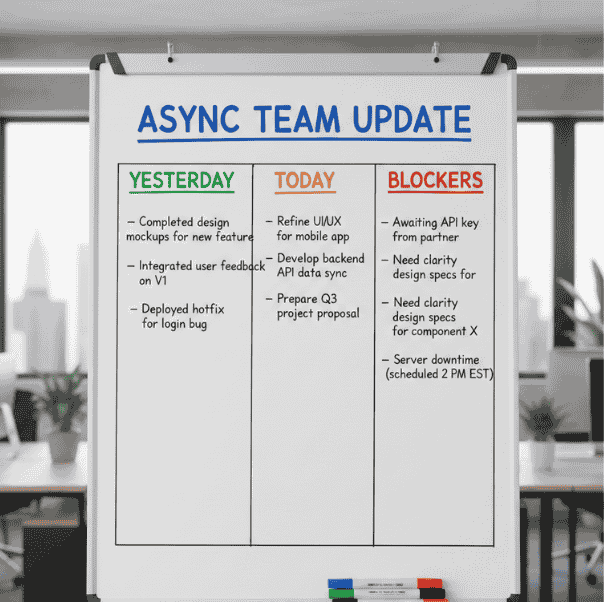
Asynchronous team update template
employee onboarding routines, onboarding templates, and how async updates fit into new-hire routines.
Client onboarding workflows; client intake flows that reduce ad hoc meetings.
Task-flow & ownership system (single-ticket truth)
Confusion happens when tasks live in multiple places: a notebook, an email thread, and a Slack DM. To fix this, you need one central place where every project lives. This “single source of truth” ensures that everyone knows exactly who is responsible for what and when it is due. It eliminates the “status check” messages that clutter your inbox.
How to implement
- Pick one tool: Choose a project management tool for the whole team and move all active tasks there.
- Keep it simple: Use a basic workflow like Backlog, Ready, In Progress, and Done. Limit your statuses to five or fewer.
- Assign ownership: Every task must have one owner and a clear definition of what “done” looks like.
- Review weekly: Spend 30 minutes once a week cleaning up the list and prioritising the next steps.
Tools
Trello – https://trello.com/
Asana – https://asana.com/
ClickUp – https://clickup.com/
Jira – https://www.atlassian.com/software/jira
Zapier (for integrations) – https://zapier.com/
Practical tip: Use templates for recurring work (content, client reports). Templates save decisions and speed handoffs.
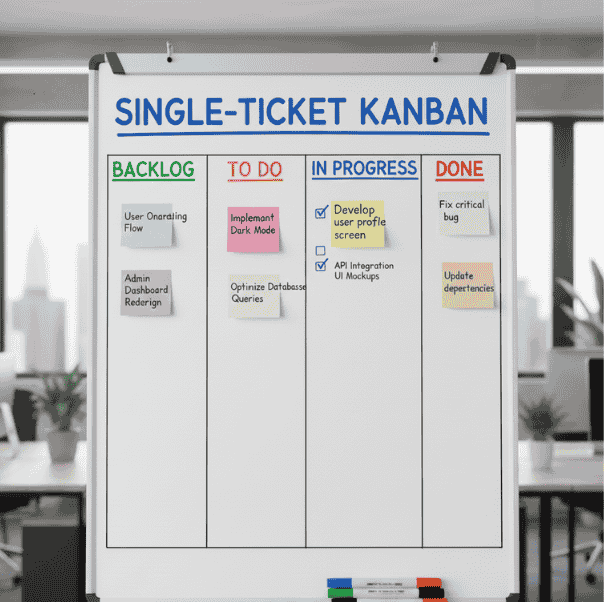
Kanban board
Time-blocking + deep work routine
High-quality work requires long stretches of uninterrupted time. In a remote setting, it is easy to spend the whole day doing “shallow” work, answering pings and attending calls without actually finishing a major project. Time-blocking is the act of claiming your calendar. By scheduling 60 to 120-minute blocks for deep work, you signal to yourself and your team that this time is for high-level thinking only.
How to implement
- Audit your time: Look at your calendar for two days to see where your focus is being broken by small gaps.
- Set focus blocks: Reserve two or three blocks daily. Label them clearly so others know not to disturb you.
- Use entry and exit rituals: Take three minutes at the start to write down your goal and three minutes at the end to note your progress.
Practical tip: Block calendar time in consistent daily slots so teammates learn when you are routinely unavailable.
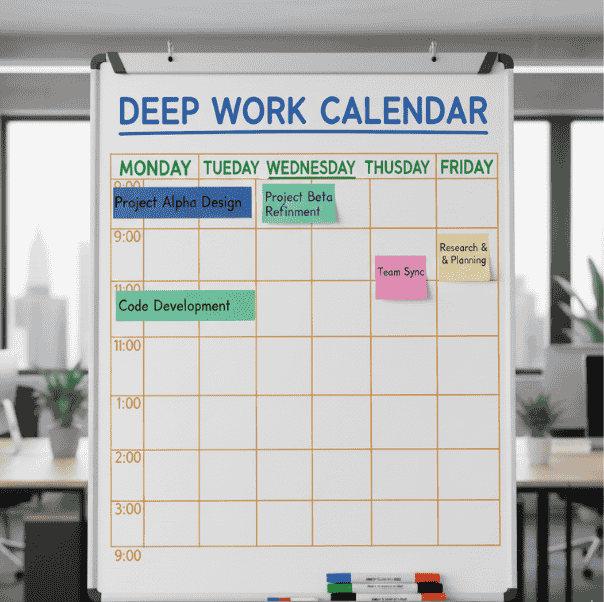
Shared calendar showing reserved deep work
Automation & integration system
Every team has administrative friction, the tiny, repetitive tasks like moving files, sending notifications, or naming documents. While these only take a few minutes, they add up to hours of lost time each week. Workflow automation tools eliminate repetitive steps, reduce human error, and standardise operations essential for efficient productivity.
How to implement
- Log your repetitions: For one week, write down any task that takes more than five minutes and happens frequently.
- Start with a “safe” win: Create one simple automation, such as having a form submission automatically create a task in your project tool.
- Keep a shared catalogue: Maintain a simple list of your automations so the team knows how they work.
Tools
Zapier – https://zapier.com/
Make (Integromat) – https://www.make.com/
Native integrations (Google Workspace APIs) – https://developers.google.com/
Built-in automations (Notion, ClickUp)
Example automation: A new client intake form creates a Trello/Asana card, provisions a Google Drive folder, and posts a message to the #client-onboarding Slack channel.
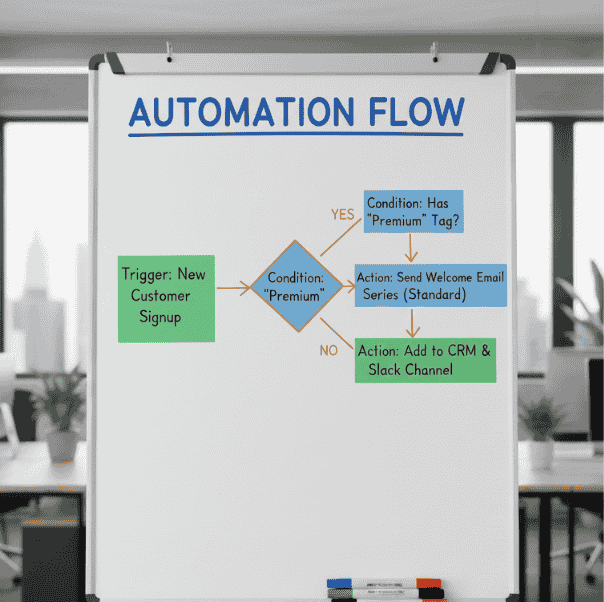
Form submission triggering automation
Good practice: Always have a visible owner and manual fallback so a failed automation doesn’t block work.
Knowledge ops: Single Source of Truth (SSOT)
When information is hard to find, work stops. People end up asking the same questions over and over, creating a cycle of interruptions. “Knowledge Ops” is simply the practice of keeping your guides and decisions in a searchable home. This allows every team member to find their own answers, which is especially vital for scaling a productivity system for remote workers.
How to implement
- Choose a KB tool (Notion, Confluence, or Google Drive with a governance model) and migrate the most referenced docs first.
- Design a simple taxonomy (e.g., People / Projects / Tools / SOPs / Onboarding) and enforce tagging.
- Create contribution rules: who can publish, review frequency, and how to request edits.
Tools
Notion – https://www.notion.so/
Confluence – https://www.atlassian.com/software/confluence/
Google Drive – https://workspace.google.com/
Practical tip: Link SOPs directly from task templates in your PM tool so users can access instructions in context.
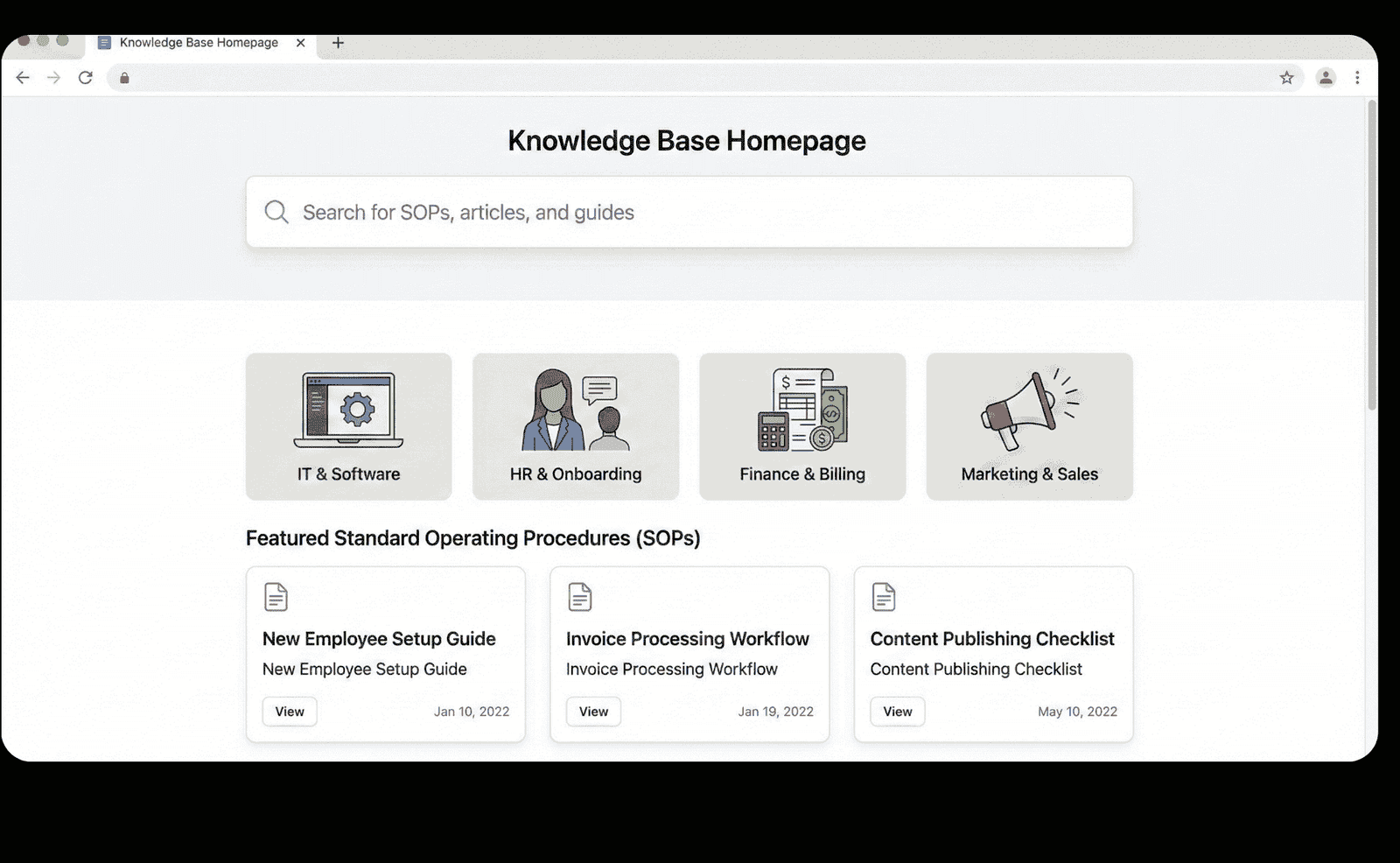
Searchable knowledge base homepage showing categories and featured SOPs
Onboarding & offboarding system
The way a person enters or leaves your team sets the tone for your entire operation. In a remote environment, you cannot rely on “shadowing” someone at their desk to learn the ropes. You need a structured system that guides new hires through their first few months. When onboarding is automated and role-based, new team members become productive faster and feel less dependent on their managers for every small question.
Similarly, a clean offboarding process is about more than just closing accounts; it is about protecting the team’s shared knowledge. Without a standard way to capture a departing employee’s insights and hand off their tasks, the rest of the team is left with “knowledge gaps” that cause friction for months. A consistent template for these transitions ensures that your productivity stays high, regardless of changes in your staff.
How to implement
- Create role-based 30/60/90 templates with access, tools, training milestones, and early deliverables.
- Automate provisioning using HR forms that trigger account creation, PM tasks, and welcome messages.
- Standardise offboarding: access removal, knowledge capture (handoff doc), and exit interview to capture improvements.
Tools (with URLs)
HRIS integrations (work with your HRIS vendor)
Zapier (automation) – https://zapier.com/
Google Workspace admin – https://workspace.google.com/
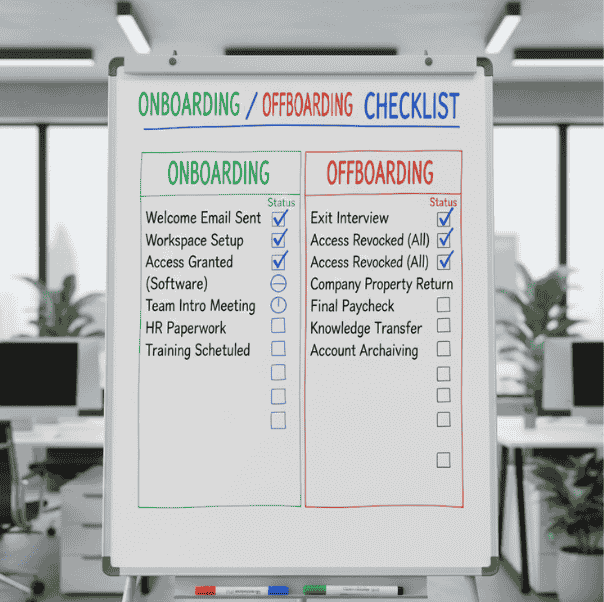
Checklist showing steps for onboarding and offboarding
Note: Keep the first week’s tasks small and visible; early quick wins build confidence and reduce ad-hoc support requests.
Weekly review & improvement cycle
Every productivity system needs a heartbeat, a regular rhythm of checking in to see what is working and what is causing friction. Without this feedback loop, processes tend to decay as the team’s needs change. By establishing a simple, repeatable habit of reviewing your progress, you can catch “process rot” early. This allows you to run small, low-risk experiments to improve your flow without needing a massive, disruptive overhaul. A consistent review habit is the “glue” that keeps all your other systems running smoothly over the long term.
How to implement
- Personal weekly review (30 minutes): Set aside 30 minutes every Friday to look back at your wins, your biggest time-wasters, and any blockers you faced. Pick one small thing you want to try the following week.
- Team retrospective (30–60 minutes biweekly): Every two weeks, host a short meeting where the team identifies their top obstacles. Choose one “experiment” with a clear owner to see if you can solve a recurring problem.
- Log experiments with start/end dates and outcomes. If an experiment fails, capture the learning and pivot.
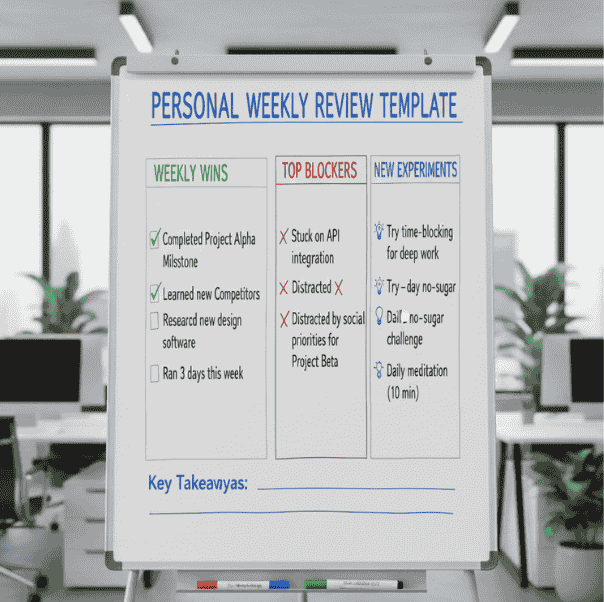
Personal weekly review template
Two-week roll-out playbook
This playbook compresses priority moves into a manageable two-week sequence so you can get immediate momentum and improve remote work productivity using structured productivity systems for remote workers.
Week 1: The Foundation
- Day 1: Audit your current workflow. Identify where the most time is being wasted.
- Day 2-3: Move all tasks into one tool and assign owners.
- Day 4: Share your new Communication Playbook and try your first “update” post.
- Day 5: Set up your central knowledge base with your top three guides.
Week 2: Focus and Automation
- Day 6-7: Set up one simple automation to save time on a recurring task.
- Day 8-9: Start blocking focus time on your calendar.
- Day 10: Have a short team meeting to discuss how the new systems feel.
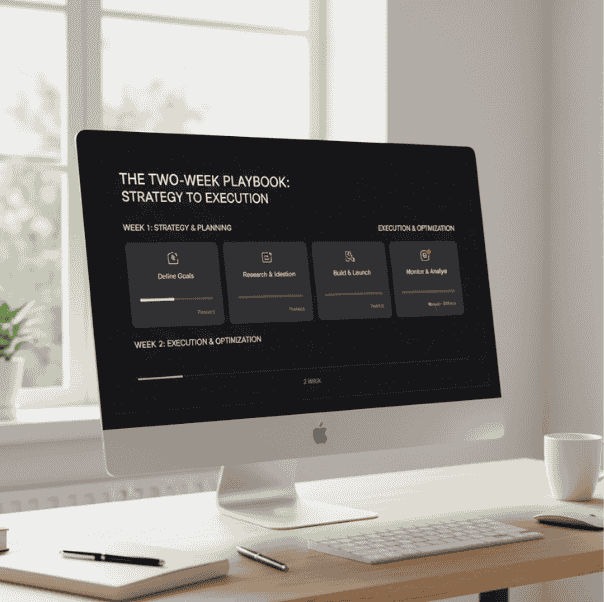
Two-week tactical playbook
Recommended tool stack (lean and practical)
Choose the smallest set of tools that covers your needs; each additional tool adds integration overhead. These are the core workflow automation tools that best support productivity systems for remote workers:
Communication: Slack, Microsoft Teams
Project Management: Trello, Asana, ClickUp, Jira
Knowledge Base: Notion, Confluence
Automation: Zapier, Make
Scheduling & Time: Google Calendar, Calendly
Focus Tools: Freedom; Pomodoro timers
Recording & Docs: Loom, Google Docs
What success looks like (KPIs and signals)
It is easy to get caught up in “vanity metrics” like how many emails you sent or how many hours you sat at your desk. However, true success in a remote environment is measured by the quality of your flow. You want to track leading indicators that show whether your systems are actually making work easier and faster. By monitoring a few key signals, you can see exactly where your “momentum” is coming from and where it is getting stuck.
Key signals to track:
- Speed of Work (Cycle Time): Track how long it takes for a task to move from “Ready” to “Done.” A lower median time usually means your team is facing fewer blockers and the hand-offs between people are becoming smoother.
- Quality of Focus: Keep an eye on the percentage of interruptions during your scheduled “deep work” blocks. As this number goes down, your team’s ability to produce high-level, thoughtful work goes up.
- Onboarding Speed: Measure how many days it takes for a new hire to complete their first real task. A shorter ramp-up time is a direct reflection of how well your onboarding templates and knowledge base are working.
The Human Element Numbers only tell half the story. Always include a short monthly “pulse survey” to check on your team’s sentiment. Data might show that tasks are moving fast, but if the team feels exhausted, your system isn’t sustainable. Success is finding the balance where the metrics look good, and the people feel great.
Systems are a durable asset.
Remote work is an environment that rewards predictable, repeatable systems. The seven systems presented here, async communication, single-ticket truth, time-blocking, automation, knowledge ops, onboarding/offboarding, and a short improvement cadence, are designed to be practical and incremental. Start with one system, run an experiment for 30 days, collect the KPI and sentiment signals, and iterate. Small, consistent improvements compound; productivity systems for remote workers that survive a month tend to last and dramatically improve remote work productivity over time.