



You built the site. You created the content. You attracted the traffic. Now you want to turn that traffic into revenue, and the WordPress ad plugin you choose will either accelerate that goal or quietly hold it back.
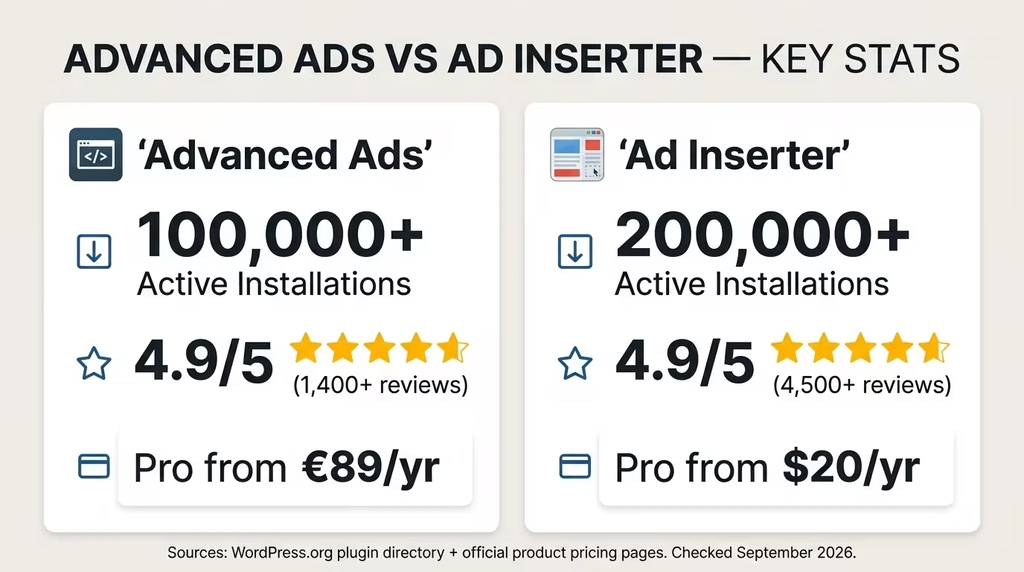
Advanced Ads and Ad Inserter are the two most trusted WordPress ad management plugins on the planet. Between them, they power over 400,000 websites and carry a combined reputation that most plugins would envy. Both score 4.9 out of 5 stars. Both work with Google AdSense, Google Ad Manager, Amazon Affiliates, and dozens of other networks. Both have free and premium tiers.
So which one is actually better for your site?
That is exactly the question this guide answers. We go beyond surface-level feature lists to break down the real differences in usability, placement control, pricing, performance, support quality, and long-term value. Whether you are a solo blogger monetising your first site or a digital consultant managing campaigns across multiple client sites, this is the clearest, most comprehensive comparison of Advanced Ads vs Ad Inserter you will find anywhere.
By the end, you will know precisely which plugin fits your workflow, your budget, and your monetisation goals.
Table of Contents
Disclosure: Our content is engineered to help you make informed, data-driven, and smart decisions. Digital Solutions Edge is reader-supported; when you engage with our recommendations or click certain links, we may receive a commission. This support allows us to continue delivering the digital solutions you rely on. Thank you for being part of our community.
Why This Comparison Matters
Choosing the wrong ad plugin is a silent revenue leak. The right plugin positions your ads where they get seen, on the right devices, by the right visitors, at the right time. The wrong one leaves money on the table through poor placement, slow loading, missed targeting opportunities, or a management interface that kills your productivity.
WordPress hosts over 43% of all websites on the internet (W3Techs, 2024). A large proportion of those sites monetise through display advertising, affiliate banners, or self-sold ad space. The tools you use to manage that monetisation layer directly affect your RPM (Revenue per Mille), your ad viewability scores, and ultimately how much time you spend maintaining your setup.
Advanced Ads and Ad Inserter are not interchangeable tools that happen to do the same job. They represent two genuinely different philosophies about how ad management should work. Once you understand that, the choice becomes straightforward.
Quick Overview: Advanced Ads vs Ad Inserter at a Glance
| Feature | Advanced Ads (Free) | Advanced Ads (All Access) | Ad Inserter (Free) | Ad Inserter Pro |
|---|---|---|---|---|
| Active Installs | 100,000+ | — | 300,000+ | — |
| WordPress Rating | 4.9/5 (1,387 reviews) | — | 4.9/5 (2,337 reviews) | — |
| Free Ad Blocks | Unlimited | Unlimited | 16 blocks | Up to 96 blocks |
| Ad Rotation | Yes | Yes | Yes | Yes |
| Scheduling | Yes | Yes | Yes (Pro) | Yes |
| Geo-Targeting | No | Yes (Pro add-on) | No | Yes |
| A/B Testing | No | Yes (Pro) | No | Yes |
| CSS Selector Insertion | No | No | Yes | Yes |
| Sticky Ads | No | Yes (add-on) | No | Yes |
| Click Fraud Protection | No | Yes | No | Yes |
| Lazy Loading | No | Yes (Pro) | No | Yes |
| AMP Support | No | Yes (add-on) | Yes (basic) | Yes |
| Google Ad Manager | No | Yes (add-on) | Yes (basic) | Yes |
| Ad Blocker Detection | Basic | Full (Pro) | Yes | Yes |
| Annual Cost | Free | €89–€249 | Free | €20–€100 |
| Interface Style | Dashboard / Intuitive | Dashboard / Intuitive | Block-based / Technical | Block-based / Technical |
This table summarises the headline differences. The deep dive below is where the real decision factors emerge.
Advanced Ads: Full Review (Free + Pro)
What Is Advanced Ads?
Advanced Ads was created by Thomas Maier, a web developer who built a German word-games site from scratch and grew it to over 40 million page impressions per month before selling it in 2018. He needed an ad management tool that non-developers on his team could use to run tests, rotate banners, and manage targeting, and found that nothing on the market met that standard. So he built his own.
The plugin launched on WordPress.org and quickly gained a reputation for combining a clean, familiar interface with powerful features. It is now managed and distributed under the MonetizeMore brand. Over 150,000 publishers use it, and it holds over 1,400 five-star reviews. Google itself recommends it as a method for placing AdSense codes on WordPress sites.
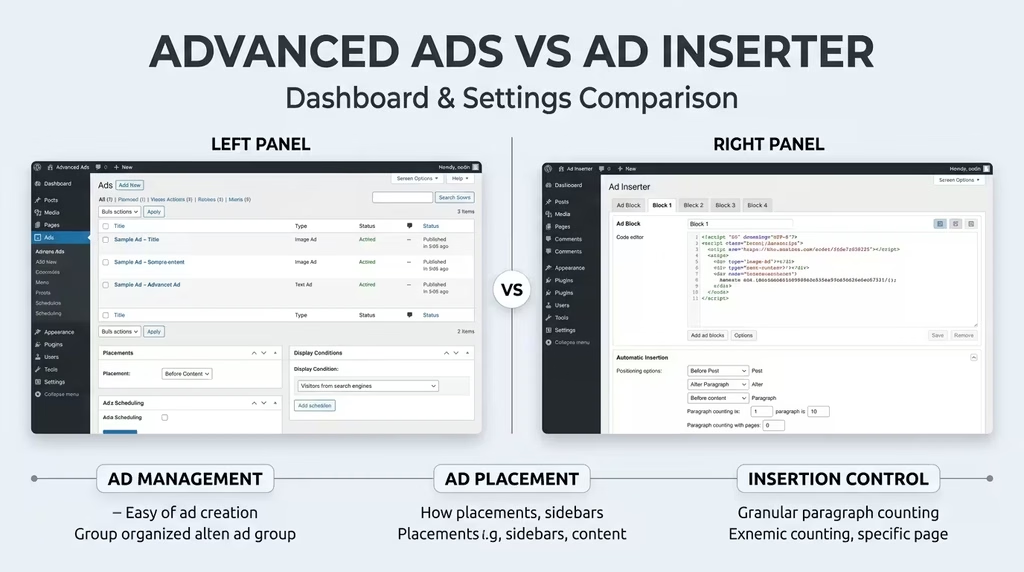
Advanced Ads takes a post-centric approach to ad management. Each ad is treated like a custom post in WordPress, meaning the entire creation and management workflow feels native to the platform. You create an ad, assign it a placement, set conditions, and publish, very much like writing a blog post.
Advanced Ads Free: Features and Limitations
The free version of Advanced Ads is genuinely useful. It is one of the more generous free tiers in this product category, covering the needs of many smaller publishers without requiring any upgrade.
What the free version includes:
- Create and manage unlimited ads with no cap on the number of ad units
- Multiple ad types: plain text and code, image banners, rich content (TinyMCE editor), dummy ads, and shortcodes
- Ad scheduling: set start and expiry dates and times for any ad
- Ad rotation: rotate multiple ads in the same placement and fight ad blindness
- Ad groups: bundle multiple ads together and control rotation modes
- Automatic injection: insert ads before or after content, at the top or bottom of posts, inside the header, and in footer areas
- Display conditions: show or hide ads by post type, category, tag, individual post/page, archive type, 404 page, and author
- Visitor conditions: show or hide ads by device (mobile, tablet, desktop) and by logged-in status
- Shortcode and widget support for manual placement
- Google AdSense integration: connect your AdSense account, pull in ad units, comply with policies, and auto-generate ads.txt
- Ad Health checks to flag potential issues
- AMP basic support for AdSense Auto ads
- Works on cached sites with dynamic delivery
- Import/Export of ad settings for quick site migration
What requires an upgrade:
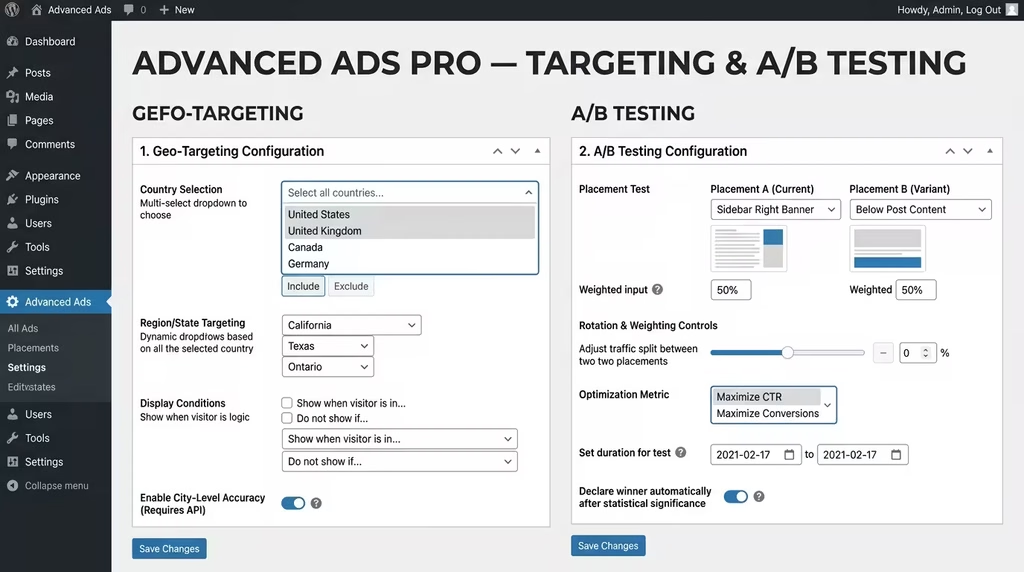
- Geo-targeting (country, city, continent, radius) is Pro only
- Lazy loading is Pro only
- Click fraud protection is Pro only
- Ad blocker monetisation and overlay/redirect options are Pro only
- A/B testing across placements is Pro only
- Sticky and pop-up ad formats require separate add-ons
- Google Ad Manager integration requires a dedicated add-on
- Tracking and reporting are available in the Tracking add-on
- Selling ad space directly to advertisers requires the Selling Ads add-on
- AMP full conversion and advanced AMP formats require the AMP Ads add-on
For a personal blog or small media site running AdSense or a few affiliate banners, the free version covers everything essential. The free tier’s unlimited ad creation, combined with native AdSense integration, makes it a strong starting point.
Advanced Ads Pro and All Access: Full Feature Breakdown
The premium tier of Advanced Ads splits into two products: Advanced Ads Pro (the core plugin upgrade) and All Access (which bundles Pro plus all available add-ons).
Advanced Ads Pro adds:
- Cache busting ensures dynamic ads are delivered fresh even on cached sites using WP Rocket, W3 Total Cache, and similar plugins
- Lazy loading: ads load only when scrolled into view, improving Core Web Vitals and page speed scores
- Click fraud protection: automatically hides ads for visitors detected clicking excessively, protecting your AdSense account.
- Ad blocker suite: detect ad blockers, show alternative content, display overlay messages, or redirect blocked users to a conversion page
- Geo-targeting: serve ads based on country, city, continent, or custom radius
- Advanced visitor conditions: browser language, user capability, IP address, previous URL (referrer), browser, browser width, time of day, frequency capping
- More placement types: custom position (point-and-click in the frontend), Post Lists (insert between posts on archive pages), Middle of Content, Background Ads (skin format), ad parallax effect
- Ad Server placement: serve ads to external sites that do not run WordPress
- A/B testing: run split tests between placements or ad groups to find the best performers
- REST API endpoints for headless integrations
- Ad refresh: reload ads after a set period without a page refresh (used for viewability optimisation)
- Keyword targeting and URL parameter conditions for content-matched targeting
All Access adds these additional components on top of Pro:
- Tracking add-on: local impression and click tracking with shareable performance reports, plus Google Analytics integration for granular ad analytics
- Google Ad Manager add-on: pull ad units directly from your GAM account, bulk import, responsive ads by screen width, automatic AMP conversion, key-values targeting by post title, slug, and category
- AMP Ads add-on: full AMP support with automatic AdSense conversion and dedicated AMP ad formats
- Sticky Ads add-on: fixed anchor ads, sticky header and footer bars, ads that stick to the browser window or content column
- PopUp and Layer Ads add-on: interstitials, popups, fullscreen layers, exit-intent popups, scroll-triggered ads
- Selling Ads add-on: sell ad placements directly to advertisers via a frontend interface, complete with payment processing and advertiser account management
- Ad Slider add-on: create visually engaging rotating ad sliders from your ad groups
Advanced Ads Pricing
Advanced Ads operates on an annual subscription model. All plans include one year of updates and support, plus a 30-day money-back guarantee. Licences can be activated on test sites at no extra cost.
Advanced Ads Pro (core plugin only):
- 1 site: €59/year
- Up to 5 sites: €89/year
- Up to 20 sites: €169/year
Advanced Ads All Access (Pro + all add-ons):
- 1 site: €89/year
- Up to 5 sites: €129/year
- Up to 20 sites: €249/year
After the licence period ends, the plugin continues to work on your site. You lose access to updates and premium support, but your existing configuration remains functional. Upgrades between tiers are supported at any point during the licence period.
There is no lifetime licence available at the time of writing. For agencies managing large client portfolios, the 20-site All Access plan at €249/year represents the most cost-efficient option.
Advanced Ads Setup: Step-by-Step
Getting started with Advanced Ads takes less than ten minutes for a basic setup.
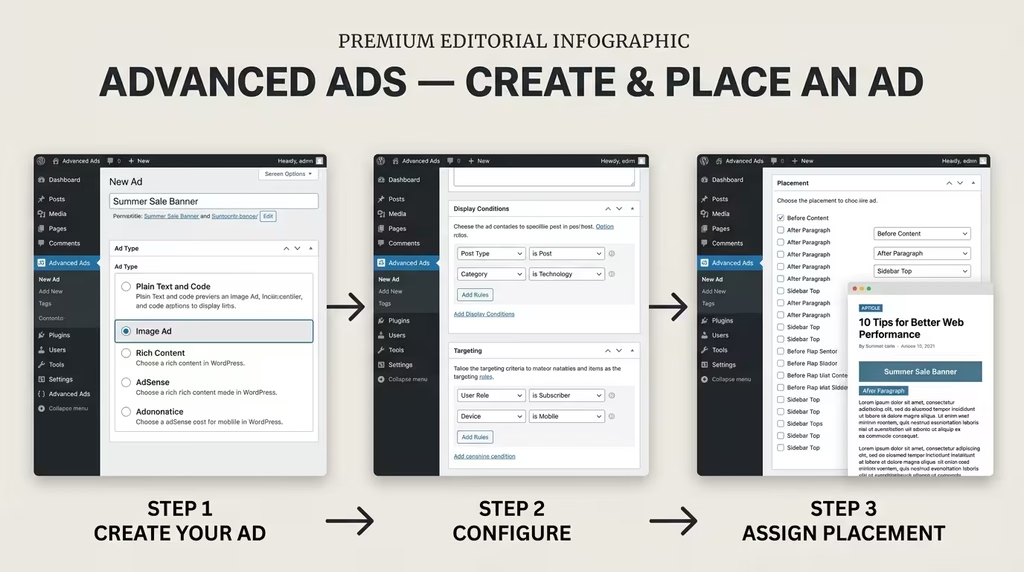
Step 1: Install and Activate Navigate to Plugins > Add New in your WordPress dashboard, search for “Advanced Ads,” click Install Now, then Activate.
Step 2: Run the Setup Wizard. Advanced Ads opens a configuration wizard on first activation. It walks you through connecting your AdSense account (optional), setting your licence key (for Pro), and confirming basic settings.
Step 3: Create Your First Ad. Go to Advanced Ads > New Ad. Give the ad a name, choose an ad type (plain code, image, AdSense unit, rich content, etc.), paste in your ad code or upload your banner, and save.
Step 4: Set Display Conditions. On the ad edit screen, scroll to the Conditions section. Choose where the ad should appear: specific post types, categories, individual posts, or globally across all pages.
Step 5: Set Visitor Conditions. Choose who sees the ad: all visitors, mobile-only, desktop-only, logged-in users, or specific device sizes.
Step 6: Create a Placement. Go to Advanced Ads > Placements. Choose a placement type (Before Content, After Content, After Paragraph X, Sidebar Widget, etc.), assign your ad or ad group to it, and save.
Step 7: Test and Preview. Use the Ad Debug Mode (available in Advanced Ads settings) to verify that ads render at the expected positions. Check on both desktop and mobile.
Advanced Ads Pros and Cons
Strengths:
- Genuinely intuitive interface that mirrors native WordPress workflows
- Unlimited ads and placements, even on the free tier
- Deep AdSense integration, including account connection, policy compliance, and Auto Ads support
- Modular add-on architecture means you pay only for what you need
- Transparent, publisher-first origin story from a real ad operations team
- Excellent documentation library with hundreds of tutorials based on first-hand testing
- Strong community and priority email support on paid plans
- Reliable compatibility with major caching plugins, page builders (Elementor, WPBakery), membership platforms, and community plugins (BuddyPress, BuddyBoss, bbPress)
- AMP conversion is automatic for AdSense, no manual reformatting required
- A/B testing is built into the Pro tier (not a separate paid add-on)
- 30-day money-back guarantee on all paid plans
Weaknesses:
- Some users on very large multi-site networks (100+ sites) have reported occasional update-related instability in recent versions.
- The All Access bundle requires an annual renewal; there is no lifetime purchase option.
- CSS selector-based insertion (placing ads inside arbitrary HTML elements) is not available. Ad Inserter wins this specifically.
- Geo-targeting and lazy loading require the Pro upgrade, which some competitors include in their free tier.
- The Selling Ads add-on requires All Access, making direct ad sales more expensive to access compared to standalone platforms.
- Support issues resolved in the last two months: 9 out of 18 tickets – a resolution rate worth monitoring
Ad Inserter: Full Review (Free + Pro)
What Is Ad Inserter?
Ad Inserter was created by Igor Funa under the Spacetime brand. It has grown to over 300,000 active installations, making it the most widely installed of the two plugins. Its philosophy is built around one principle: insert any code anywhere on any WordPress page, with maximum precision and minimum overhead.
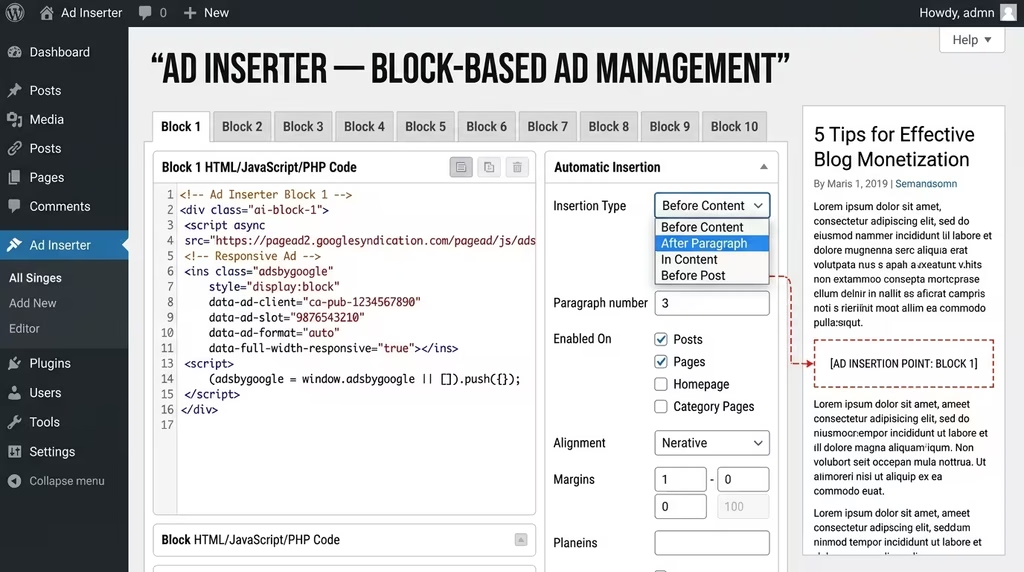
Where Advanced Ads approaches ad management as a content management workflow, Ad Inserter approaches it as a code injection system. Every ad is a “block”, a numbered code container with its own insertion settings, conditions, and controls. The entire configuration lives on a single, scrollable settings page. There are no separate CPT (custom post type) entries, no separate menus per ad. Everything is in one place.
This approach makes Ad Inserter extraordinarily powerful for technical users. It also makes it significantly more intimidating for beginners. But power is the word that keeps coming up in user reviews: “crazy flexible,” “most comprehensive ad plugin available,” “I can do things with this that no other plugin allows.”
Google lists Ad Inserter as a recommended tool for placing AdSense code in WordPress. Amazon endorses it in their Native Shopping Ads integration guide. That is a strong third-party endorsement from two of the largest ad platforms in the world.
Ad Inserter Free: Features and Limitations
The free version of Ad Inserter is strikingly generous by industry standards. Many features that competing plugins charge for are available at no cost.
What the free version includes:
- 16 code blocks (ad positions); each block is a full ad configuration with its own insertion rules
- Insert before or after any paragraph number, including random paragraphs, multiple paragraphs, or every Nth paragraph
- Insert before or after images, headers, comments, excerpts, or custom HTML elements
- CSS selector-based insertion: place ads before, inside, or after any HTML element on any page using CSS selectors, a feature unique to Ad Inserter in this tier
- Insert code above the header (after <body> tag) and in the footer (before </body> tag)
- Insert between posts on blog archive pages (in-feed placement)
- Insert between comments
- Custom WordPress hook positions via do_action()
- Device detection (server-side and client-side): show different ads on desktop, tablet, and mobile
- Ad rotation (server-side and client-side, both work with caching)
- Code preview with a visual CSS editor; see exactly how the ad will appear before saving
- Syntax highlighting editor for clean code entry
- AdSense integration: account connection, code generator, blank block detection
- Black/whitelist by category, tag, post type, post ID, URL, cookies, referrer, and browser
- Disable ads on individual posts and pages via the post editor metabox
- ads.txt editor built-in
- Clearance options: avoid inserting ads near images or headings (important for AdSense TOS compliance)
- GDPR consent integration: show ads only after cookie consent is given
- Support for IAB TCF 2.0 consent API
- Works with caching plugins for dynamic rotation and device detection
- Full PHP code processing
- Shortcode support within blocks
- Insert code into Ajax, RSS, and REST requests
- Debugging toolkit: visualise inserted blocks, available positions, HTML tags, and plugin processing log
What requires an upgrade:
- Impression and click tracking (statistics) are Pro only
- Geo-targeting at the country, state, region, and city levels is Pro only
- A/B testing is Pro only
- Click fraud protection is Pro only
- Sticky ads (fixed, floating, animated) are Pro only
- Parallax ads are Pro only
- Lazy loading (delayed script loading) is Pro only
- Frequency capping is Pro only
- reCAPTCHA v3 score check for invalid traffic is Pro only
- PDF and public web reports for clients are Pro only (Business and Corporate tiers)
- Remote plugin management across multiple sites is Pro only (Corporate tier)
The free version’s CSS selector insertion alone is worth noting. It allows you to insert ads into positions that most other plugins simply cannot reach, inside specific div containers, after a particular element class, nested within complex theme layouts. This is the single most differentiating capability in Ad Inserter’s free tier.
Ad Inserter Pro: Full Feature Breakdown
Ad Inserter Pro upgrades the block count to 96 and unlocks a full analytics and monetisation toolkit.
Core Pro additions:
- 96 code blocks (up from 16 in the free version)
- Geo-targeting: country, state, region, and city level using internal or MaxMind databases; works with caching (Business and Corporate tiers)
- Ad impression and click statistics: track exactly how many times each ad was displayed and clicked, with charts and performance breakdowns
- A/B testing: run split tests to find the highest-performing ads and insertion settings
- Click fraud protection: cookie-based detection plus IP address blocking to prevent invalid clicks
- reCAPTCHA v3 score check: filter out non-human traffic based on Google’s bot scoring system
- Frequency capping: limit the number of times a specific visitor sees a given ad within a defined period
- Sticky ads: fix ads to the screen with optional animations (fade, slide, turn, flip, zoom), scroll triggers, and close button support
- Floating slide-in banners: ads that slide in from the side or bottom of the screen
- Parallax ads: layered parallax animation effect for high-attention placements (Business and Corporate tiers)
- Background ads (skin ads): monetise the blank space surrounding your main content column
- Lazy loading: delay ad script loading until the user scrolls to the relevant section
- Scheduling: set date/time windows for ad display, with fallback options when the schedule expires
- Delayed loading: wait for user interaction before loading ad scripts (reduces page weight for inactive visitors)
- Statistics reports: export in PDF format for client reporting, or create public web-based report pages (Business and Corporate tiers)
- External tracking: send impression and click data to Google Analytics or Matomo
- Ad blocking detection: display popup messages, redirect users, replace ads, or protect (hide) content for ad-block users; includes ad blocking statistics
- Multisite support: control Ad Inserter settings across a network, limit what site admins can change
- Individual post/page exception management: fine-grained per-page control from a central list
- Remote plugin management: manage Ad Inserter Pro settings on other websites without logging in (Corporate tier)
- Custom reports for clients: generate branded performance summaries for client sites (Corporate tier)
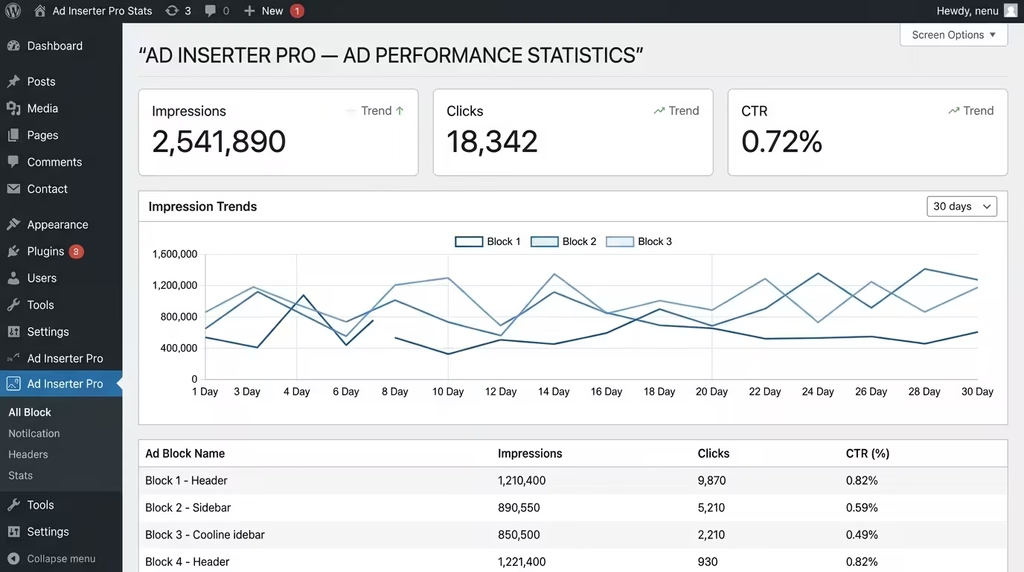
Ad Inserter Pro Pricing
Ad Inserter Pro uses an annual licence model with a one-off payment per period. There is no subscription auto-renewal unless you choose to renew. A 20% discount applies during the licence period and for 30 days after expiry. You can use the plugin indefinitely after the licence expires, but only updates and support are discontinued.
Personal: €20/year, 2 sites, standard click detection only
Freelancer: €30/year 5 sites, advanced click detection, PDF and public web reports, impression and click limits, click fraud protection, use on client sites
Business: €50/year, 25 sites, all Freelancer features plus MaxMind geolocation with state and city targeting, parallax ads, reCAPTCHA v3
Corporate: €100/year 100 sites, all Business features plus custom client reports, remote plugin management
This pricing model is significantly more affordable than Advanced Ads, especially at the Business tier (€50 for 25 sites) compared to Advanced Ads All Access (€249 for 20 sites). The trade-off is that Ad Inserter Pro includes fewer of the publisher-focused tools, like selling ads, AMP full conversion, and Google Ad Manager deep integration.
If you pay via PayPal and PayPal is not available in your country, Ad Inserter provides an invoice option for credit card payment, relevant for publishers in Nigeria and other markets where PayPal has restricted access.
Ad Inserter Setup: Step-by-Step
Ad Inserter’s setup looks more complex on screen than it actually is in practice. The initial configuration takes about 15 minutes.
Step 1: Install and Activate. Go to Plugins > Add New, search for “Ad Inserter,” install, and activate. For Pro, upload the downloaded ZIP file and enter your licence key on the plugin’s settings page.
Step 2: Access the Settings Panel. Go to Settings > Ad Inserter. You will see 16 numbered tabs across the top (one per block). Each tab is a separate ad position.
Step 3: Configure Block 1. Click Block 1. In the code editor, paste your ad code (AdSense, HTML banner, affiliate script, etc.). Below the editor, configure:
- Automatic Insertion: choose where the block inserts: Before Content, After Content, Before Paragraph X, After Paragraph X, Before/After Image, Header, Footer, Between Posts, etc.
- Page types: check which WordPress page types the block should run on (Posts, Pages, Home, Archive, etc.)
Step 4: Set Conditions. Use the Black/White List tab to include or exclude specific categories, tags, post IDs, or URLs. Use the Exceptions link in the post editor to disable the block on individual posts.
Step 5: Device Targeting. In the block settings, choose Desktop, Tablet, or Phone from the device detection dropdown. Ad Inserter supports both server-side and client-side detection – client-side works with caching.
Step 6: Use the Visual Element Selector (CSS Insertion). For precise placement inside complex HTML, click the “HTML element selection” tool. Ad Inserter opens a visual DOM explorer overlaid on your site’s frontend, letting you click any element to generate its CSS selector automatically. Paste this selector into the insertion settings.
Step 7: Preview and Debug. Use the Code Preview button to see the ad code rendered in context. Use the debugging toolbar (visible to admins in the frontend) to see which blocks are active, where they are inserted, and any potential conflicts.
[IMAGE PLACEHOLDER: Screenshot of Ad Inserter setup panel showing block configuration with paragraph insertion settings and device detection. Alt text: Ad Inserter WordPress plugin setup guide block configuration AdSense]
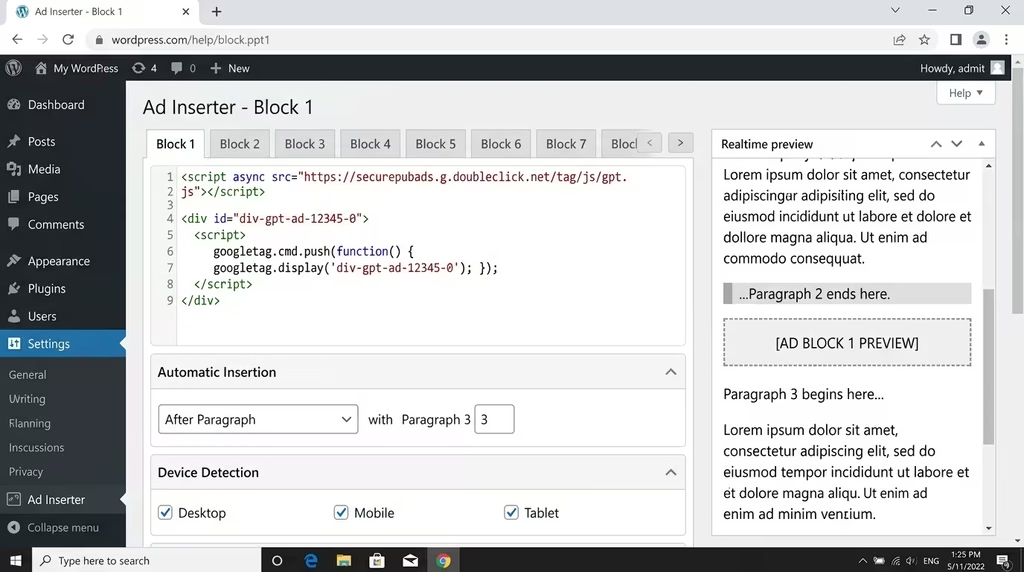
Ad Inserter Pros and Cons
Strengths:
- CSS selector-based insertion in genuinely unique places ads where other plugins cannot reach
- The free version is among the most feature-rich in this category (device detection, ad rotation, paragraph targeting, all included for free)
- All settings on a single page reduce navigation time and cognitive load once familiar
- 300,000+ active installs reflect a large and stable user base
- Lightweight with minimal frontend overhead
- Works cleanly with caching plugins for dynamic ad delivery
- Endorsed by both Google and Amazon for ad code placement
- Pro pricing is significantly lower than that of most competitors, especially for multi-site agencies
- Annual payment (not a forced subscription); keep using the plugin after the licence expires
- Comprehensive debugging toolkit that makes troubleshooting faster
- Support ticket resolution rate: 6 out of 6 in the last two months (100% resolution rate at time of writing)
- Excellent documentation covering every feature with practical examples
Weaknesses:
- The interface is undeniably dense; the block-based layout with dozens of settings per block has a steep learning curve for non-technical users.
- All configuration lives on a single page with 16 (or 96 Pro) tabs, no visual ad list or individual ad post management.
- Some recent reviews note that ad blocker detection has produced false positives in certain configurations, causing revenue loss for affected sites.
- No dedicated AdSense policy compliance tools (unlike Advanced Ads, which hides ads on 404 pages automatically)
- No built-in direct ad-selling marketplace
- No AMP full conversion automation; requires manual AMP code setup
- The visual interface lacks the polished, gallery-style management experience of Advanced Ads
- For non-technical users, understanding CSS selectors for precise placement requires a learning investment
Head-to-Head Comparison: 10 Key Battlegrounds
Interface and Ease of Use
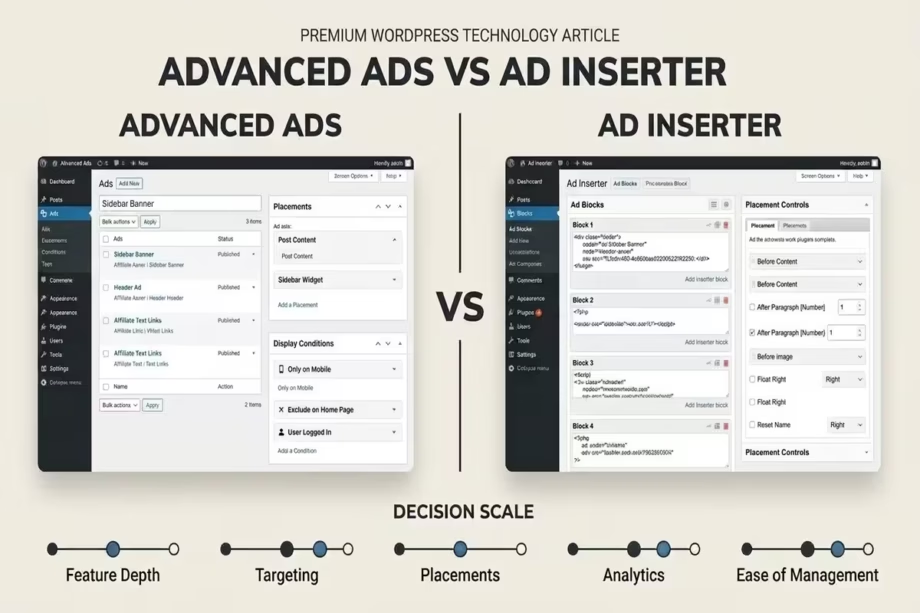
Advanced Ads wins this decisively. It mirrors WordPress’s native post management interface, making it immediately familiar. Creating an ad feels like writing a post. Managing placements feels like configuring menus. The learning curve is minimal.
Ad Inserter’s single-page block system is powerful but initially overwhelming. Every setting is visible at once, which is efficient for experts but confusing for newcomers. If your team includes non-developers who manage ad campaigns, Advanced Ads will save significant onboarding time.
Winner: Advanced Ads
Ad Placement Options
Ad Inserter wins on breadth and precision. Its CSS selector-based insertion is a genuine capability gap; it can place an ad anywhere in the HTML structure of any page, including inside complex div containers, after specific element classes, or within third-party plugin output. Advanced Ads relies on predefined placement positions, which cover most use cases but cannot match Ad Inserter’s DOM-level precision.
For standard use cases (before/after content, after paragraph X, in the sidebar, sticky footer), both plugins perform equally. For edge cases where your theme or layout requires non-standard insertion, Ad Inserter is the only option.
Winner: Ad Inserter
Targeting and Conditions
Both plugins offer device targeting, logged-in/out status, category, tag, and post-level conditions. Advanced Ads Pro extends this with browser width, time of day, frequency capping, referrer, cookies, and user activity conditions. Ad Inserter Pro adds geo-targeting at the state and city level (Business tier), which Advanced Ads also offers in Pro.
Advanced Ads edges this slightly for its A/B testing integration, which lets you run controlled experiments across placement types and ad groups. Ad Inserter’s A/B testing is available in all Pro tiers (including Personal at €20/year), making it accessible at a lower cost point.
Winner: Draw (Advanced Ads for workflow integration; Ad Inserter for cost-accessible A/B testing)
Ad Network Compatibility
Both plugins work with all major ad networks: Google AdSense, Google Ad Manager, Amazon Affiliates, Media.net, Ezoic, Infolinks, BuySellAds, and any custom HTML/JavaScript/PHP code. Advanced Ads has deeper native integrations with Google AdSense (direct account connection, policy tools, auto ads.txt) and Google Ad Manager (bulk import, responsive ad sizing, key-values targeting). Ad Inserter’s universal code insertion means it works with everything, but provides fewer native network-specific tools.
Winner: Advanced Ads (for AdSense/GAM publishers); Ad Inserter (for universal code injection)
Free Version Generosity
Ad Inserter offers a more powerful free tier in terms of placement flexibility, specifically CSS selector insertion and both server-side and client-side device detection, which Advanced Ads only adds in Pro. Advanced Ads counters with unlimited ad creation (Ad Inserter limits you to 16 blocks free), scheduling, deeper AdSense integration, and native A/B group rotation.
For a technical user who wants maximum placement control at zero cost, Ad Inserter’s free tier is the stronger pick. For a publisher who wants a clean management experience with unlimited ads and AdSense tools, Advanced Ads Free is more complete.
Winner: Draw (depends on your technical comfort level)
Premium Value for Money
Ad Inserter Pro wins purely on price-to-features at the Business tier: €50/year for 25 sites with tracking, A/B testing, geo-targeting, sticky ads, and click fraud protection. Advanced Ads All Access for 20 sites costs €249/year. The feature sets differ (Advanced Ads includes AMP, GAM integration, sticky ads, popups, and ad selling in All Access), but for core analytics and targeting, Ad Inserter Pro delivers more per euro.
For agencies managing dozens of client sites on a tight budget, Ad Inserter Pro is the more cost-efficient choice. For publishers who need the full stack of publisher-specific tools in one bundle, Advanced Ads All Access justifies its premium.
Winner: Ad Inserter Pro (cost efficiency); Advanced Ads All Access (comprehensive bundle value)
Performance and Page Speed
Ad Inserter is designed with speed as a core principle. Plain JavaScript on the frontend with no library dependencies means minimal overhead. The plugin’s processing time is described in its own documentation as “in the range of a few 10 milliseconds.” Lazy loading and delayed script loading (available in Pro) further reduce the impact on Core Web Vitals.
Advanced Ads Pro also supports lazy loading and cache busting for dynamic delivery. Both plugins are well-optimised for production environments. The performance gap, if one exists, is negligible for most sites.
Winner: Draw (both are well-optimised; Ad Inserter’s no-library approach gives it a marginal edge)
Support Quality
Advanced Ads offers free community forum support and priority email support on paid plans. Their documentation library is extensive, covering hundreds of tutorials written by actual publishers. Recent reviews consistently praise the support team’s responsiveness and depth of knowledge. The support resolution rate of 9 out of 18 recent tickets is worth watching, as it suggests some unresolved cases, though the context of those tickets is not public.
Ad Inserter’s free support relies on the WordPress.org forum. Pro users get email support during the active licence period. Their recent resolution rate of 6 out of 6 tickets is impressive. The documentation is thorough. One recurring criticism from long-term Pro users is that bug fixes can be slow, with support sometimes directing users to downgrade versions rather than deploy targeted patches.
Winner: Advanced Ads (for documentation quality and publisher-focused support experience)
Stability and Update History
Advanced Ads has had frequent releases through 2025 and into 2026, with the changelog showing consistent improvements to rendering performance, WPML support, Gutenberg compatibility, and caching integrations. One verified review from a 100+ site agency raised concerns about update-related instability over the past year. This is a minority view among 1,387 reviews, but worth factoring in for mission-critical deployments.
Ad Inserter’s version history shows steady, incremental improvements. The Pro changelog covers security fixes, geolocation library updates, front-end code optimisations, and compatibility updates. The free version’s changelog on WordPress.org shows similar stability. The false positive ad blocker detection issue reported in some recent reviews (particularly with the Brave browser) was addressed in version 2.0.18 of Advanced Ads, and Ad Inserter’s own version 2.8.2 included a fix for ad blocking detection with AdBlock.
Winner: Draw (both have active development; stability concerns exist on both sides at scale)
Best Use Cases
Advanced Ads excels for:
- Solo bloggers and content creators monetising via AdSense or affiliate banners
- Small to mid-size media teams where non-developers manage ad campaigns
- Publishers using Google Ad Manager as their primary ad server
- Sites where AMP monetisation is a priority
- Publishers who want to sell ad space directly to advertisers
- Agencies managing up to 20 professional publisher sites with complex targeting requirements
Ad Inserter excels for:
- Technical users and developers who want DOM-level placement control
- Sites with complex, non-standard themes or page builder layouts that standard placements cannot penetrate
- Publishers running multiple ad networks simultaneously who need a universal code injection layer
- Agencies managing large client portfolios on a strict budget (25 sites for €50/year)
- Sites that also need header/footer code management, tracking pixels, and custom script injection in addition to ads
- Developers who want to inspect and debug ad placement behaviour with granular tools
Who Should Choose Advanced Ads?
Choose Advanced Ads if your primary goal is a clean, manageable, scalable ad operation that does not require deep technical knowledge to run day-to-day.
It is the right choice for the publisher who wants to connect their AdSense account, create a handful of well-targeted ad units, run A/B tests, and check a performance report all without writing a line of code or deciphering a CSS selector. The intuitive dashboard means you can onboard a virtual assistant or editorial team member to manage ads in minutes.
It is also the right choice if AMP monetisation, Google Ad Manager integration, or selling ad space directly are on your roadmap. Advanced Ads All Access bundles those capabilities into a single, coherent product.
Advanced Ads is the optimal pick for: content creators, bloggers, small media publishers, ad operations teams, agencies managing AdSense/GAM-heavy campaigns, and any publisher prioritising workflow simplicity alongside professional-grade features.
Who Should Choose Ad Inserter?
Choose Ad Inserter if you are a technical user who wants maximum insertion precision, or a budget-conscious agency that needs enterprise-grade targeting across many sites at minimal cost.
The CSS selector insertion alone is a compelling reason to choose Ad Inserter if your site has a complex theme or page builder layout where standard before/after-content placements produce incorrect positioning. No other free plugin replicates this capability.
It is also the stronger choice if you already use the plugin as a general script management tool, for header/footer code, tracking pixels, and analytics tags and want to consolidate that function alongside ad management.
Ad Inserter is the optimal pick for: WordPress developers, technical site owners, multi-site agencies on tight budgets, publishers using non-standard themes, and anyone who needs a single plugin to manage all injected code (not just ads) across a site.
Can You Use Both Plugins Together?
Technically, yes. Advanced Ads explicitly notes that its shortcode ad type supports inserting ads from other plugins, including Ad Inserter. This means you could manage ad groups and targeting logic in Advanced Ads while using Ad Inserter’s CSS selector precision for specific placements that Advanced Ads cannot reach.
In practice, running both plugins is overkill for most publishers. Each plugin handles the full ad management lifecycle independently. Using both introduces unnecessary complexity, potential conflicts between their respective injection logic, and doubles the management overhead.
The smarter approach is to choose one as your primary plugin and use it fully. If you hit a placement edge case that your chosen plugin cannot handle, that is the time to evaluate switching, not to run both simultaneously.
FAQ
Is Advanced Ads really free? What does the free version actually do?
Yes, Advanced Ads has a fully functional free version available on WordPress.org. It includes unlimited ad creation, ad rotation, scheduling, basic display and visitor conditions, AdSense integration, and shortcode/widget placement. For most solo bloggers and small content sites, the free tier is sufficient to run a professional ad setup.
Is Ad Inserter better than Advanced Ads for AdSense?
Both plugins support AdSense fully. Advanced Ads has a deeper native AdSense integration, which connects directly to your account, pulls in ad units, auto-generates the ads.txt file, and flags policy violations. Ad Inserter focuses more on code injection precision. For AdSense-first publishers, Advanced Ads provides a more complete and compliant experience.
Which WordPress ad plugin is easier to set up for beginners?
Advanced Ads is significantly easier for beginners. Its dashboard mirrors the standard WordPress post interface, and the setup wizard guides you through the first configuration. Ad Inserter’s single-page block system is powerful but requires more technical confidence to configure correctly.
How does Ad Inserter’s CSS selector insertion work?
CSS selector insertion in Ad Inserter lets you target any HTML element on your page using its CSS class, ID, or element type, then insert your ad code before it, after it, inside it (prepended or appended), or replace it entirely. The plugin includes a visual DOM explorer that lets you click any element on your live site to generate the correct CSS selector automatically.
Which plugin is better for agencies managing multiple client sites?
Ad Inserter Pro offers significantly more cost-efficient multi-site pricing. Its Business tier (€50/year for 25 sites) and Corporate tier (€100/year for 100 sites) are well-suited for agencies. Advanced Ads All Access at €249/year for 20 sites is more expensive but includes tools like ad selling, AMP support, and Google Ad Manager integration that agencies may need for premium publisher clients.
Does Advanced Ads slow down my website?
Advanced Ads is designed to work with cached sites and includes lazy loading in its Pro tier to defer ad script loading until ads enter the viewport. Properly configured, it adds minimal overhead. The Pro tier’s cache-busting feature ensures dynamic ads remain fresh even on heavily cached sites without affecting page speed.
Can Ad Inserter be used without technical knowledge?
The free version of Ad Inserter can be used by non-developers for standard placements (before/after content, after paragraph X). The interface is more demanding than Advanced Ads, but the plugin’s documentation is comprehensive. The advanced features, CSS selector insertion, client-side rotation configuration, and debugging tools do require some technical comfort.
Is Advanced Ads All Access worth the price?
If you need more than basic ad placement, including Google Ad Manager integration, AMP monetisation, sticky and pop-up ads, ad performance tracking, or the ability to sell ad space directly, then the All Access bundle at €89 to €249/year is strong value. It replaces what would otherwise be several separate plugins and services.
Which plugin has better support?
Advanced Ads has a more extensive documentation library and a publisher-focused support culture, with priority email support for paid users. Ad Inserter provides email support for Pro licence holders and has demonstrated a 100% recent ticket resolution rate. Both have active WordPress.org forums. Advanced Ads edges ahead for documentation depth and the breadth of practical tutorials.
Can I switch from Ad Inserter to Advanced Ads (or vice versa) without losing my setup?
Advanced Ads 2.0.18 added an Ad Inserter importer that migrates ads, groups, placements, and settings from Ad Inserter to Advanced Ads. This makes a transition from Ad Inserter to Advanced Ads more manageable than it used to be. Switching in the opposite direction requires manual recreation of your Advanced Ads setup in Ad Inserter’s block system.
Which plugin is recommended for Nigerian and African publishers?
Both plugins work globally. For Nigerian publishers, a key consideration is payment access for Pro licences. Advanced Ads uses card payment systems. Ad Inserter supports PayPal and also offers an invoice option for credit card payment where PayPal is unavailable, an important flexibility for publishers in markets with PayPal restrictions.
Are there any known issues with either plugin?
Advanced Ads has received a small number of reports regarding update stability on very large multi-site deployments in recent versions. Ad Inserter has received reports of false positive ad blocker detection in some configurations, which can inadvertently hide ads from users who have no blocker active. Both development teams actively address these issues in their update cycles.
Both Advanced Ads and Ad Inserter are elite-level WordPress ad management tools. The decision between them is less about which is objectively better and more about which is the right fit for how you work.
If you want a clean, scalable, publisher-first workflow with deep AdSense and Google Ad Manager integration, strong documentation, and a modular premium tier that grows with your site’s needs, Advanced Ads is your plugin. Its intuitive interface, unlimited free ad creation, and polished All Access bundle make it the stronger choice for the majority of content publishers and media teams.
If you are a technical user who needs DOM-level insertion precision, wants maximum features at minimum cost across multiple sites, or needs a single plugin to handle ad management and general code injection across your entire site, Ad Inserter is your plugin. Its free CSS selector insertion, budget-friendly Pro pricing, and comprehensive debugging toolkit make it indispensable for developers and technically confident site owners.
The clearest signal for your choice: open each plugin’s free version and spend 30 minutes configuring a basic ad setup. The one that feels natural to you, the one whose logic maps to how you already think about your site, is the one you will manage most effectively over the long term.
Both plugins offer free tiers you can test today with no commitment. Start there. Then upgrade when the features you need become clear.
Ready to take your WordPress monetisation strategy further? Explore our library of ad optimisation guides, or book a Transformation Clarity Call (TCC) with a DSE consultant to get a personalised monetisation roadmap for your site.