



What if you had a thinking partner who never gets tired, never judges your half-formed ideas, and gets measurably better at helping you every time Anthropic ships an update?
That is not a pitch. That is a fair description of what Claude AI has become in 2025 and 2026 for millions of professionals, students, entrepreneurs, and creators worldwide.
You have probably tried a chatbot before. Maybe you even have a subscription somewhere. But there is a difference between using an AI tool and knowing how to use it so well that it doubles your output, sharpens your thinking, and frees you to do the work that actually matters.
This guide covers everything: what Claude is, how its products and models work, which plan fits your situation, and, most importantly, how to get real productivity results from it across writing, coding, design, brainstorming, content creation, marketing, selling, learning, and beyond. Whether you are a Nigerian entrepreneur building your first digital business, a student preparing coursework, or a consultant juggling client deliverables, this article will show you the exact workflows that change how you work.
By the end of this guide, you will know not just what Claude can do but what it should be doing for you.
Table of Contents
Disclosure: Our content is designed to help you experience digital transformation across your areas of interest and needs. Digital Solutions Edge is reader-supported; when you engage with our recommendations or click certain links, we may receive a commission. This support allows us to continue delivering the digital solutions you rely on. Thank you for being part of our community.
What Is Claude AI?
Claude is an AI assistant built by Anthropic, a safety-focused AI research company. Where many AI products chase novelty, Anthropic builds with a specific philosophy: create AI that is helpful, harmless, and honest. That design choice shows up in how Claude handles complex questions, nuanced writing, and high-stakes professional tasks.
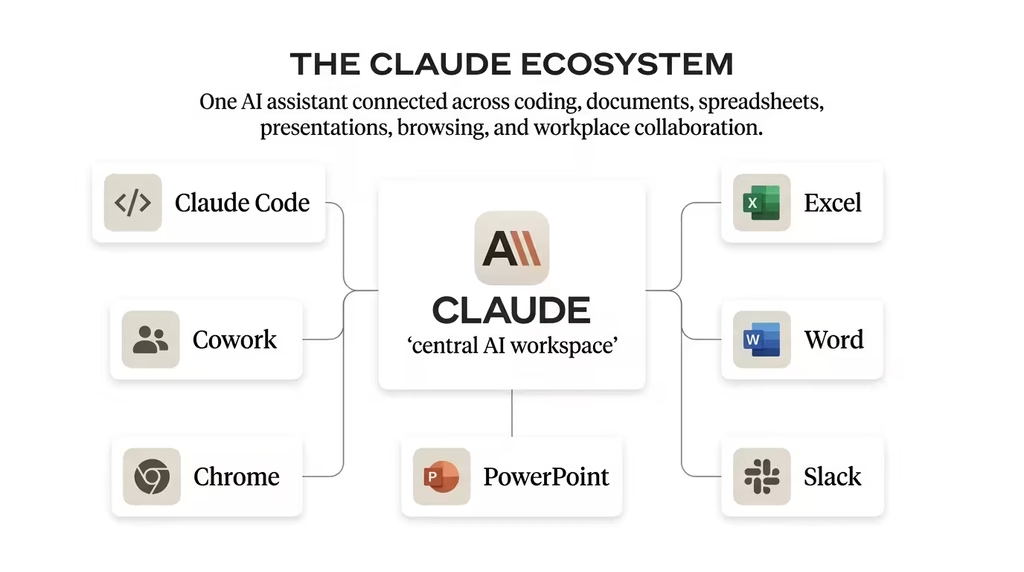
Claude is accessible in several ways: through the web and mobile app at claude.ai, through the Claude desktop app for Mac and Windows, through Claude Code for developers working in terminals and IDEs, through Claude Cowork for agentic desktop tasks, and through integrations with tools like Microsoft Excel, PowerPoint, Word, Slack, and Google Chrome. It also runs on major cloud platforms, including Amazon Bedrock, Google Cloud’s Vertex AI, and Microsoft Foundry for enterprise deployments.
What makes Claude stand apart in a crowded AI field is its handling of long, complex documents, its willingness to push back when your thinking needs challenging, and its capacity to operate across an entire workflow rather than just answering individual questions. Anthropic has also built a memory system that carries context between conversations, a Skills system that lets you teach Claude your own procedures, and a Research feature that conducts multi-step investigations on your behalf.
Claude’s Models Explained: Opus, Sonnet, Haiku, and Mythos
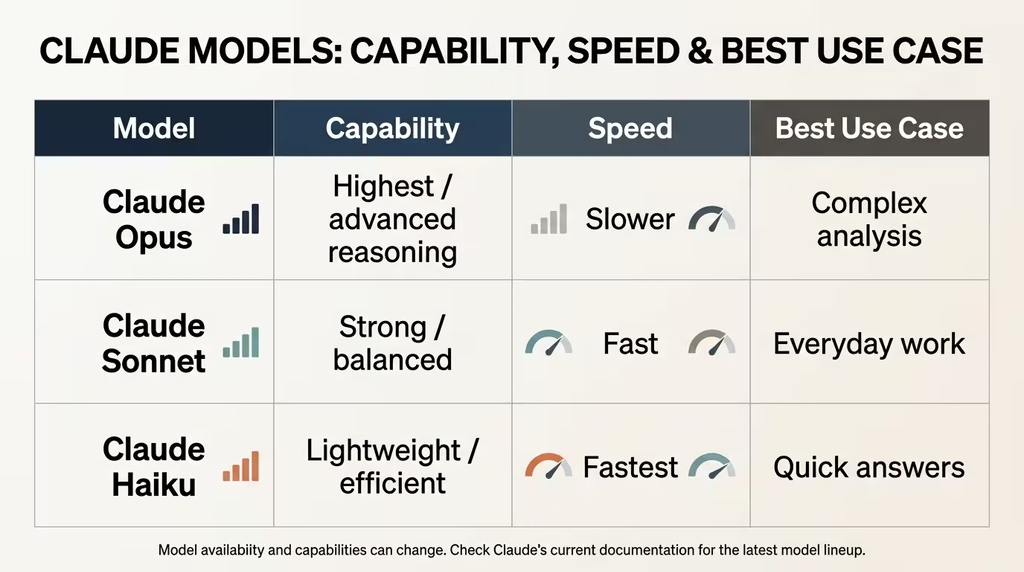
Claude is not a single model. Anthropic releases a family of models at different performance and speed tiers, and choosing the right one for the right task changes your results significantly.
Claude Opus 4.6 is the most capable model in the current family. It handles the most ambitious tasks: complex multi-document analysis, deep research synthesis, sophisticated code generation, and high-stakes writing projects. If you are preparing a business strategy, reviewing a long legal document, or building a complex codebase, Opus is the model you want. It powers many of the advanced Claude Code features.
Claude Sonnet 4.6 is the everyday workhorse. Powerful and fast, it handles writing tasks, analysis, content production, marketing copy, and most business workflows with excellent results. For the majority of users on the Pro plan, Sonnet is the model they will interact with most. It sits in a productive middle ground between capability and speed.
Claude Haiku 4.5 is the fastest and lightest option. It is built for quick answers, everyday lookups, web searches, and routine tasks where you need speed over depth. Use Haiku when you want rapid responses, and you do not need the full reasoning capacity of Sonnet or Opus.
Mythos (Preview) is Anthropic’s newest model in preview access, available to subscribers. Details on its full capabilities continue to emerge, but it represents the direction of Anthropic’s research into more capable, reasoning-intensive AI.
The practical implication for you: match the model to the task. Use Haiku for quick information pulls. Use Sonnet for writing, drafts, marketing, and most daily work. Save Opus for your hardest problems, your biggest projects, and anything where depth matters more than speed.
The Full Claude Product Ecosystem
Claude is beyond a single chat interface. As of 2025 and 2026, Anthropic has built an ecosystem of products that bring AI directly into your existing tools and workflows.
Claude (Chat)
The core interface is available on web, iOS, Android, and desktop. You can write, analyse, code, research, brainstorm, and create directly in the chat window. Projects let you organise conversations and attach documents so Claude retains context across sessions. Memory means Claude can remember your preferences, your business context, and your communication style across separate conversations.
Claude Code
Claude Code is Anthropic’s agentic coding tool for developers. It lives in your terminal, integrates with VS Code and JetBrains IDEs, and can handle full development workflows: reading codebases, writing and editing files across multiple directories, running tests, opening pull requests, and integrating with GitHub and GitLab. Non-technical users can also use Claude Code through the desktop app, sending coding tasks from their phone and coming back to working pull requests. Vercel teams using Claude Code have reported 7.6 times more frequent deployments.
Claude Cowork
Cowork is Anthropic’s answer to desktop task automation for knowledge workers. Available in the desktop app, it can complete tasks that involve your local files, your browser, your calendar, spreadsheets, and connected cloud apps. Describe what you want, approve the plan, and Claude executes it. You can schedule recurring tasks, send instructions from your phone, and receive finished deliverables rather than step-by-step updates. Cowork is the product that turns Claude from a conversational tool into an autonomous work assistant.
Claude for Chrome
Claude for Chrome is a browser extension that lets Claude navigate websites, click buttons, fill forms, and extract data directly in your browser. Paired with Cowork, it can research competitor pricing, pull metrics from analytics dashboards, scan inboxes, log CRM activities, and compile the results into formatted documents on your desktop. It is in beta on all paid plans.
Claude for Slack
Claude for Slack brings the full Claude chat experience into your team’s Slack workspace. You can send it a direct message, mention it in any thread for a draft response, or kick off coding tasks via Claude Code. It can summarise threads, draft content, prepare meeting notes, and answer research questions, all without leaving Slack.
Claude for Excel
The Claude for Excel add-in sits directly inside Microsoft Excel. It can navigate complex financial models, explain any cell or formula, update assumptions without breaking dependencies, debug errors like #REF! and #VALUE!, build models from scratch, and populate existing templates. Teams can save their own workflow sequences as Skills so anyone on the team can run a standard analysis in one click.
Claude for PowerPoint
The PowerPoint add-in lets Claude build slides using your existing templates and master layouts, iterate on individual slides or entire decks, generate native charts and diagrams, and convert bullet points into professional visuals. Like the Excel add-in, it supports Skills for repeatable workflows.
Claude for Word
Claude for Word works inside your Microsoft Word documents, editing selected text as tracked changes, reading your comments and applying them, checking cross-references and numbering consistency, and drafting content in your document’s own heading and bullet styles. Every change appears as a native tracked change that you accept or reject through Word’s standard review pane.
Claude Plans and Pricing: Which Plan Do You Actually Need?
Claude’s pricing structure is straightforward once you understand what each tier is actually for.
The free plan gives you access to Claude’s core chat interface with web search, file analysis, image analysis, memory, code execution, and Slack and Google Workspace connectors. It is a genuine free tier, not a stripped-down trial. If you are exploring Claude or using it occasionally, the free plan works.
Pro plan at $17 per month (annual billing, $20 monthly) includes everything in Free plus Claude Code, Claude Cowork, access to more models, unlimited Projects, the Research feature, Claude for Excel (beta), and Claude for PowerPoint (beta). This is the plan for professionals, entrepreneurs, and creators who use Claude regularly.
Max 5x at $100 per month adds five times the usage of Pro, higher output limits, early access to advanced features, and priority access during high-traffic periods. This is for heavy daily users and teams handling large volumes of work.
Max 20x at $200 per month is for power users who delegate work throughout the day and need maximum access to Opus, Sonnet, and Claude Code.
For teams and enterprises, separate Team and Enterprise plans add SSO, admin controls, HIPAA-ready deployments, compliance APIs, audit logs, organisation-wide Skills deployment, and more.
The key decision point is usage frequency. If Claude is central to how you work, Pro pays for itself within a few hours of real use. If you are running a team or business on Claude, the Max plans prevent you from hitting limits at critical moments.
Writing with Claude: From First Draft to Final Copy
Writing is the area where Claude delivers immediate, measurable results for almost everyone. The question is beyond whether Claude can write. It is how you structure your interaction to get writing that sounds like you, serves your audience, and achieves your actual goal.
How to Write Better with Claude
The key to getting good writing from Claude is specificity at the brief stage. Do not ask Claude to “write a blog post about X.” Tell Claude who the reader is, what they already know, what you want them to feel, what tone you want, and what action you want them to take. The more context you provide upfront, the less revision you need on the back end.
Effective writing prompts include:
- “Write a 600-word introduction for a guide targeting Nigerian entrepreneurs who are new to freelancing. Tone: direct, practical, and encouraging. Primary goal: make them feel capable of getting their first client.”
- “Rewrite this paragraph to be more concise. Keep the key claim but cut passive voice and remove the hedging language.”
- “Edit this email to sound warmer without losing the professional boundary I need to maintain with this client.”
Writing Tasks Claude Handles Exceptionally Well
Claude excels at long-form drafting, editing for tone and clarity, restructuring content that is technically correct but poorly organised, and writing first drafts of content types you find tedious. It produces strong work on blog posts, email sequences, landing page copy, proposal narratives, newsletter content, academic essays, case studies, LinkedIn posts, and business reports.
For book writing, Claude can help you outline chapters, develop character arcs, write scene drafts, and maintain consistency of tone across long manuscripts. The Projects feature is particularly useful here because you can upload your manuscript chapters and have Claude work with the full document context.
The Humaniser Layer
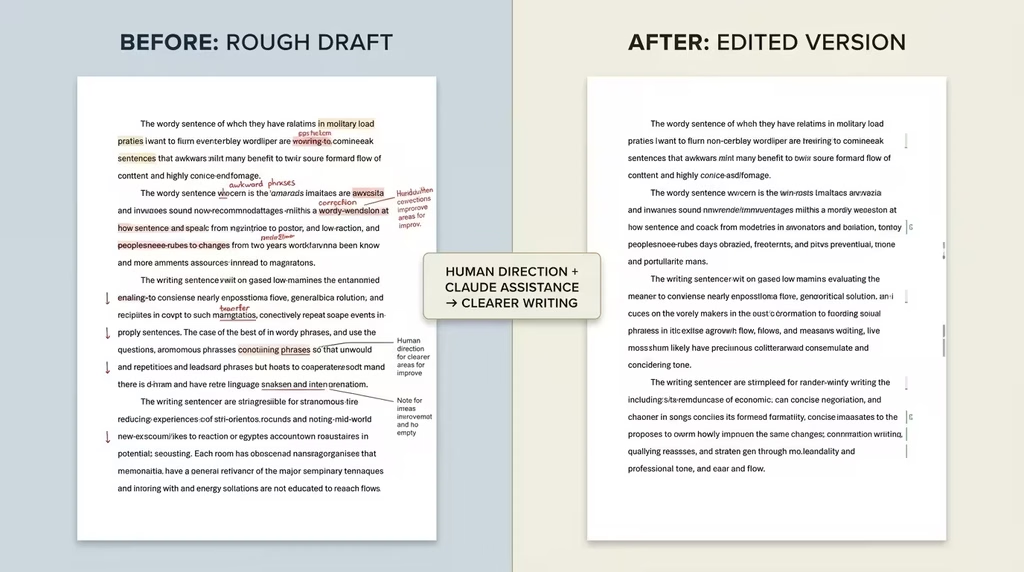
One important step for writing with Claude is the humanising pass. AI-generated text has recognisable patterns: inflated significance claims, superficial analyses using gerund phrases, vague attributions, the rule of three, and promotional language that no human would naturally use. Running your Claude-drafted content through a humanising review, whether manually or using a humaniser skill, closes the gap between AI output and genuinely good prose.
The Humaniser Skill (/mnt/skills/user/humanizer/SKILL.md) is specifically built for this, based on Wikipedia’s documented signs of AI writing. Apply it after any Claude-drafted piece before publication.
Coding with Claude: Build Without Being a Developer
Claude Code has changed the accessibility of software development. You do not have to be a developer to ship functional digital products when Claude can read codebases, write multi-file changes, run tests, and submit pull requests. What you need is the ability to describe what you want clearly.
Claude Code in Practice
Claude Code installs via a terminal command and connects directly to your codebase. Once installed, you can ask it to explain how a codebase works, identify bugs, refactor code for performance, write new features, or convert a working prototype into a production-ready structure. It uses agentic search to understand your entire project without you having to manually point it at files.
For developers, Claude Code integrates with VS Code, JetBrains IDEs, and GitHub Copilot workflows. It handles GitHub and GitLab integrations natively, reading issues, writing code, running tests, and opening PRs from a single conversational prompt.
For non-technical users, the desktop app version of Claude Code lets you start a coding task from your phone and return to a finished result. This is genuinely useful for entrepreneurs who know what they want built but do not write code themselves.
What You Can Build with Claude Code
Claude Code can build websites, web applications, landing pages, internal tools, data processing scripts, automation workflows, API integrations, and much more. Teams at companies like Notion, Vercel, Ramp, and Intercom use it to accelerate development cycles measurably.
Even for basic tasks, Claude Code is valuable for non-developers. Generating a CSV-to-Excel converter, building a custom WordPress plugin, automating a data cleanup process, or creating a client reporting dashboard are all feasible tasks for someone with no coding background, provided they can describe the problem clearly.
Levelling Up Claude Code with UI UX Skills
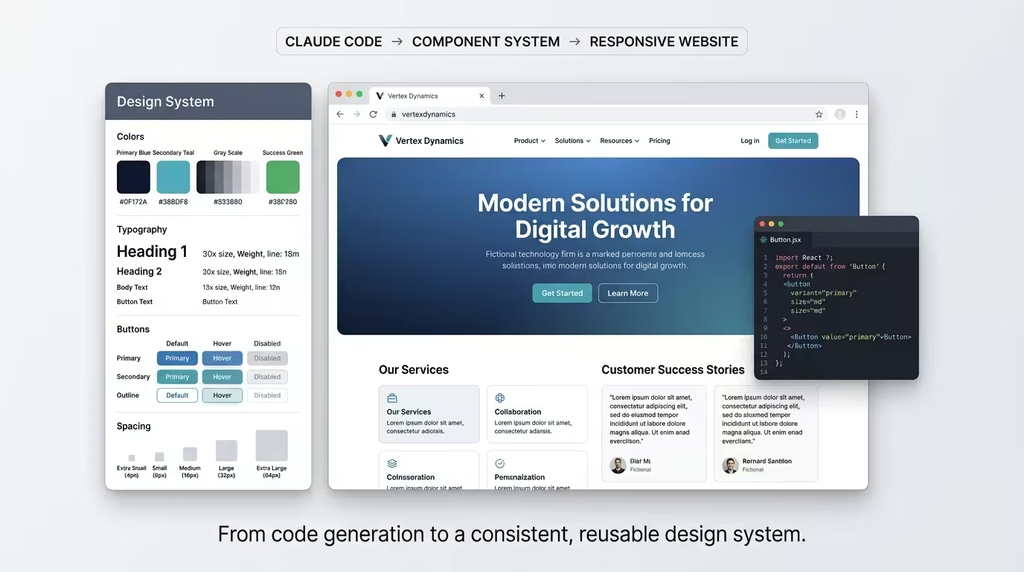
The UI UX Pro Max skill is an open-source skill from GitHub (nextlevelbuilder/ui-ux-pro-max-skill) that gives Claude Code a full design intelligence layer. It includes 161 industry-specific design system reasoning rules, 67 UI styles, 161 colour palettes matched to product types, 57 curated font pairings, and 99 UX guidelines.
Install it via the Claude Marketplace or via npm:
npm install -g uipro-cli
uipro init –ai claude
Once installed, asking Claude to build a landing page for a beauty spa triggers the design reasoning engine, which selects the appropriate style (Soft UI Evolution), colour palette (soft pink, sage green, gold), typography (Cormorant Garamond / Montserrat), and delivers a pre-delivery checklist covering accessibility, hover states, responsive breakpoints, and more. The result looks like a professional designer was involved because, in effect, one was.
Design with Claude: Creating Visuals, Websites, and Decks
Design is one of the more surprising productivity wins available through Claude. The combination of Claude’s natural language understanding with the right skills creates a capable design workflow without requiring specialist software or expertise.
Websites and Landing Pages
Paired with Claude Code and the UI UX Pro Max skill, Claude can generate full HTML, React, Next.js, Vue, or mobile app UI designs. You describe the product, the industry, and the feel you want. Claude’s design reasoning engine selects the appropriate style and produces the code. The output is responsive, accessible, and production-ready.
For DSE readers building service sites, coaching pages, or product landing pages, this workflow removes the cost of a web designer for standard projects entirely.
Presentations with Claude for PowerPoint
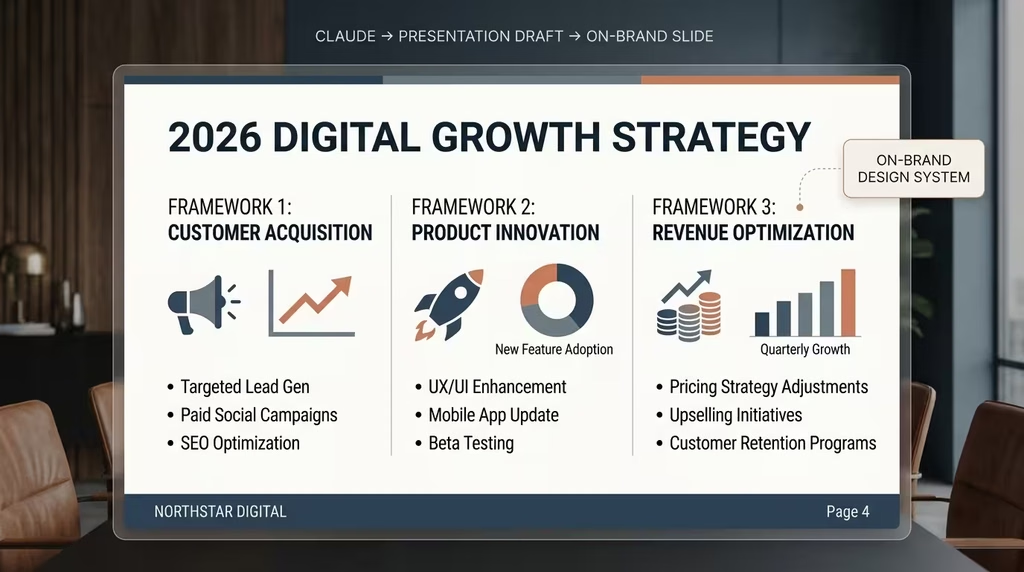
Claude for PowerPoint works inside your existing Microsoft PowerPoint templates. Open your branded template, describe the section you need, and Claude generates slides using the correct layouts, fonts, and colour schemes from your master deck. It builds native charts, converts bullet points into visual diagrams, and maintains formatting integrity across slides.
Teams using Claude for PowerPoint have reported reducing deck creation time significantly on standard presentations. The Skills feature means you can save a deck structure once, for a client pitch format or a quarterly review template, and every team member can generate a consistent version in one click.
Brand Assets
The Claude use cases page lists brand asset creation as a direct application: business cards, flyers, and marketing materials matched to your branding guidelines. Combined with the Projects feature and your uploaded brand guidelines, Claude can generate on-brand copy and structure for creative assets at scale.
Brainstorming with Claude: Thinking Partner on Demand
Claude is an exceptional brainstorming partner for one reason most people underestimate: it does not get tired of your ideas, and it does not have social discomfort pushing back on bad ones.
How to Brainstorm Effectively with Claude
The best brainstorming sessions with Claude are structured dialogues, not open-ended questions. Start with your constraint. Tell Claude what you are trying to solve, what you have already tried, and what feels stuck. Ask it to give you ten angles you have not considered, not just variations on your existing thinking.
Useful brainstorming prompts:
- “I am trying to build a new revenue stream for my coaching business. I have already tried group programmes and one-to-one coaching. What are ten models I have not mentioned that could work for someone with my type of expertise?”
- “Challenge my assumption that we need a social media presence to grow this brand. What business models succeed without social media, and which of them could apply here?”
- “Give me five ways this idea could fail within the first year and one mitigation strategy for each.”
Using Claude for Strategic Thinking
Claude is strong in framework applications. If you are familiar with strategic frameworks, SWOT, PESTLE, Value Proposition Canvas, Jobs-to-Be-Done, you can ask Claude to apply them to your specific situation rather than generic examples. The results are more useful than a textbook walkthrough because they engage your actual context.
For DSE readers working with proprietary frameworks like the CARES Framework, Zero DECLINE, or THRIVE 247, you can load the framework into a Project with a full description and have Claude apply it consistently across brainstorming sessions, content strategy work, and client analysis.
Content Creation with Claude: Scale Your Output Without Burning Out
Content creation is where Claude’s productivity impact is most visible. If your business depends on consistent content output, whether blog posts, newsletters, social media, email sequences, or video scripts, Claude fundamentally changes what one person can produce.
Blog and Article Writing
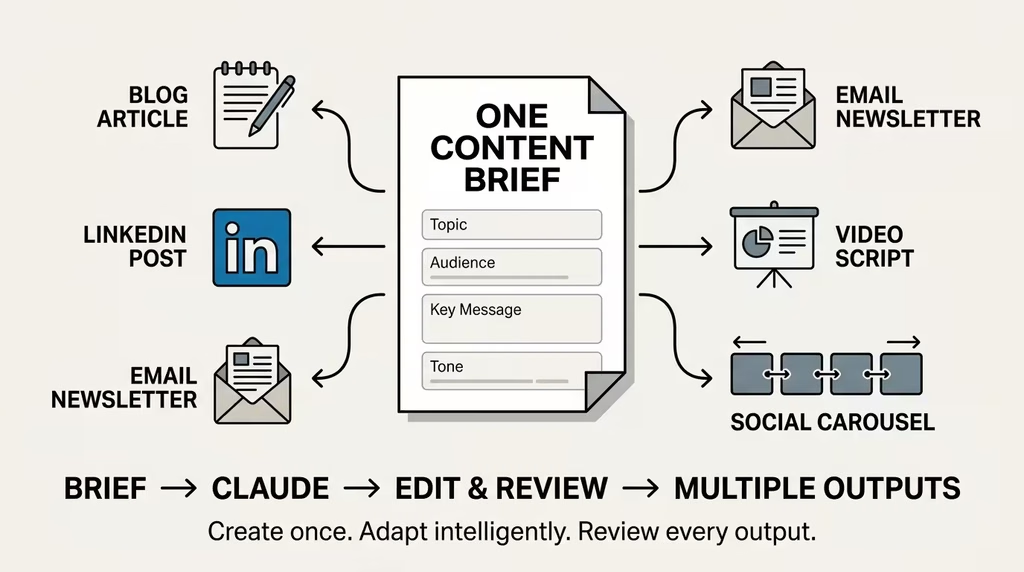
Claude can produce strong first drafts of long-form articles from a brief outline, or even just a working title and keyword. The DSE workflow is to brief Claude with the topic, primary keyword, target audience, pillar classification, and desired tone, then run the output through an editorial and humanising pass before publishing.
The DSE Article Writing Skills MD (available at digitalsolutionsedge.com/article-skills-md) teaches Claude the full 15-section DSE output format, keyword strategy, banned word lists, the FACCT tone blend, UK English requirements, and more. This means every article Claude produces matches DSE’s editorial standards from the first output, reducing editing time substantially.
Newsletter and Email Content
Claude handles newsletter content reliably. Give it your subscriber context, the topic of the week, and your brand voice, and it drafts the full email. For email sequences, describe the journey you want the reader to take across five or seven emails, and Claude can draft the full series with consistent messaging and progression.
Social Media Content
Claude can generate LinkedIn posts, Twitter/X threads, Instagram captions, and YouTube descriptions at scale. The most effective approach is batching: write your main content piece first, then ask Claude to derive social posts from it at multiple lengths and for multiple platforms. This way, your social content stays consistent with your core message and does not require a separate creative effort.
Video Scripts
For YouTube, Shorts, Reels, or TikTok, Claude can write full scripts, hook lines, call-to-action language, and video descriptions. Pair this with a strong brief about your audience and your on-screen style to get scripts that fit how you actually speak.
Anthropic Research on AI Capabilities
Learning with Claude: Turn Claude into Your Personal Tutor
One of Claude’s most underutilised capabilities is as a learning tool. Claude is patient, adaptive, knowledgeable across a staggering range of subjects, and capable of meeting you exactly where your current understanding sits.
Concept Explanation and Simplification
Ask Claude to explain a complex concept at the level you are currently at, and it adjusts. You can ask it to explain blockchain to someone who has never used a computer, or to explain neural network architecture to someone with a calculus background. The model adapts its language, examples, and depth to the level you specify.
This is particularly valuable for self-directed learners in Africa and emerging markets who are acquiring technical skills outside of formal education. Claude can effectively bridge the gap between a YouTube tutorial and genuinely understanding the underlying concept.
Study Support
For students, Claude can summarise textbook chapters, generate practice questions, explain exam concepts in multiple ways, give feedback on essay drafts, help plan study schedules, and create flashcard sets. The key is treating Claude as a study partner, not an essay-writing service. Use it to strengthen your understanding, not to bypass the learning process.
Skill Acquisition
Claude can teach you practical skills through step-by-step explanations paired with immediate application. Want to learn SQL? Ask Claude to teach you from scratch with small exercises you try and then paste back for feedback. Want to understand financial modelling? Claude can walk you through a DCF model concept by concept, check your understanding with questions, and guide corrections.
Language Learning
Claude speaks over a dozen languages with high fluency. You can use it for translation, grammar correction, practice conversations, vocabulary building, and cultural context. For Nigerian professionals wanting to improve their business English or add a second professional language, Claude provides a low-cost, high-quality practice environment.
Marketing with Claude: Strategy, Copy, and Campaigns
Marketing is a high-leverage application of Claude because it touches both strategic thinking and tactical execution, two areas where Claude contributes at different scales of depth.
Marketing Strategy
Claude can analyse your market position, audit your competitors, identify audience segments you have not targeted, evaluate pricing psychology, and build go-to-market frameworks. Feed it your product details, your current customer profile, and your growth challenge, and ask for a structured marketing strategy. The output is a starting point for human strategic refinement, not a finished plan, but it is a very productive starting point.
Copywriting
This is where Claude pays back its subscription cost quickly. Strong marketing copy requires understanding your audience’s language, pain points, and buying psychology. Give Claude a detailed buyer persona and a specific objective (get clicks, generate leads, close a sale), and it produces copy that is directional and convertible. Run it through a humanising pass and tune it to your voice before publishing.
Claude handles: headline generation, landing page copy, email subject lines, ad copy for Facebook, Google, and LinkedIn, product descriptions, sales page structures, and promotional scripts.
SEO Content
Claude understands SEO well enough to write content optimised for specific keywords, structure articles for featured snippets, generate meta descriptions, and produce FAQ sections targeting question-based searches. For content marketers and SEO practitioners, Claude dramatically reduces the time required to produce a full content brief and first draft.
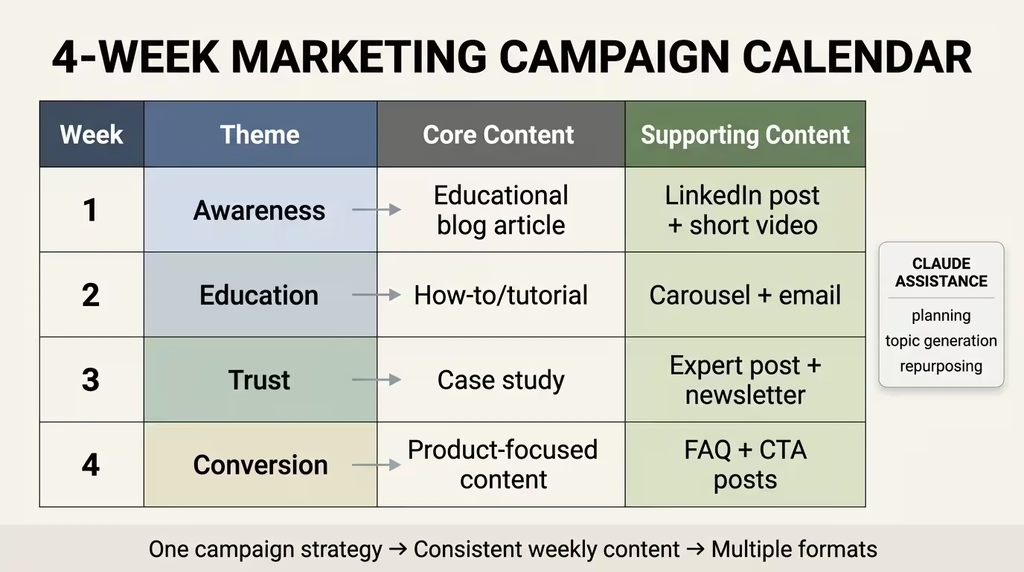
Campaign Planning
Use Claude to plan full campaign calendars. Describe your product, launch date, budget context, and audience, then ask for a 90-day campaign structure with content themes, channel recommendations, and key message progressions. Claude produces a workable structure that you refine with your own market knowledge.
Selling with Claude: Proposals, Pitches, and Client Conversations
Sales is an area where many knowledge workers and consultants under-use Claude. If you send proposals, pitch services, handle client objections, or work on business development, Claude is a tool that belongs in your sales workflow.
Writing Proposals
Proposal writing is time-consuming and high-stakes. Claude can draft the full proposal structure from a brief: executive summary, problem statement, proposed solution, methodology, team and credentials, timeline, pricing rationale, and next steps. Provide it with the client’s brief, your approach, and your value proposition, and it assembles a first draft that you then personalise and strengthen.
For consultants and freelancers, this cuts proposal writing time from hours to under an hour for standard engagements.
Pitch Preparation
Before a client call or pitch meeting, use Claude to prepare. Feed it what you know about the client, the deal, and the key objection you expect, and ask Claude to help you anticipate every question and prepare a crisp response. It can also help you practice by roleplaying the client’s likely pushback, so you walk into the meeting more prepared.
Client Communication
Claude drafts professional emails, follow-up messages, difficult feedback conversations, contract negotiation language, and scope change communications. The message compose feature in Claude allows you to generate multiple strategic variants of the same message, useful when you are not sure whether to be direct, diplomatic, or somewhere in between.
CRM and Lead Follow-Up
Paired with Claude for Chrome, you can automate parts of your sales workflow. Claude can read your calendar, match meeting attendees to your CRM contacts, and draft activity logs for each call. You review and approve before anything gets submitted.
Claude at Work: Cowork, Excel, PowerPoint, Word, Slack, and Chrome
The workplace integration products represent Claude’s most direct value for professionals inside organisations. These are the tools that bring Claude into the work you are already doing, in the software you already use.
Claude Cowork: Your Desktop Agent
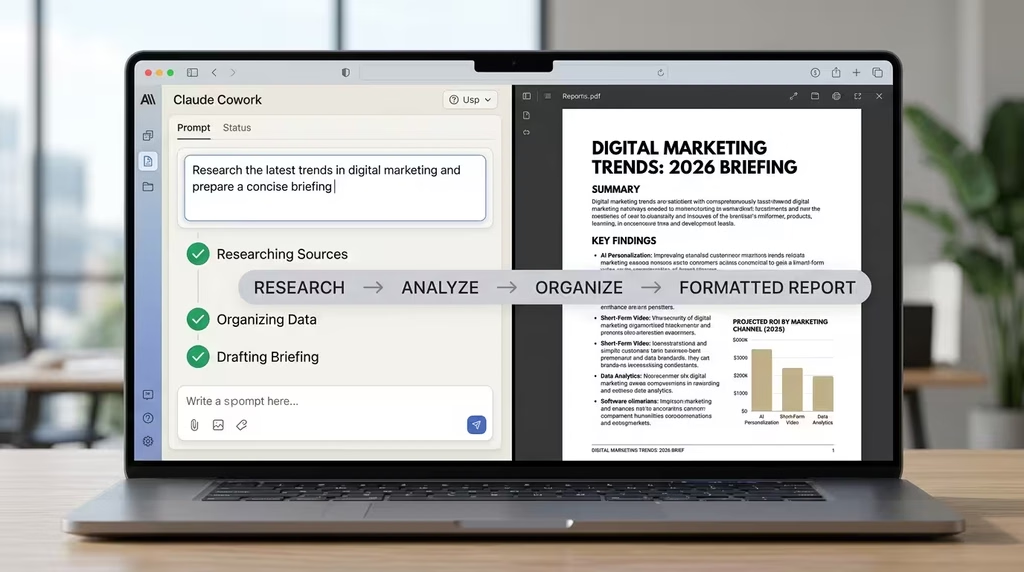
Cowork is the biggest shift in how you can use Claude for work. Past chat AI, Cowork takes real action: it organises folders, builds spreadsheets, prepares reports, researches competitors, cleans inboxes, and produces polished deliverables. You describe the outcome, Claude shows you the plan, you approve, and it is executed.
The scheduled tasks feature means you can set up recurring workflows: pulling your weekly metrics, preparing your Monday briefing from Slack and email, or running a Friday CRM cleanup. Set it once. Claude handles it from there.
Jamf built a performance review system in Cowork in 45 minutes that would have required a full engineering team building a custom React app by conventional means. That benchmark illustrates the potential for knowledge workers who know what they want to build but lack the developer resources to build it.
Claude for Excel: Financial Modelling Without the Frustration
If you work with financial models, Excel spreadsheets, or data analysis, Claude for Excel removes the most frustrating parts of the job. It explains formulas in plain English with cell-level citations, updates assumptions without breaking dependencies, traces errors to their source in seconds, and builds models from scratch based on your requirements.
The Skills feature in Excel means your team can save a workflow, say a DCF model review or a variance analysis, and any team member can run it with one click from the add-in. This turns expert-level Excel workflows into repeatable, delegatable processes.
Claude for Word: Tracked Changes You Can Trust
Document editing in Word becomes faster when Claude reads your comments, applies edits as tracked changes, and checks the document for consistency errors. Every change is visible, attributable, and reversible through Word’s standard review pane. You maintain full editorial control without doing every mechanical edit yourself.
Claude for Slack: Collaboration Without Context Switching
Claude in Slack handles summarisation, content drafting, meeting preparation, and coding task delegation without pulling you out of the tool where your team already communicates. For busy teams, the ability to mention Claude in a thread and get a draft response ready to review before posting saves meaningful time on internal and external communication.
Claude for Research and Analysis
Claude’s Research feature is one of its most powerful and most underused capabilities on paid plans. It conducts multi-step web research on your behalf, reads sources, synthesises findings, and delivers structured reports.
Deep Research with Claude
Use the Research feature for market sizing, competitor landscape analysis, industry trend reports, due diligence on a business partnership, academic literature reviews, and regulatory briefings. Claude searches multiple sources, evaluates their quality, and synthesises the findings into a coherent output with citations.
For content marketers, researchers, and consultants, this replaces several hours of manual research. You still need to evaluate the output critically, but you start from a structured, cited foundation rather than blank search results.
Data Analysis
Upload a CSV or Excel file and ask Claude to analyse it. Claude identifies patterns, flags outliers, builds correlation analyses, generates visualisations, and produces summary reports. The chart-building is particularly useful for presenting data findings without a separate analytics tool.
Document Analysis
Claude can read long documents (contracts, research papers, annual reports, policy documents) and give you a clear summary, flag key clauses, identify gaps, compare two versions of a document, and answer specific questions about the content. This is a high-leverage application for lawyers, consultants, academics, and anyone who regularly processes long documents professionally.
Claude Across Industries: Finance, Healthcare, Education, and More
Anthropic has published specific solution areas for Claude across a wide range of industries. The core capability is the same, but the application and compliance considerations differ.
Financial Services
Claude is used in financial services for building and reviewing financial models, drafting credit memos and filing narratives, conducting due diligence research, generating variance analyses, and supporting compliance workflows. Claude for Excel supports the specific conventions of financial modelling, including DCF, comps analysis, and reserve calculations.
Healthcare
In healthcare, Claude supports clinical documentation, patient communication drafts, medical literature review, insurance prior authorisation preparation, and administrative workflow automation. Anthropic offers a HIPAA-ready deployment for enterprise customers, which addresses regulatory requirements for handling protected health information.
Education
For educators and learning designers, Claude supports curriculum development, syllabus planning, lesson preparation, assessment design, student feedback drafts, and professional development content. The theory-of-change visualisation use case on Anthropic’s site shows Claude drawing causal chains for programme logic inline in a conversation, a practical tool for anyone building educational or nonprofit interventions.
Nonprofits
Claude supports nonprofits in grant writing, donor communication, fundraising strategy, impact reporting, and theory-of-change documentation. The campaign feasibility tool on Claude’s use cases page lets fundraisers input a campaign goal and get a live gift pyramid showing what prospect volume is realistically required to hit the target.
Government and Legal
Claude’s government solutions cover public service communication, policy drafting, document management, and citizen engagement. For legal teams, Claude handles contract review, NDA triage, compliance workflows, and document organisation. The Claude for Word integration makes tracked-change editing on legal documents significantly faster.
Anthropic Responsible Scaling Policy for Safe AI Deployment
Levelling Up Claude with Skills
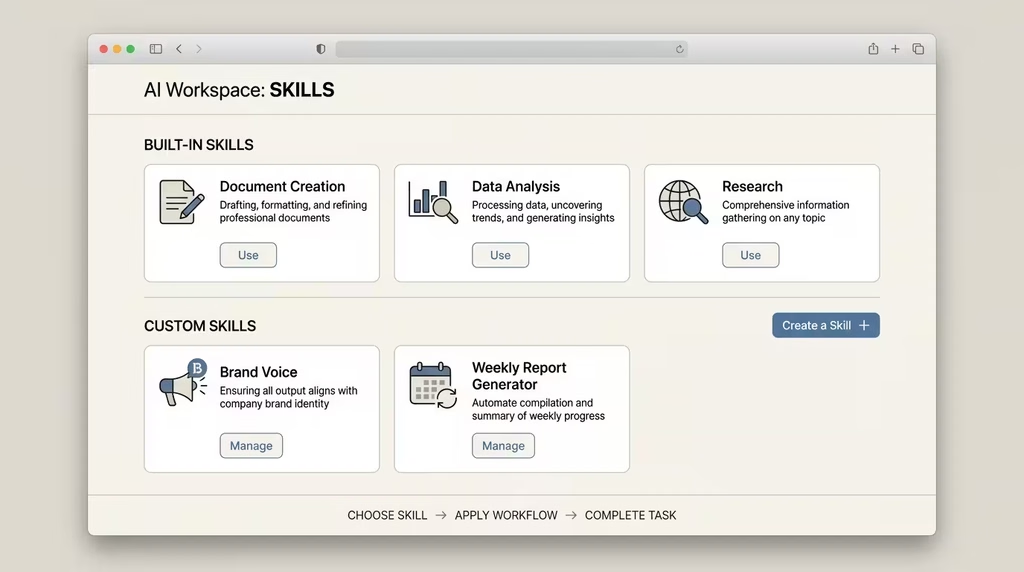
Skills are reusable capability packages that teach Claude how to perform specific tasks according to your standards, not generic defaults. They are folders containing a SKILL.md file with instructions, plus any reference documents, templates, or scripts Claude needs to do the job.
Why Skills Matter for Productivity
Without Skills, every conversation with Claude starts from scratch on how you want things done. With Skills, Claude knows your formatting standards, your terminology, your workflow steps, and your quality benchmarks before you say a word. The result is consistent, high-quality output from the first attempt, without repeated instruction.
Skills are available across Claude.ai, Claude Code, and the API, so you build once and use everywhere.
Built-In Skills
Claude comes with built-in Skills for common workflows: creating Excel sheets with working formulas, building PowerPoints with your branding, analysing and visualising data, and converting files between formats. These run automatically when you request the relevant type of work.
Team and Company Skills
Organisations can build Skills that package institutional knowledge: brand guidelines, financial modelling standards, compliance checklists, onboarding documentation, and client communication protocols. A new team member with access to the right Skills produces expert-level work from day one.
Building Your Own Skills
Claude includes a Skill Creator Skill. Describe what you want the Skill to do, and Claude generates the folder structure and formats the SKILL.md file, and bundles your resources. For developers who prefer full control, Skills are just Markdown files. You write the instructions, add reference files and scripts, and Claude uses them.
DSE Recommended Skills for Writers and Content Creators
For DSE readers who produce content professionally, three Skills are worth prioritising:
DSE Article Writing Skills MD (digitalsolutionsedge.com/article-skills-md) applies the full DSE editorial standard to every article Claude writes, including the TNT title formula, FACCT tone blend, 15-section output structure, UK English requirements, and banned word enforcement. Available for $2.47 with future updates.
DSE Book Writing Skills MD (digitalsolutionsedge.com/book-skills-md) applies a comparable system to long-form book production, including chapter structure, voice consistency, and the THRIVE 247 narrative framework.
Humanizer Skill (open source, see github.com/blader/humanizer) applies the full 29-pattern AI writing audit to any text, making it sound like a human writer wrote it.
UI UX Pro Max Skill (open source, see github.com/nextlevelbuilder/ui-ux-pro-max-skill) gives Claude Code a full professional design intelligence layer for web and app development.
Power Tips to Maximise Claude for Productivity
These are the habits that separate average Claude users from high-output practitioners.
1. Use Projects to Maintain Context
Projects let you attach documents, maintain conversation history, and set persistent instructions for Claude. For any ongoing piece of work, a client engagement, a book project, a content series, or a product launch, create a Project and keep all relevant sessions and documents inside it. Claude will carry context intelligently across every conversation in that Project.
2. Set System Instructions in Projects
Every Project can have a custom instruction set that Claude reads before every conversation. Use this to specify your name, your business context, your audience, your tone, your non-negotiables, and any frameworks Claude should apply. Setting this up once saves you from re-explaining your context repeatedly.
3. Brief Claude Like a Professional, Not a Search Engine
The quality of Claude’s output is directly proportional to the quality of your input. A two-sentence request produces a generic result. A structured brief, with audience, objective, tone, format, and constraints specified, produces a targeted, useful output. Think of briefing Claude the same way you would brief a talented freelancer.
4. Use Extended Thinking for Hard Problems
On Pro and Max plans, Claude’s extended thinking mode works through complex problems with a visible reasoning chain before producing its final answer. For strategy questions, difficult analytical problems, or any situation where you need Claude to slow down and think rather than produce the first plausible answer, enable extended thinking.
5. Iterate, Don’t Regenerate
When Claude produces a draft that is close but not quite right, do not discard it and regenerate. Tell Claude specifically what to change: “This paragraph is too formal, rewrite it more conversationally,” or “The conclusion is weak, make it more concrete by adding a specific next step.” Iterating on a draft is faster and produces better results than starting over.
6. Build a Personal Skill Library
Every time you find yourself repeating the same set of instructions to Claude, that is a candidate for a Skill. The DSE-style content brief, your proposal template, your data analysis standard, and your brand voice guide. Build these into Skills and let Claude apply them automatically.
7. Use Memory Proactively
Claude’s memory system stores facts about you across conversations. You can tell Claude your professional context, your preferences, your ongoing projects, and your communication style, and it will carry this into future sessions. Use the memory management tools to keep this information accurate and current.
8. Pair Claude for Chrome with Cowork for Full Browser-to-Document Workflows
For research-to-deliverable workflows, the combination of Claude for Chrome (navigating and extracting from the web) and Cowork (processing and formatting into documents) eliminates manual handoff. Research competitor pricing, pull the data, and compile it into a formatted comparison report, all without copying and pasting between tabs.
9. Import Your Memory from Other AI Platforms
If you have built up useful context in another AI assistant, Anthropic now supports memory import, so you can bring your preferences and context to Claude without starting over.
10. Use Claude Code for Tasks That Seem Too Technical
Many tasks that feel like they need a developer are within reach through Claude Code and a clear English description. If you can explain what you want the software to do, Claude Code can often build it. The barrier is not technical knowledge. It is the clarity and specificity of your requirement.
FAQ
What is Claude AI, and who makes it? Claude AI is an AI assistant built by Anthropic, an AI safety research company. It is available as a chat interface, a coding tool (Claude Code), a desktop agent (Claude Cowork), and as integrations inside Microsoft Office applications, Slack, and Google Chrome.
Which Claude plan should I start with? If you are new to Claude, start with the free plan to understand how it works. If you find yourself using it daily for writing, content creation, coding, or work tasks, upgrade to Pro at $17 per month. The Pro plan includes Claude Code, Cowork, Research, Excel, and PowerPoint integrations alongside the standard chat.
Can I use Claude AI for free? Yes. The free plan is a genuine working tier with access to core chat features, including web search, image analysis, memory, file analysis, and connectors for Slack and Google Workspace. Usage limits apply to the free tier.
What is Claude Code, and do non-developers need it? Claude Code is Anthropic’s agentic coding tool. Developers use it to write, debug, and manage full codebases from the terminal. Non-developers can use it through the desktop app to build websites, automate workflows, and create digital tools without writing code themselves. It is included in the Pro plan.
What is Claude Cowork? Claude Cowork is a desktop agent that takes real actions on your computer: organising files, building spreadsheets, preparing reports, researching topics, and executing multi-step workflows. It is distinct from Chat Claude in that it completes tasks autonomously rather than just generating text. Available in the desktop app on paid plans.
How does Claude handle sensitive data? Claude is built with enterprise-grade security. Team and Enterprise plans include HIPAA-ready deployments, compliance APIs, audit logs, and admin controls over data access. Personal conversations are not used for model training on paid plans by default.
What are Claude Skills, and how do I create one? Skills are reusable instruction sets that teach Claude how to perform specific tasks to your standard. You create them by writing a SKILL.md file with your instructions and any supporting reference files. Claude includes a Skill Creator Skill that guides you through the process in a conversation. Skills work across Claude.ai, Claude Code, and the API.
Can Claude AI write books? Yes. Claude handles long-form book writing, including chapter outlines, scene drafts, narrative arc development, and consistency checking across manuscripts. The DSE Book Writing Skills MD applies a structured framework for this. Use Projects to keep your chapters and style notes accessible across writing sessions.
Is Claude better than ChatGPT? This depends on the task and the user. Claude generally performs better on tasks requiring careful reasoning, nuanced writing, long document analysis, and ethical sensitivity. ChatGPT has a broader plugin ecosystem and a longer track record in some application areas. The honest answer is that both have strengths, and many professionals use both strategically for different task types.
How do I get Claude to produce better outputs? Write better briefs. The single biggest factor in Claude’s output quality is input quality. Specify your audience, your objective, your tone, your format, your constraints, and the context of the task. Add a Skills layer for recurring work types. Use extended thinking for complex analytical tasks. Iterate on drafts rather than regenerating from scratch.
Does Claude work in Nigeria? Yes. Claude is accessible in Nigeria through the web interface, iOS and Android apps, and the desktop app. The Free plan is available at no cost. Paid plans require a valid international payment method. Claude’s knowledge of the Nigerian business context, regulations, and market conditions is generally strong, making it well-suited to African entrepreneurs and professionals.
Claude AI is not just another chatbot. It is an ecosystem of tools built to handle the full weight of professional and personal intellectual work, from drafting a business proposal to building a production-ready web application, from preparing a student essay to running an automated weekly CRM workflow.
The productivity gain from Claude depends entirely on how deliberately you use it. Surface-level users get surface-level results. Practitioners who build Skills, maintain Projects, brief Claude with professional quality, and integrate it into their actual workflows get results that change how much work they can produce, at what quality, and in what time.
The tools covered in this guide, Claude Code, Cowork, Excel, PowerPoint, Word, Slack, Chrome, Skills, and the model selection strategy, collectively represent a productivity system, not just a product. The question is not whether Claude can help you work better. It is whether you are willing to invest the short time required to integrate it properly.
Start with one workflow: the writing task you do every week, the spreadsheet you rebuild every month, the proposal you write for every client. Build a Skill around it. Let Claude handle the mechanical weight. Redirect your energy to the thinking, the relationships, and the strategy that only you can do.
That is what Informed, Transformed, Empowered actually looks like in practice.
Ready to go deeper? Book a Transformation Clarity Call with DSE Consultants to build your personalised Claude productivity system, or explore our related guides below.