



You just received a ZIP file from a colleague. Or downloaded a PDF from a website that looked legitimate. Or opened an email attachment you weren’t entirely sure about. Sound familiar?
Here’s a sobering reality: according to Verizon’s 2024 Data Breach Investigations Report, over 94% of malware is delivered via email attachments and malicious downloads. The files hiding in your Downloads folder, your inbox, and your cloud storage are statistically the most common entry points for ransomware, trojans, and spyware attacks.
The good news? You do not need to install any software to protect yourself. A growing category of powerful, free tools lets you scan any file, be it a ZIP archive, a PDF document, a Word file, or an executable, directly in your browser. These online virus scanners run your files through multiple security engines simultaneously, giving you a fast, multi-layered verdict before you open anything that could compromise your system.
This guide covers 11 of the most effective online virus scanners available today. You will see exactly what each tool does, what makes it stand out, and where it falls short, so you can make the smartest choice based on your specific situation.
Table of Contents
Disclosure: Our content is engineered to help you make informed, data-driven, and smart decisions. Digital Solutions Edge is reader-supported; when you engage with our recommendations or click certain links, we may receive a commission. This support allows us to continue delivering the digital solutions you rely on. Thank you for being part of our community.
What Is an Online Virus Scanner?
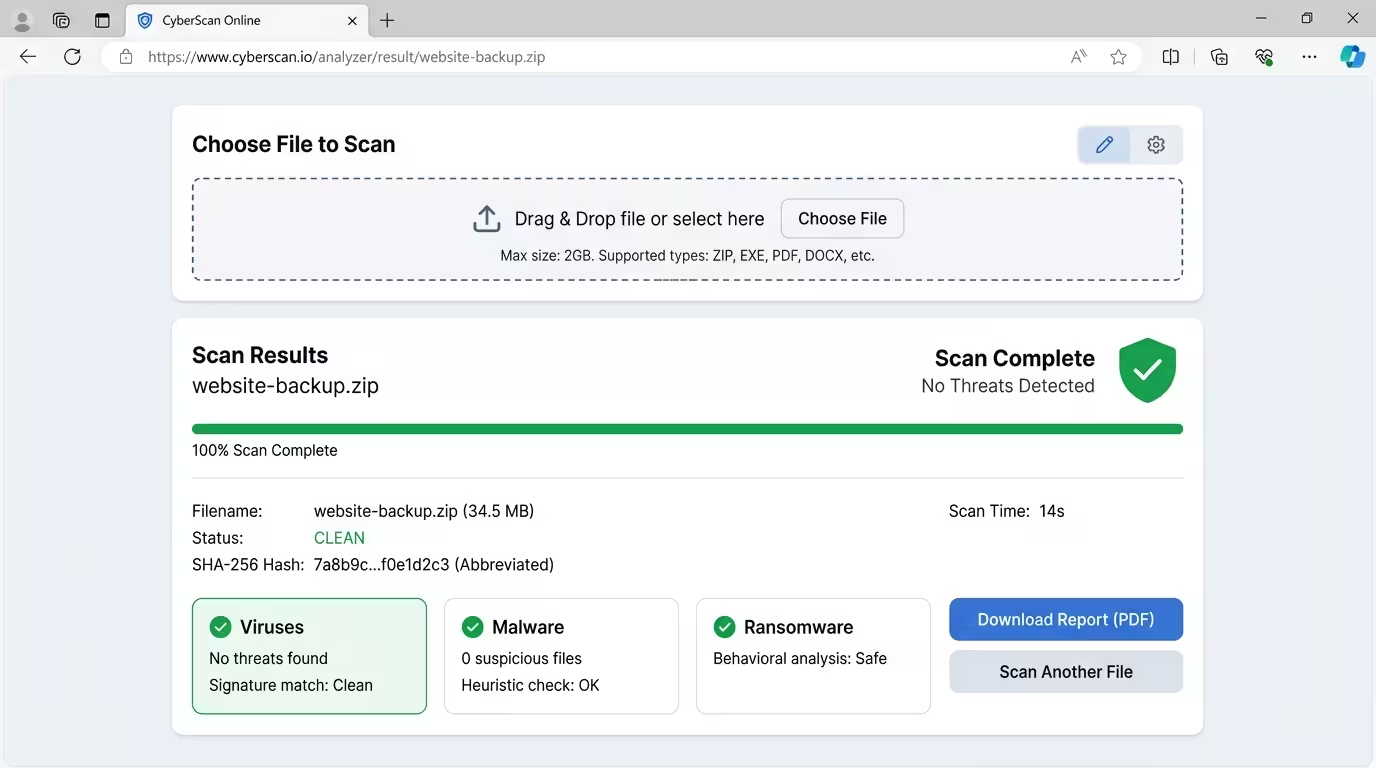
An online virus scanner is a web-based tool that allows you to upload a file, URL, or file hash to a remote server where it is analysed for malware, viruses, trojans, ransomware, and other threats. Unlike traditional antivirus software, online scanners require no installation, no subscription, and often no account creation. You visit a website, upload your file, and receive a threat report within seconds.
The best online scanners go beyond simple signature matching. They cross-reference your file against multiple antivirus engines simultaneously, run behavioural sandbox analysis, check file reputation against global threat databases, and even reconstruct files to strip out malicious components. For anyone who handles digital content professionally, that combination of speed and depth is invaluable.
How Online File Scanners Work
Understanding the mechanics behind these tools helps you interpret results correctly and choose the right scanner for your needs.
- Signature-based detection is the foundation. The scanner compares your file’s code against a library of known malware signatures. It is fast and reliable for identified threats, but it cannot catch brand-new malware that hasn’t been catalogued yet.
- Multi-engine scanning takes this further by running your file through dozens of antivirus engines at once. A file that slips past one engine might be flagged by another. Tools like VirusTotal and MetaDefender Cloud use this approach, increasing the statistical probability of detection dramatically.
- Behavioural sandbox analysis is the gold standard for catching sophisticated threats. Instead of looking at what the file is, the scanner runs the file in an isolated virtual environment and observes what it does. Does it attempt to modify system files? Does it make unusual network calls? Does it try to spread to other directories? Tools like Hybrid Analysis and ANY.RUN specialise in this approach.
- Hash-based lookup skips the upload entirely. The scanner generates a cryptographic fingerprint (MD5, SHA-1, or SHA-256 hash) of your file and checks it against a global database. If the file has been scanned before and flagged, you get an instant result without ever sending the file’s contents to the server. NordVPN File Checker uses this method, making it one of the most privacy-conscious options available.
- Content Disarm, and Reconstruction (CDR) is a more aggressive technique employed by MetaDefender Cloud. Rather than just detecting threats, CDR deconstructs a file and rebuilds it without the potentially malicious components, delivering a sanitised version that retains full usability.
What File Types Are Most at Risk?
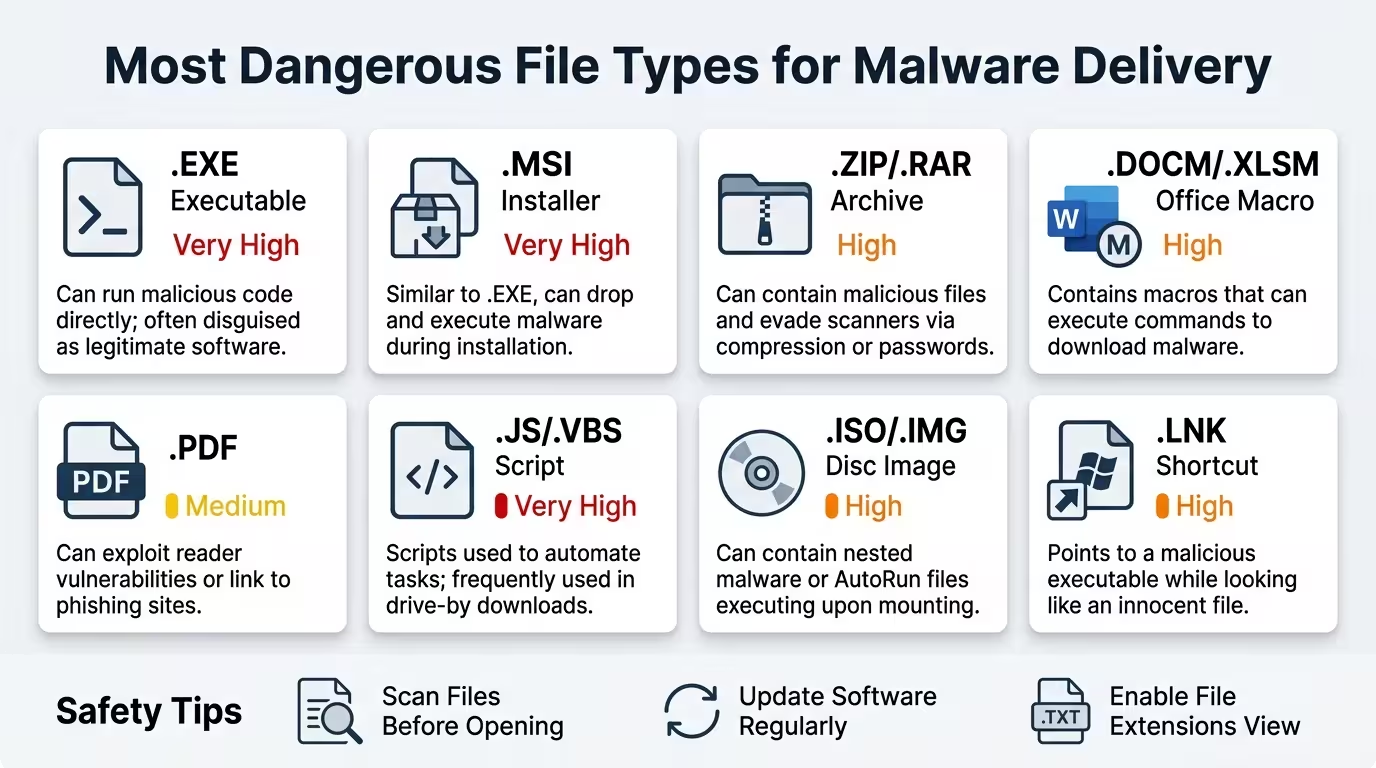
Not all files carry equal risk. Understanding which formats are most commonly weaponised helps you prioritise what to scan.
- Executable files (.exe, .bat, .msi, .dll) remain the most direct vehicle for malware delivery. When executed, they run code directly on your system with whatever privileges you or your OS grants them.
- Archive files (.zip, .rar, .7z, .tar.gz) are frequently used to package and deliver malicious payloads. The compression wrapping can sometimes obscure the content from basic scanners. A ZIP file containing a malicious executable is a classic phishing technique.
- PDF documents are deceptively dangerous. They can contain embedded JavaScript, hidden URLs, launch commands, and macro-like actions that exploit vulnerabilities in PDF readers. According to Palo Alto Networks’ Unit 42, PDFs are consistently among the top file types used in phishing campaigns.
- Office documents (.docx, .xlsx, .pptx) can carry malicious macros. When a victim opens the file and enables macros, the embedded script executes on their system, often downloading further payloads from the internet.
- ISO and image files (.iso, .img) have become increasingly popular malware delivery methods because older operating systems mounted them without security warnings, and some antivirus tools do not inspect their contents fully.
The 11 Best Online Virus Scanners for Files
1. VirusTotal
Website: virustotal.com Best for: Comprehensive multi-engine scanning and community threat intelligence
VirusTotal is the industry benchmark for online file scanning, and for good reason. Owned by Google via its Chronicle Security division, VirusTotal aggregates results from over 70 antivirus engines, including Kaspersky, Bitdefender, Avast, Sophos, McAfee, and Symantec, into a single unified report. When you upload a file, every participating engine scans it independently and reports its verdict. The result is a threat consensus backed by more analytical breadth than any single antivirus tool can provide.
Beyond the multi-engine scan, VirusTotal offers URL and domain scanning, file hash lookup (MD5, SHA-1, SHA-256), IP address reputation checks, and community-contributed notes from cybersecurity researchers. The behavioural analysis tab, powered by the Cuckoo sandbox, provides dynamic insights into what a suspicious file actually does when executed.
Supported file types: All major types, including EXE, PDF, ZIP, DOC, ISO, APK, and more.
File size limit: Up to 650 MB via the web interface.
Pros:
- 70+ antivirus engines in a single scan
- URL, domain, and IP reputation scanning alongside file analysis
- Cuckoo sandbox integration for dynamic behavioural analysis
- File hash lookup for instant results without uploading
- Detailed community notes from global security researchers
- Completely free for personal use
- No account required for basic scans
- API access available for developers and security teams
Cons:
- All uploaded files are shared with antivirus vendors and the security community. Sensitive documents should never be uploaded here.
- Does not remove or quarantine threats. It reports only.
- Results can include false positives, especially for niche or custom software
- Free API tier is rate-limited to 4 requests per minute
- A minority of sophisticated, newly created malware may still evade detection across all engines
- The sheer volume of data in the results can be overwhelming for non-technical users
Verdict: VirusTotal is the go-to first stop for any suspicious file. Its breadth of coverage and free access make it irreplaceable in any digital security workflow. Treat it as a threat intelligence tool, not a disinfection service.
2. MetaDefender Cloud (OPSWAT)
Website: metadefender.com Best for: Enterprise-grade analysis with file sanitisation capability
MetaDefender Cloud by OPSWAT occupies a tier above most free scanners because it combines detection with remediation. It operates under a philosophy that no file should be trusted by default, so it does not just scan your file and report findings. It also offers to reconstruct a sanitised version of the document with all potentially malicious content stripped out, using its proprietary Deep Content Disarm and Reconstruction (Deep CDR) technology.
MetaDefender uses over 20 antivirus engines, including Bitdefender, McAfee, and Avira and claims detection rates above 99%. Its adaptive sandbox detonates files in a controlled virtual environment and records behaviour. The platform also supports scanning of URLs, IP addresses, and file hashes. Importantly, files processed in basic mode are stored temporarily and deleted immediately after analysis, addressing some privacy concerns.
Supported file types: 200+ file types, including all Office formats, PDFs, archives, executables, and images.
File size limit: 140 MB on the free community tier.
Pros:
- Deep CDR technology reconstructs clean, safe versions of scanned files
- 20+ AV engines with 99%+ claimed detection rates
- Adaptive sandbox for behavioural analysis
- Proactive data loss prevention (DLP) scanning
- Vulnerability assessment capability
- Supports scanning of URLs, IPs, and hashes
- No account required for basic scanning
- Trusted by military, defence, and critical infrastructure organisations
Cons:
- Fewer antivirus engines than VirusTotal (20+ vs 70+)
- 140 MB free file size cap is more restrictive than VirusTotal
- Advanced features and higher scan volumes require a paid subscription
- The interface is more complex than simpler tools; beginners may find it intimidating
- CDR-reconstructed files may occasionally lose minor formatting nuances
Verdict: MetaDefender Cloud is the strongest free option for anyone who needs more than a detection report. The ability to download a sanitised version of a potentially compromised file is a genuinely useful capability that most competitors do not offer.
3. Internxt Virus Scanner
Website: internxt.com/virus-scanner Best for: Quick, privacy-conscious scanning with zero friction
Internxt, best known as a privacy-focused cloud storage alternative, offers a standalone online virus scanner that is refreshingly simple to use. There is no registration, no sign-up, and no software to install. You drag and drop a file into the browser interface, and the scanner checks it for viruses, malware, and other threats automatically.
Internxt’s scanner is purpose-built for everyday users who want an instant second opinion on a file without the complexity of multi-engine reports or behavioural analysis dashboards. It handles all major file types, including PDFs, images, documents, archives, and more. The tool is particularly well-suited for checking attachments received via email or files downloaded from unfamiliar sources.
Supported file types: All common types, including PDF, ZIP, images, and Office documents.
File size limit: Not publicly specified; suitable for typical document and attachment sizes.
Pros:
- Zero registration required
- Extremely simple drag-and-drop interface
- Privacy-first design consistent with Internxt’s brand ethos
- Works in any browser on desktop and mobile
- Ideal for non-technical users
- Fast results for common file types
- Part of a broader suite of free privacy tools from Internxt
Cons:
- Does not specify the number of AV engines used, reducing transparency
- No URL or hash scanning capability
- No sandbox or behavioural analysis
- No detailed threat report; results are pass/fail rather than engine-by-engine breakdowns
- File size limits are unclear, which may cause issues with larger archives.
Verdict: Internxt Virus Scanner wins on simplicity and privacy branding. It is the ideal tool for a quick, no-fuss check on a suspicious attachment. For deeper threat intelligence, you will need to complement it with VirusTotal or MetaDefender.
4. Hybrid Analysis
Website: hybrid-analysis.com Best for: In-depth behavioural analysis and zero-day threat detection
Hybrid Analysis is powered by CrowdStrike’s Falcon Sandbox, one of the most respected names in enterprise cybersecurity. Unlike scanners that focus primarily on signature detection, Hybrid Analysis combines static machine learning analysis, multi-engine antivirus reputation checks, and dynamic sandboxing to produce forensic-level reports on file behaviour. The tool was originally designed for cybersecurity researchers and analysts, but its drag-and-drop interface makes it accessible to any technically literate user.
When you submit a file, Hybrid Analysis detonates it in a Windows or Linux sandbox, captures every system event the file triggers, including file system writes, registry modifications, network connections, and process spawning, and produces a detailed behavioural report. This level of depth is exceptional for detecting advanced persistent threats (APTs), polymorphic malware, and zero-day exploits that evade signature-based tools entirely.
Supported file types: EXE, PDF, DOC, ZIP, JAR, APK, PowerShell scripts, and most common formats.
File size limit: Up to 100 MB.
Pros:
- CrowdStrike Falcon Sandbox provides enterprise-grade behavioural analysis
- Detects zero-day threats that signature-based tools miss
- Detailed forensic report including network activity, file writes, and process behaviour
- Free to use; email address is optional for receiving results
- Cross-platform: works on desktop, tablet, and mobile browsers
- Publicly accessible database of previously submitted samples
- Yara rule generation for analysts integrating findings into detection pipelines
Cons:
- Analysis can take several minutes for complex files
- The level of technical detail in the results is not beginner-friendly
- No CDR or file sanitisation capability
- Free tier limits private submissions; all scans are public by default
- 100 MB file size cap is more restrictive than VirusTotal
Verdict: Hybrid Analysis is the strongest free option for detecting sophisticated, evasive threats. If you suspect a file contains an advanced payload, this is where you bring it.
5. Jotti’s Malware Scan
Website: virusscan.jotti.org Best for: Fast, no-nonsense multi-engine scanning with privacy-aware terms
Jotti’s Malware Scan is one of the oldest and most dependable free multi-engine scanners on the internet. It currently uses 14 antivirus engines, including Avast, Bitdefender, and Kaspersky. The interface is minimal by design: upload a file, get a clean list of results, done. There are no dashboards to navigate, no account prompts, no upsells.
What makes Jotti trustworthy beyond its simplicity is its transparent privacy policy. It explicitly states that scanned files are not shared outside the cybersecurity industry and recommends against uploading files containing personal data. You can submit up to 5 files simultaneously, with a 250 MB limit per file, which is generous enough for most use cases.
Supported file types: All file types; Jotti scans the uploaded binary regardless of extension.
File size limit: 250 MB per file; up to 5 files at once.
Cons:
- Only 14 AV engines compared to VirusTotal’s 70+
- No URL scanning, sandbox analysis, or behavioural reporting
- The results page shows only a pass/fail per engine, with no additional threat detail
- No sanitised file download
- The service shares files with antivirus companies for research purposes
Pros:
- Interface available in 10 languages, making it accessible globally
- 250 MB per file is one of the most generous free limits available
- Accepts multiple files at once
- No account required
- Extremely fast results
- Completely free with no premium tiers or feature paywalls
Verdict: Jotti is the best choice when you need a fast, lightweight multi-engine check and value simplicity over depth. It is an excellent complement to VirusTotal for a second opinion.
6. ANY.RUN
Website: any.run Best for: Interactive sandbox analysis and incident response
ANY.RUN takes online malware analysis in an entirely different direction. Rather than running a file through a static analysis pipeline and returning a report, ANY.RUN lets you interact with the sandbox environment in real time. You can watch the file execute, click through its interface, observe network requests as they happen, and trigger different behavioural branches that a purely automated sandbox might miss.
This interactive approach makes ANY.RUN is particularly powerful for analysing complex malware families, phishing documents that require user interaction to trigger, and multi-stage payloads that only deploy their malicious components after certain conditions are met. The platform covers both Windows and Linux environments and includes threat intelligence products (TI Lookup, Yara Search, and IOC Feeds) that integrate with security operations workflows.
Supported file types: EXE, PDF, DOC, ZIP, JAR, APK, scripts, and more.
File size limit: 100 MB on the free tier.
Pros:
- An interactive sandbox lets you observe and trigger malware behaviour in real time.
- Covers both Windows and Linux execution environments
- Detailed IOC extraction for incident response integration
- Threat intelligence feeds and Yara Search for advanced users
- MITRE ATT&CK mapping in paid tiers
Cons:
- The free tier makes all sandbox sessions public; confidential files should not be submitted.
- More complex to use than signature-based scanners; it has a learning curve
- Detailed analysis takes longer than a basic scan
- Premium subscription required for private sessions and advanced features
- Not ideal for casual, one-off file checks
Verdict: ANY.RUN is the specialist’s choice for active malware investigation. If you’re in IT security, incident response, or digital forensics, it is a genuinely powerful free tool. For everyday file scanning, it is significantly more complex than necessary.
7. NordVPN File Checker
Website: nordvpn.com/file-checker Best for: Privacy-conscious users who don’t want to upload file contents
NordVPN’s File Checker takes a fundamentally different approach to online virus scanning that prioritises privacy above all else. Rather than uploading your file to a remote server, the tool generates a cryptographic hash of your file locally in your browser, and only that hash, not the file content itself, is transmitted to NordVPN’s servers for lookup against its real-time malware signature database.
This means your file never leaves your device. For anyone handling sensitive client documents, legal files, health records, or proprietary business data, this approach eliminates the primary privacy risk associated with cloud-based file scanning. NordVPN backs this system with over 10 years of cybersecurity expertise, AI and machine-learning-enhanced threat detection, and a continuously updated database of malware signatures.
Supported file types: All file types are supported for hash-based scanning.
File size limit: One file at a time; no specified size restriction on the hash itself.
Pros:
- File contents never leave your device; only a hash is transmitted
- Strongest privacy posture of any tool on this list
- Works on mobile, tablet, and desktop browsers
- No account required
- Built and maintained by a globally recognised cybersecurity brand
- Fast results based on hash lookup
Cons:
- Hash-based detection only identifies known malware. Brand-new or never-before-seen threats will not be detected.
- Only one file can be scanned at a time
- No sandbox or behavioural analysis
- No URL scanning
- Privacy benefit disappears if the hash matches a known threat and further investigation requires uploading the actual file.
Verdict: NordVPN File Checker is the correct tool when privacy is your primary concern. It is not the most powerful detection system on this list, but it is the one you can use confidently on sensitive documents without worrying about your data ending up in a third-party database.
8. Kaspersky Threat Intelligence Portal (VirusDesk)
Website: opentip.kaspersky.com Best for: Single-engine precision scanning using Kaspersky’s full AV database
Kaspersky VirusDesk, now integrated into the broader Kaspersky Threat Intelligence Portal, gives you direct access to the same antivirus engine and signature database that powers Kaspersky’s paid security products. This is a different proposition from multi-engine tools. Rather than aggregating dozens of opinions, it gives you a single, deeply calibrated verdict from one of the world’s most respected antivirus vendors.
The tool scans files against Kaspersky Security Network (KSN) databases and notifies you of any known threats detected, including the specific threat name and category. A particularly useful feature is the “disagree with scan” option, which allows software developers and webmasters to flag results they believe are false positives, triggering further manual review by Kaspersky analysts. URL and link reputation checking is also supported, returning a clear, clean, poor, or unknown reputation status.
Supported file types: All major types; archives can be submitted password-protected using “virus” or “infected” as the password.
File size limit: 50 MB.
Pros:
- Uses the same engine and database as Kaspersky paid products
- URL and link reputation checking alongside file scanning
- “Disagree with scan” feature for developers challenging false positives
- Clean, straightforward interface
- No account required
- Part of a broader Threat Intelligence Portal with IP and domain lookup
Cons:
- 50 MB file size limit is the most restrictive on this list
- A single-engine approach means a lower aggregate detection probability compared to multi-engine tools
- Cannot disinfect or quarantine files
- Normal ZIP files cannot be scanned; only password-protected archives with “virus” or “infected” as the password.
- Kaspersky’s Russian origin remains a point of political controversy in some regions and regulatory environments.
Verdict: Kaspersky VirusDesk is the right tool when you want a single, authoritative verdict from one of the top-ranked antivirus engines in the world. Pair it with VirusTotal for maximum coverage.
9. VirSCAN.org
Website: virscan.org Best for: Multi-engine scanning with a broad international engine roster
VirSCAN.org has been a reliable free multi-engine scanner for well over a decade. It runs uploaded files through a comprehensive roster of antivirus engines, including AhnLab, ESET NOD32, Kaspersky, Sophos, Symantec, F-Secure, Bitdefender, Comodo, Avast, Dr.Web, and many others, providing results across more than 45 engines. The engine list skews international, with notable representation from Chinese and Asian AV vendors, which can be a distinct advantage when analysing threats that originate from or target those regions.
The service is transparent about its limitations: it explicitly states that it bears no responsibility for scan results and that false positives are possible. The maximum file size is 100 MB. While the interface is less polished than newer competitors, the breadth of its engine roster makes it genuinely useful for a comprehensive second opinion.
Supported file types: Files containing viruses, trojans, backdoors, spyware, and dialers.
File size limit: 100 MB.
Pros:
- 45+ antivirus engines covering a diverse international vendor base
- Strong coverage of Asian AV vendors, useful for threats from those regions
- Free with no registration
- Has been operating reliably for many years
- Results available quickly
Cons:
- The interface is dated and less user-friendly than modern alternatives
- No URL, hash, or IP scanning
- No sandbox or behavioural analysis
- No file sanitisation or CDR capability
- Transparency around data retention and file-sharing policies is limited
Verdict: VirSCAN.org earns its place on this list through sheer engine coverage and longevity. Use it as a third-opinion tool alongside VirusTotal and MetaDefender for the most comprehensive coverage possible.
10. FileScan.io
Website: filescan.io Best for: Indicator of Compromise (IOC) extraction and next-generation threat analysis
FileScan.io represents the newer generation of online malware analysis platforms, developed by security research firm FileScan GmbH. Its primary differentiator is a strong focus on automated IOC extraction, producing structured, machine-readable threat intelligence output that security teams can feed directly into SIEM tools, threat hunting workflows, and detection pipelines.
The platform performs rapid static and dynamic analysis and generates detailed reports identifying network IOCs (URLs, domains, IP addresses contacted), host-based IOCs (files written, registry keys modified, processes spawned), and behavioural signatures. For individual users, the drag-and-drop upload interface is easy enough, but FileScan.io really shines in professional security operations and incident response contexts where structured threat data is more useful than a simple clean/infected verdict.
Supported file types: EXE, DLL, PDF, Office documents, archives, scripts, and most common types.
File size limit: 40 MB on the free public tier.
Pros:
- Structured IOC extraction ideal for threat hunters and SOC analysts
- Machine-readable output integrates with security tools and workflows
- Next-generation analysis combining static and dynamic techniques
- Free public tier available with no registration
- Continuously evolving platform with active development
Cons:
- 40 MB free-tier file size limit is among the most restrictive on this list
- Primarily designed for security professionals, the output may be overwhelming for casual users
- All scans on the free tier are public
- Smaller community and threat database compared to VirusTotal
- Requires security knowledge to interpret results fully
Verdict: FileScan.io is a specialist tool for security professionals who need structured threat intelligence output from their file scans. For everyday users checking an email attachment, the output is more information than needed. For a security team investigating an incident, it is exceptionally valuable.
11. Gridinsoft Online Virus Scanner
Website: gridinsoft.com/online-virus-scanner Best for: Quick scan combined with a clear path to full malware removal
Gridinsoft’s online virus scanner combines a free web-based scan with a seamless integration path to full malware removal via its Gridinsoft Anti-Malware desktop product. The online tool analyses suspicious files for malware and threats, shares flagged samples with its research team for ongoing database improvement, and makes the results freely accessible in a public report format.
The platform supports ZIP archive submissions using “infected” as the extraction password, which is a standard convention across security analysis tools. For users who discover a threat and want to go beyond detection to actual removal, Gridinsoft’s premium product integrates directly from the online scan results, making the upgrade path unusually smooth compared to competitors.
Supported file types: Common types including executables, archives, and documents.
File size limit: Not explicitly stated; typical document and archive sizes are supported.
Pros:
- Free online scan with clear results
- Smooth integration with Gridinsoft Anti-Malware for removal
- Actively contributes to community threat research
- Public scan reports accessible without registration
- Clean, modern interface
Cons:
- A single-engine approach has a lower aggregate detection probability
- An online scanner is partly a lead-generation tool for the paid desktop product
- No URL or hash scanning
- No sandbox or behavioural analysis
- Less established reputation compared to VirusTotal or Kaspersky
Verdict: Gridinsoft’s online scanner is a solid entry point for users who discover a threat and want a single integrated workflow from detection through to removal. For pure scanning breadth, multi-engine tools remain superior.
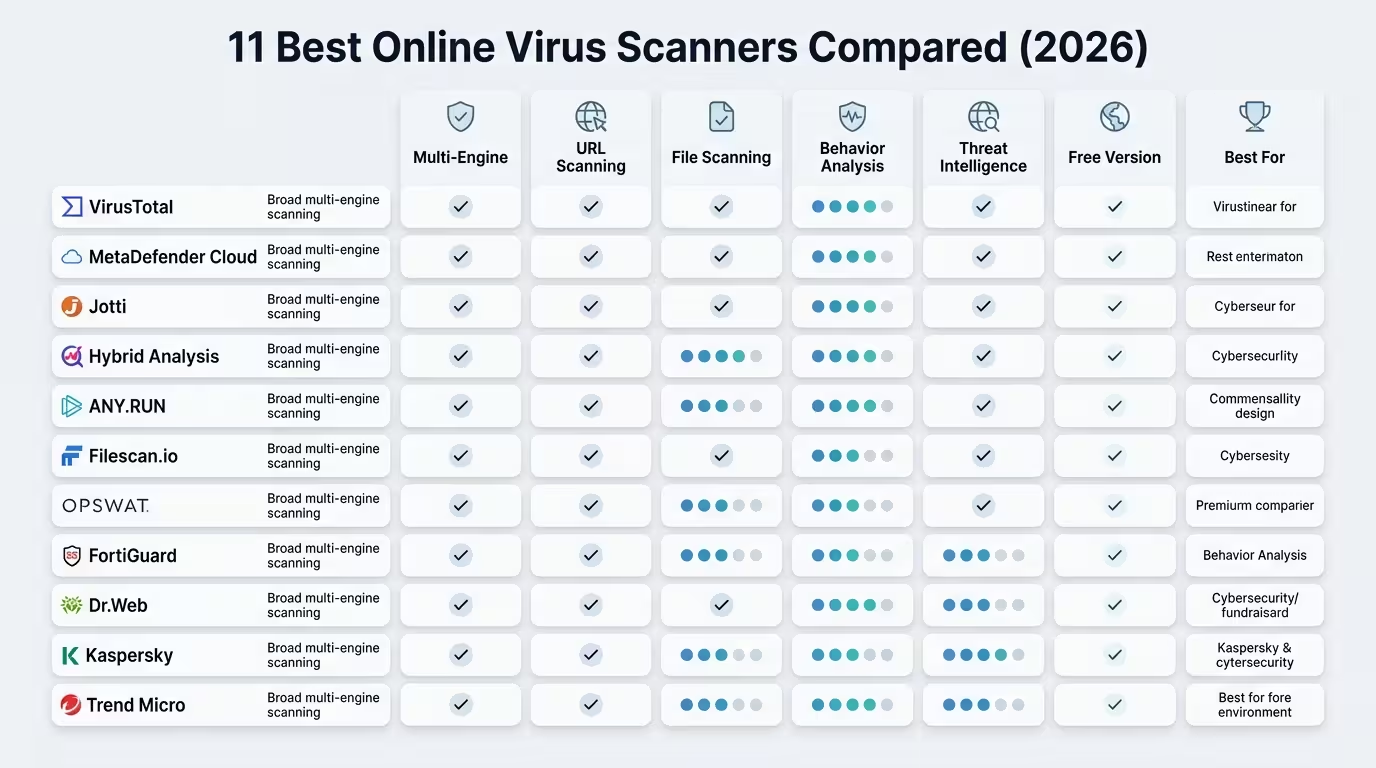
Comparison Table: Features at a Glance
| Tool | Engines | File Size Limit | Sandbox | CDR/Sanitise | URL Scan | Privacy Mode | Free |
|---|---|---|---|---|---|---|---|
| VirusTotal | 70+ | 650 MB | ✅ Cuckoo | ❌ | ✅ | ❌ | ✅ |
| MetaDefender Cloud | 20+ | 140 MB | ✅ Adaptive | ✅ Deep CDR | ✅ | Partial | ✅ |
| Internxt Scanner | Undisclosed | Not stated | ❌ | ❌ | ❌ | ✅ | ✅ |
| Hybrid Analysis | Multi + Falcon | 100 MB | ✅ Falcon | ❌ | ❌ | ❌ | ✅ |
| Jotti’s Malware Scan | 14 | 250 MB | ❌ | ❌ | ❌ | Partial | ✅ |
| ANY.RUN | Multi | 100 MB | ✅ Interactive | ❌ | ✅ | Paid only | Freemium |
| NordVPN File Checker | Hash-based | No limit | ❌ | ❌ | ❌ | ✅ Hash only | ✅ |
| Kaspersky VirusDesk | 1 (Kaspersky) | 50 MB | ❌ | ❌ | ✅ | ❌ | ✅ |
| VirSCAN.org | 45+ | 100 MB | ❌ | ❌ | ❌ | ❌ | ✅ |
| FileScan.io | Multi | 40 MB | ✅ | ❌ | ✅ | Paid only | Freemium |
| Gridinsoft | 1 | Not stated | ❌ | ❌ | ❌ | ❌ | ✅ |
How to Choose the Right Scanner for Your Needs
With 11 tools on this list, the choice can feel overwhelming. It doesn’t need to be. Here’s a practical decision framework.
You received a suspicious email attachment or downloaded a file from an unfamiliar source. Start with VirusTotal. It gives you the broadest multi-engine consensus in the shortest time, and no account is required.
You need to scan a sensitive business document such as a client contract, medical record, or legal file. Use NordVPN File Checker. The hash-only approach means your file’s content never leaves your device.
You want to scan a file and download a clean version of it. MetaDefender Cloud is your only option on this list. Its Deep CDR feature reconstructs the file without potentially malicious components.
You suspect a sophisticated, targeted threat or zero-day malware. Hybrid Analysis or ANY.RUN will give you the behavioural depth that signature-based tools miss. ANY.RUN is better if you want to interact with the malware in real time.
You need structured IOC data for a security investigation. FileScan.io is purpose-built for this. It outputs clean, machine-readable threat intelligence.
You want a fast, simple second opinion with no complexity. Jotti’s Malware Scan is the fastest, most straightforward tool on the list.
You specifically want Kaspersky’s engine verdict. Use the Kaspersky Threat Intelligence Portal directly.
The most effective approach for high-value files is to run at least two tools: a multi-engine scanner like VirusTotal, plus a behavioural sandbox like Hybrid Analysis. The combination of broad signature coverage and dynamic analysis creates a substantially higher detection probability than either approach alone.
Limitations of Online Virus Scanners
Online scanners are powerful, but they carry inherent limitations that every user should understand before treating a clean scan as a guarantee of safety.
Detection is never 100%. Even VirusTotal with 70+ engines cannot detect every threat. Brand-new malware, custom-built APT tools, and highly obfuscated payloads can evade all signature-based engines. Behavioural sandboxes improve this significantly, but determined adversaries specifically test their tools against VirusTotal before deployment.
False positives exist. A flagged file is not always infected. Legitimate software, especially lesser-known applications, can be flagged by one or two engines. Interpret results as risk signals, not verdicts. Contextual judgement is always required.
No removal capability. Online scanners detect, not disinfect. If your system is already infected, you need a full endpoint security solution to remove the threat. An online scanner cannot reach into your operating system and quarantine malware.
Privacy trade-offs are real. Most multi-engine scanners share uploaded files with antivirus vendors for research purposes. Do not upload documents containing personal data, financial details, passwords, or confidential business information to tools like VirusTotal or Jotti.
File size limits restrict large archive scanning. ZIP and archive files containing large volumes of content may exceed upload limits. VirusTotal’s recommendation is to extract and scan inner files individually, which provides better results than submitting an oversized bundle anyway.
Online scanners complement, not replace, endpoint protection. A good premium antivirus solution with real-time protection, behaviour monitoring, and automatic removal remains the foundation of any personal or business security strategy. Online scanners are the forensic second opinion, not the primary defence.
Best Practices: Scanning Files Safely Online
Getting the most out of online virus scanners requires more than just uploading a file and reading the result. These practices will sharpen both your security and your privacy.
Always scan before opening. This sounds obvious, but the majority of infections happen because files are opened before they are verified. Build scanning into your workflow as a default habit, especially for email attachments, downloads from unfamiliar domains, and files shared via messaging apps.
Never upload sensitive documents to public scanners. For confidential files, use hash-based tools like NordVPN File Checker or check with MetaDefender’s private scan option. As a rule, assume that anything uploaded to a free public scanner is accessible to the global security research community.
Scan inner files, not just the archive. When you receive a ZIP file, scan the archive first. If it is clean, unzip it and scan the individual contents as well. Some scanners have difficulty fully inspecting nested archives, particularly those with password protection.
Cross-reference results across at least two tools. A single clean result from one scanner should not give you false confidence. A clean result across VirusTotal plus Hybrid Analysis is a meaningfully stronger signal.
Submit the hash first before uploading the file. VirusTotal and several other tools allow hash lookup. If the file has been scanned before, you get an instant result without any upload. This is faster, preserves privacy, and places no load on the scanner.
Treat one or two engine flags with scepticism. On VirusTotal, a file flagged by 2 out of 70 engines is likely a false positive, particularly if those engines are from less well-known vendors. A file flagged by 15+ engines is a serious concern. Context matters.
Keep your actual antivirus solution updated regardless. Online scanners are a supplement, not a substitute. Your endpoint protection, operating system patches, and browser security settings are the real first line of defence.
FAQ
Can online virus scanners detect ransomware in ZIP files? Yes, most multi-engine scanners like VirusTotal and MetaDefender can detect known ransomware payloads inside ZIP archives. Behavioural tools like Hybrid Analysis and ANY.RUN are particularly effective at catching ransomware through its execution behaviour in a sandbox environment, even when the signatures are new or obfuscated.
Is it safe to upload a PDF to VirusTotal? VirusTotal is a safe and reputable platform, but all uploaded files are shared with the security community and contributing antivirus vendors. Do not upload PDFs containing sensitive personal, financial, or confidential information. If your PDF is sensitive, use NordVPN File Checker (hash-only, file never leaves your device) or MetaDefender’s private scan option.
What is the best free online virus scanner for ZIP files? VirusTotal handles ZIP files well and supports files up to 650 MB. Jotti’s Malware Scan is another strong option with a 250 MB per file limit and simultaneous submission of up to 5 files. For deep behavioural analysis of ZIP contents, Hybrid Analysis is the strongest free option.
Can a PDF really contain a virus? Yes. PDFs can carry embedded JavaScript, hidden URLs, launch actions, and exploits targeting vulnerabilities in PDF rendering engines. Malicious PDFs are a consistent component of phishing campaigns. Always scan PDFs received from unknown senders before opening.
Do online scanners slow down my computer? No. Because all processing happens on remote servers, your device’s performance is unaffected. The only demand on your system is the bandwidth required to upload the file.
What does it mean if VirusTotal flags 0 out of 72 engines? It means no participating engine detected known malware signatures in your file. This is a strong indicator of safety but is not a guarantee. Brand-new malware, or malware specifically crafted to evade detection, could still be present. Pair with a behavioural scanner if you have ongoing concerns.
Can I scan a file without uploading it? Yes. Tools like VirusTotal, MetaDefender, and NordVPN File Checker support hash-based lookup (MD5, SHA-1, or SHA-256). You compute the file’s hash locally and submit only the hash. The file’s content is never transmitted. NordVPN File Checker generates the hash directly in your browser, making it the most accessible implementation of this approach.
Are these online scanners safe to use on a mobile phone? Yes. Tools like VirusTotal, MetaDefender, Internxt Scanner, Hybrid Analysis, and NordVPN File Checker are all fully browser-based and work on Android and iOS devices without any app installation required.
What happens to my file after I upload it to an online scanner? This varies by tool. VirusTotal shares files with its antivirus vendor contributors. Jotti shares files within the cybersecurity industry. MetaDefender deletes files immediately after analysis in basic mode. NordVPN File Checker never receives the file at all. Always read the privacy policy of the specific tool you are using before uploading sensitive content.
Is there an online scanner that can both detect and remove malware from a file? MetaDefender Cloud is the closest option. Its Deep CDR technology deconstructs and reconstructs a sanitised version of the file with potentially malicious content removed, and you can download that clean version. No other free online tool on this list offers file disinfection or reconstruction.
Can I scan a URL instead of a file? Yes. VirusTotal, MetaDefender Cloud, Kaspersky Threat Intelligence Portal, FileScan.io, and ANY.RUN all support URL scanning alongside file analysis. Paste a URL, and the tool checks it against blacklists, phishing databases, and, in some cases, performs a live visit to assess the page.
Online virus scanners are one of the most practical and underused security tools available to anyone who works with digital files. They require no installation, no ongoing subscription, and no technical expertise to use at a basic level. In the time it takes to double-click an attachment, you can run it through VirusTotal and know whether 70 of the world’s leading antivirus engines consider it safe.
The 11 tools in this guide serve different needs. VirusTotal is the starting point for most users. MetaDefender Cloud adds the unique ability to sanitise files. Hybrid Analysis and ANY.RUN go deeper for sophisticated threats. NordVPN File Checker leads the list for privacy. Each tool earns its place, and the smartest approach is to use two or three in combination rather than relying on any single scanner as your only safeguard.
The broader point is this: digital hygiene is not optional for anyone operating in a professional capacity online. Whether you are a consultant, an educator, a media creator, or an entrepreneur, the files passing through your inbox and your cloud storage represent real risk. The tools on this list are free, fast, and effective. There is no good reason not to use them.
Scan before you click. Every time.
Found this guide useful? Share it with a colleague who handles sensitive documents, drop a comment below with your own go-to scanner, or explore our related guides on digital security for remote professionals.