




What if you could replace five separate software subscriptions, a Zapier account, a form builder, a social media scheduler, a file manager, and a customer chat widget, all with one trusted suite of WordPress plugins? That is the promise Bit Apps makes, and after digging deep into every product they offer, the evidence says they largely deliver on it.
WordPress powers over 43% of all websites on the internet (W3Techs, 2024), yet most site owners are still stitching together expensive, disconnected tools to run their operations. Bit Apps was built specifically to solve this infrastructure problem, and it has been quietly doing so since 2019, now serving over 2.80 million downloads across more than 150 countries.
This is a complete, honest Bit Apps review. You will get a thorough breakdown of every plugin in their product suite, real user feedback, pricing analysis, and a clear answer to the question that matters most: Is Bit Apps the right automation toolkit for your WordPress site?
Whether you are an educator, consultant, content creator, or small-business owner running on WordPress, this guide gives you everything you need to make a decision.
Table of Contents
Disclosure: Our content is engineered to help you make informed, data-driven, and smart decisions. Digital Solutions Edge is reader-supported; when you engage with our recommendations or click certain links, we may receive a commission. This support allows us to continue delivering the digital solutions you rely on. Thank you for being part of our community.
What Is Bit Apps?
Bit Apps is a Bangladesh-based WordPress plugin company founded in 2019 by Abdul Kaioum Fayshal (CEO and Founder) alongside CTO Anisur Rahman. The company started with a single product, Bit Form, and has since grown into a comprehensive plugin ecosystem that currently serves over 67,000 active users across 150+ countries, with a 4.8-star rating on WordPress.org.
The founding philosophy was straightforward: build affordable, well-coded, user-friendly WordPress plugins that solve the real, recurring problems creators and businesses face every day. That philosophy has held. Today, Bit Apps ships seven active products and operates with a team of 45+ professionals spanning engineering, design, support, and content.
What sets Bit Apps apart is not just the breadth of its product catalogue but the deliberate decision to ensure every plugin works together. Bit Form connects to Bit Integrations. Bit Integrations connects to Bit Flows. Bit Flows connects to your CRM, your email platform, your payment processor, and 250+ other tools. It is an interconnected system, not a collection of isolated plugins.
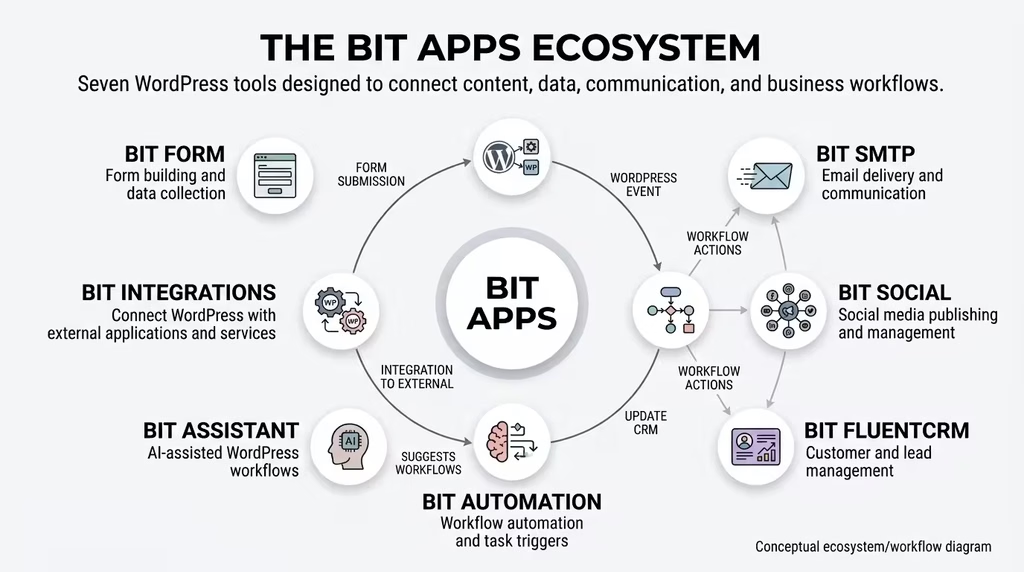
A Brief Timeline
- 2019–2020: Bit Form launches as a drag-and-drop form builder
- 2021: Bit SMTP was released for email authentication
- 2022: Bit Integrations, Bit Assist, and Bit File Manager join the suite
- 2024: Bit Social enters as a full social media management tool
- 2025: Bit Flows launches with AI-powered automation, quickly growing to 257+ integrations
This is a company on an upward trajectory, and the 2025 annual review numbers confirm it: 2.80 million+ total downloads, 135+ product updates in one year, and 12,000+ GitHub commits are meaningful indicators of a development team that is genuinely invested in its product.
The Bit Apps Product Suite at a Glance
| Plugin | Primary Function | Active Installs | Rating | Best For |
| Bit Form | Form builder | 10,000+ | 4.8/5 | Lead capture, payments, surveys |
| Bit Integrations | App connections | 20,000+ | 4.8/5 | CRM/email automation |
| Bit Assist | Customer chat widget | 10,000+ | 4.9/5 | Multi-channel communication |
| Bit Flows | No-code automation | 1,000+ businesses | 4.9/5 | Complex workflow automation |
| Bit Social | Social media scheduler | 5,000+ | 4.8/5 | Auto-posting and scheduling |
| Bit SMTP | Email delivery | Active | 4.8/5 | WordPress transactional email |
| Bit File Manager | File management | Active | 4.8/5 | Server-side file access |
Every plugin listed below is available individually or as part of the Agency Lifetime Bundle, a one-time payment deal that will be covered fully in the pricing section.
Bit Form Review: The Smartest WordPress Form Builder
What It Does
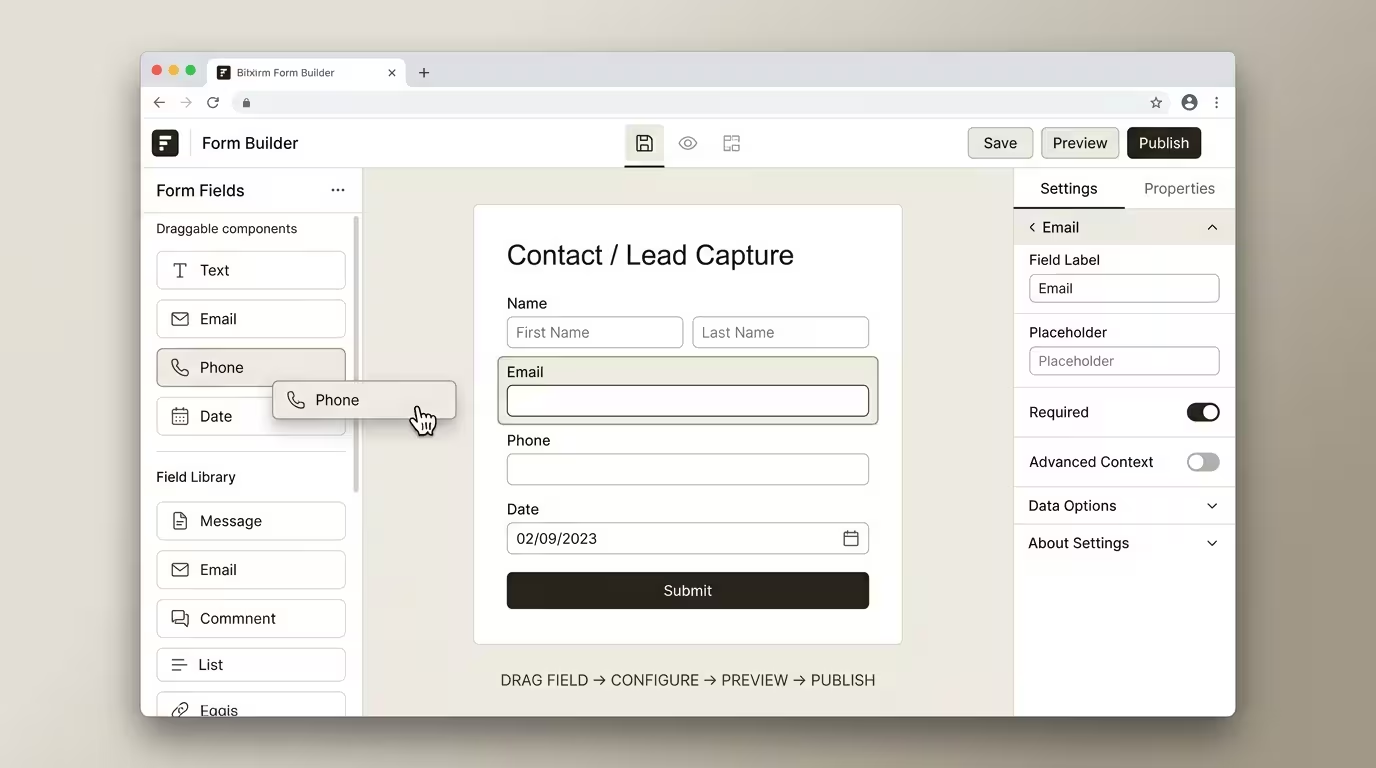
Bit Form is the flagship product of the Bit Apps suite and, arguably, one of the most feature-rich form builders available for WordPress at any price. The free version on WordPress.org alone covers the needs of most small websites. The pro version takes you into territory typically reserved for plugins costing two to three times the price.
The builder uses a true visual drag-and-drop canvas. You choose from 50+ field types: text, date-time, multi-step, file upload, calculations, signature, rating, and more, and then arrange them exactly as needed. Conditional logic controls which fields appear based on user input. Styling is fully customisable without touching code.
Standout Features
Multi-step forms with progress bars. Long forms convert better when broken into digestible steps. Bit Form handles multi-step forms natively, with animated progress indicators.
Calculation fields. This is where Bit Form genuinely separates itself from most form builders. You can create ROI calculators, quote generators, and pricing forms using formula-based logic without any custom development.
50+ native integrations. Bit Form connects directly to popular platforms, including Mailchimp, Zoho CRM, HubSpot, Google Sheets, Stripe, PayPal, and WooCommerce. For anything beyond that list, Bit Integrations picks up the connection.
Advanced conditional logic. Show or hide fields, pages, or entire sections based on user responses. The logic engine is visual and intuitive.
Native embedding for major page builders. Bit Form embeds cleanly into Elementor, Gutenberg, and Bricks, no shortcode gymnastics required.
Bit Form 2025 Performance
In 2025 alone, Bit Form shipped 27 updates backed by 600+ GitHub commits. The team resolved 2,000+ support tickets and maintained zero backlog on the WordPress.org forum. Bit Form 3.0 is scheduled for 2026 and will include a complete dashboard redesign.
Bit Form Pricing
- Free version: Available on WordPress.org
- Pro plans: Starting at $29/year for a single site
- Agency Lifetime: Included in the bundle
Verdict: Bit Form earns its place as a top-tier WordPress form builder. The calculation engine alone justifies the upgrade for consultants, educators, and service businesses.
Without the Price Tag
What It Does
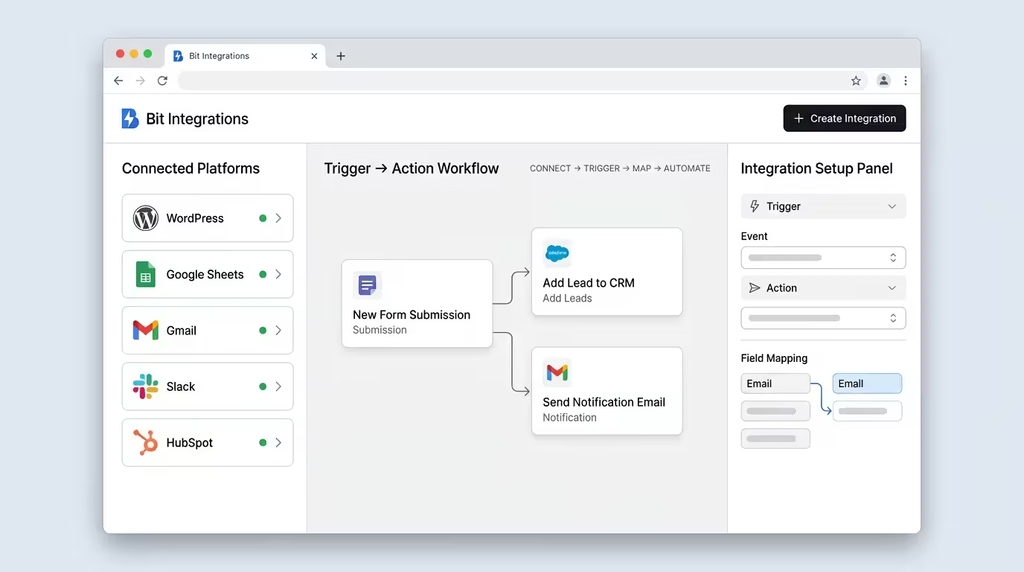
Bit Integrations is a WordPress-native automation plugin that connects your site to 300+ external platforms without requiring code or a third-party automation service. It sits in the same category as Zapier and Make, except the automations run on your own WordPress installation, with no per-task pricing, no usage caps, and no monthly bill that scales with your volume.
The setup follows three steps: choose a trigger (something that happens on your site), map your data, and select an action (something that happens on a connected platform). That is the full workflow.
What Makes It Different from Zapier
Zapier is a cloud-based service. Every automation runs through Zapier’s servers, and pricing increases as your task volume grows. Bit Integrations runs on your WordPress server. Once you have paid for the plugin, the automations run without a per-task cost. For high-volume users, educators with large email lists, coaches with busy intake forms, and agencies processing client requests, this distinction translates to substantial savings.
Standout Features
300+ platform connections. In 2025, the team added 67 new triggers with 322 events and 7 new actions with 37 events, expanding an already impressive library. Supported platforms include Mailchimp, HubSpot, Zoho CRM, ActiveCampaign, Airtable, Notion, Slack, WooCommerce, and dozens more.
No task limits. Unlike Zapier’s tiered task pricing, Bit Integrations charges a one-time or annual fee regardless of how many automations you run.
Real-time data sync. When a form is submitted or an event is triggered, the data moves immediately.
Web hooks and custom API support. For platforms not in the native library, custom webhooks and API connections extend the reach of the plugin to virtually any modern web application.
Bit Integrations 2025 Performance
Bit Integrations surpassed 20,000 active installations in 2025, doubling from 2024. The support team resolved 1,225+ tickets and served 1,185+ live chat users. The 240+ five-star reviews on WordPress.org reflect consistent reliability.
Bit Integrations Pricing
- Free version: Available on WordPress.org
- Pro plans: Starting at $39/year
- Agency Lifetime: Included in the bundle
Verdict: For any WordPress site already spending money on Zapier, Bit Integrations should be evaluated immediately. The value proposition is difficult to argue against.
Bit Assist Review: Multi-Channel Customer Communication in One Button
What It Does
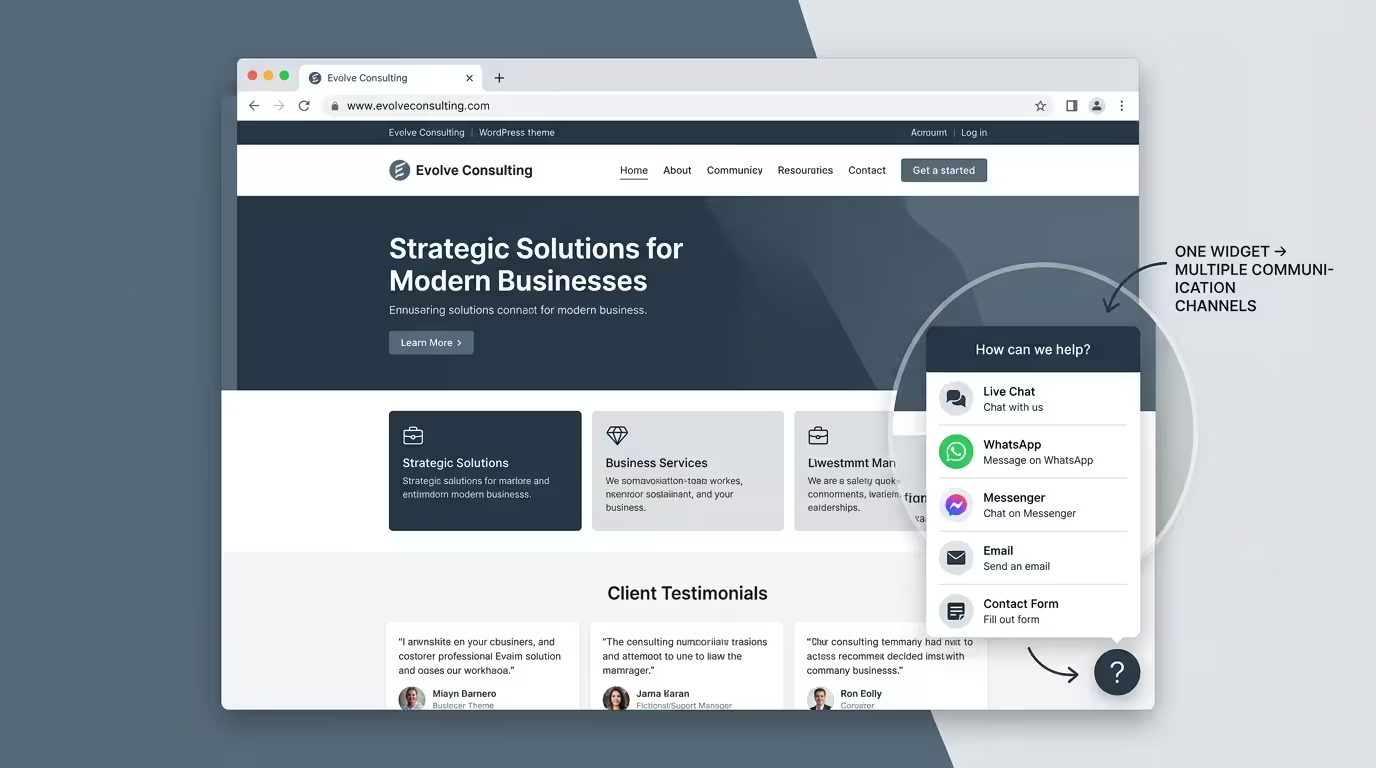
Bit Assist is a lightweight communication widget for WordPress that places a single floating button on your site. When visitors click it, they see a menu of messaging channels: WhatsApp, Messenger, Telegram, Instagram, and 26+ others, and choose the one they prefer to contact you through.
This is a fundamentally smarter way to approach customer communication than a traditional live chat plugin. Instead of forcing visitors into a proprietary chat window that requires you to be online, Bit Assist routes them to the channels where real conversations already happen.
Standout Features
30+ messaging channels. A single button connects visitors to WhatsApp, Facebook Messenger, Telegram, Instagram, Viber, WeChat, and more. Visitors choose their preferred channel.
GDPR-compliant contact form option. For regions where visitors prefer not to use messaging apps, a built-in contact form with optional data storage provides a privacy-conscious alternative.
Business hours configuration. Set availability windows and display different options or messages outside of those hours.
Fully customisable widget. Brand colours, button position, labels, and which channels appear on mobile versus desktop are all configurable.
WooCommerce order lookup. In 2025, the team added a WordPress Search channel and implemented secure login requirements for WooCommerce order status lookups.
Bit Assist Performance
With 10,000+ active installations and a 4.9-star rating from 112 reviews, Bit Assist is the quiet workhorse of the suite. The 2025 focus was stability rather than new features, performance improvements, dark mode fixes, and UI enhancements.
Bit Assist Pricing
- Free version: Available on WordPress.org (covers most use cases)
- Pro plans: Available via bitapps.pro
- Agency Lifetime: Included in the bundle
Verdict: If your business communicates with clients through WhatsApp, Messenger, or any popular messaging app, Bit Assist is a must-have. It is one of the strongest free plugin offerings in this category.
Bit Flows Review: AI-Powered No-Code Workflow Automation
What It Does
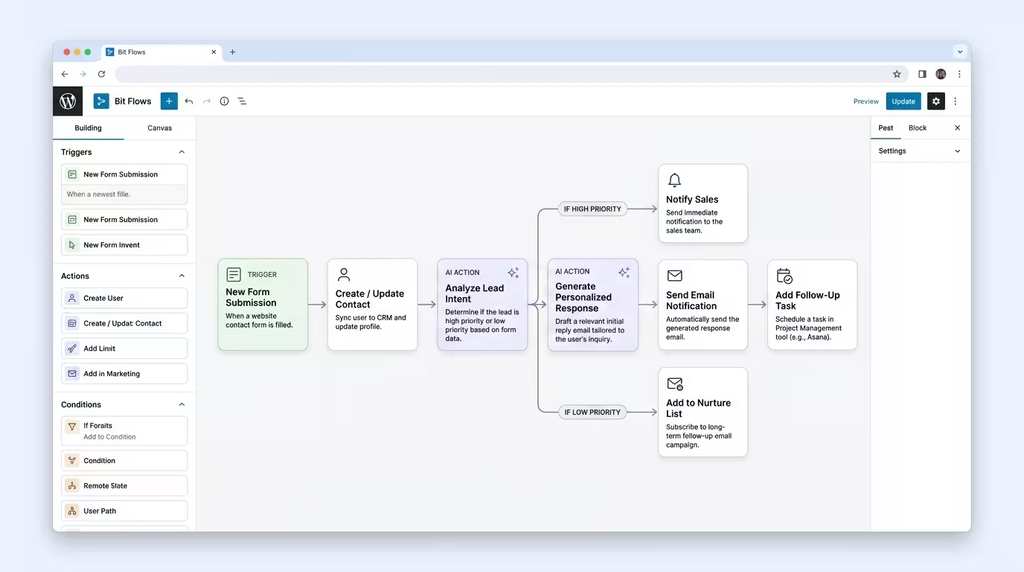
Bit Flows is the newest and arguably most ambitious product in the Bit Apps suite. Launched in January 2025, it is a visual, no-code workflow automation platform with native AI integration. Think of it as a visual canvas where you connect triggers, conditions, data transformers, and actions into a multi-step automation chain without writing a single line of code.
Where Bit Integrations handles one-to-one app connections (Form submitted > Add to Mailchimp), Bit Flows handles complex, multi-step logic (Form submitted > Check data > Parse CSV > Run AI analysis > Update CRM > Send conditional email sequence). It is a different level of automation sophistication.
What Makes Bit Flows Genuinely Exciting
Native AI actions. Bit Flows integrates directly with OpenAI, Google Gemini, Claude, and Perplexity AI within your workflows. You can feed form submission data to an AI model, get a structured output, and route that output to the next step in your workflow, all without leaving WordPress. For educators and content creators, this opens up genuinely powerful applications: auto-generating course summaries, analysing survey responses, personalising email sequences, and more.
257+ integrations. Launched with 149 integrations, the platform grew to 257+ in 11 months, adding 108 new platforms across email, CRM, eCommerce, and social media categories.
Visual canvas builder. The drag-and-drop workflow canvas makes complex automation readable and manageable. You can see exactly what is happening at each step.
CSV and XML parsers, Schedule triggers, Image Helper. These utility tools allow you to work with structured data, run time-based automations, and manipulate media all inside the workflow.
Bit Flows 2025 Performance
In its first year, Bit Flows earned a 4.9-star rating from 63 reviews and shipped 40 releases (3 to 4 updates per month). The development team committed 8,023+ code changes to GitHub at an extraordinary pace for a newly launched product. Over 1,000 businesses worldwide are already running automations on the platform.
Looking ahead to 2026, Bit Apps has announced AI Agents for goal-driven workflows and an MCP Server for scaling high-volume automation capabilities that will push Bit Flows into enterprise-grade automation territory.
Bit Flows Pricing
- Free version: Available on WordPress.org
- Pro plans: Available via bitapps.pro
- Agency Lifetime: Included in the bundle
Verdict: Bit Flows is the most forward-thinking product in the suite. For WordPress users who have outgrown simple one-step integrations and want AI-powered, multi-step workflow automation on their own server, this is a compelling and rapidly maturing solution.
Bit Social Review: WordPress-to-Social Media on Autopilot
What It Does
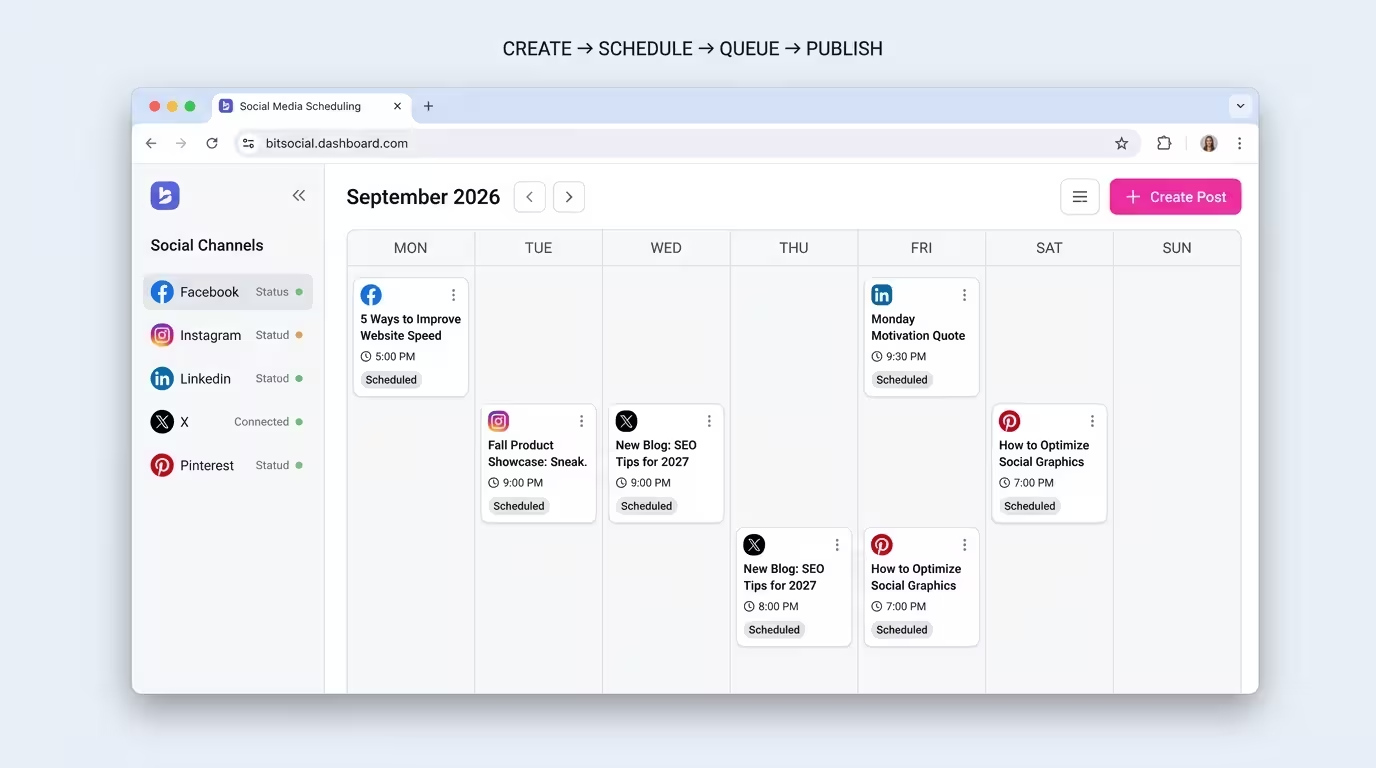
Bit Social is a social media management plugin that connects your WordPress site to 13 social media platforms and automates the process of posting, scheduling, and distributing content. Every time you publish or update a WordPress post, Bit Social can automatically share it across your connected social accounts.
For content creators, bloggers, course sellers, and small business owners who publish regularly, Bit Social eliminates one of the most time-consuming recurring tasks in digital media operations.
Supported Platforms
Facebook, Instagram (including carousel posts), LinkedIn, Twitter (X), Pinterest, TikTok, Bluesky, LINE, Telegram, Threads, YouTube, Google Business Profile, and more. The TikTok, Bluesky, LINE, Telegram, and Threads additions all came in 2025.
Standout Features
WooCommerce smart tags. Automatically populate your social posts with dynamic product data: names, prices, descriptions, and purchase links pulled directly from your WooCommerce catalogue. Auto-generated hashtags are included.
Rescheduling and random posting. Stagger posts across time slots to avoid platform spam filters and ensure consistent presence without manual scheduling.
14 developer action hooks. For technically advanced users, the plugin offers developer-friendly extensibility.
Carousel posts on Instagram. In 2025, Bit Social added support for multi-image carousel posts with captions and first comments on Instagram.
Bit Social 2025 Performance
Bit Social surpassed 5,000+ active installations and earned 92 five-star reviews at a 4.8/5 average. The support team handled 245 email enquiries and assisted 130+ community members. The platform’s 2025 expansion from a basic auto-poster to a sophisticated multi-platform management tool marked a significant maturity step.
Bit Social Pricing
- Free version: Available on WordPress.org
- Pro plans: Available via bitapps.pro
- Agency Lifetime: Included in the bundle
Verdict: For WordPress site owners who publish content regularly and want that content distributed across multiple social channels without manual effort, Bit Social is a practical and affordable solution.
Bit SMTP Review: Reliable Email Authentication for WordPress
What It Does
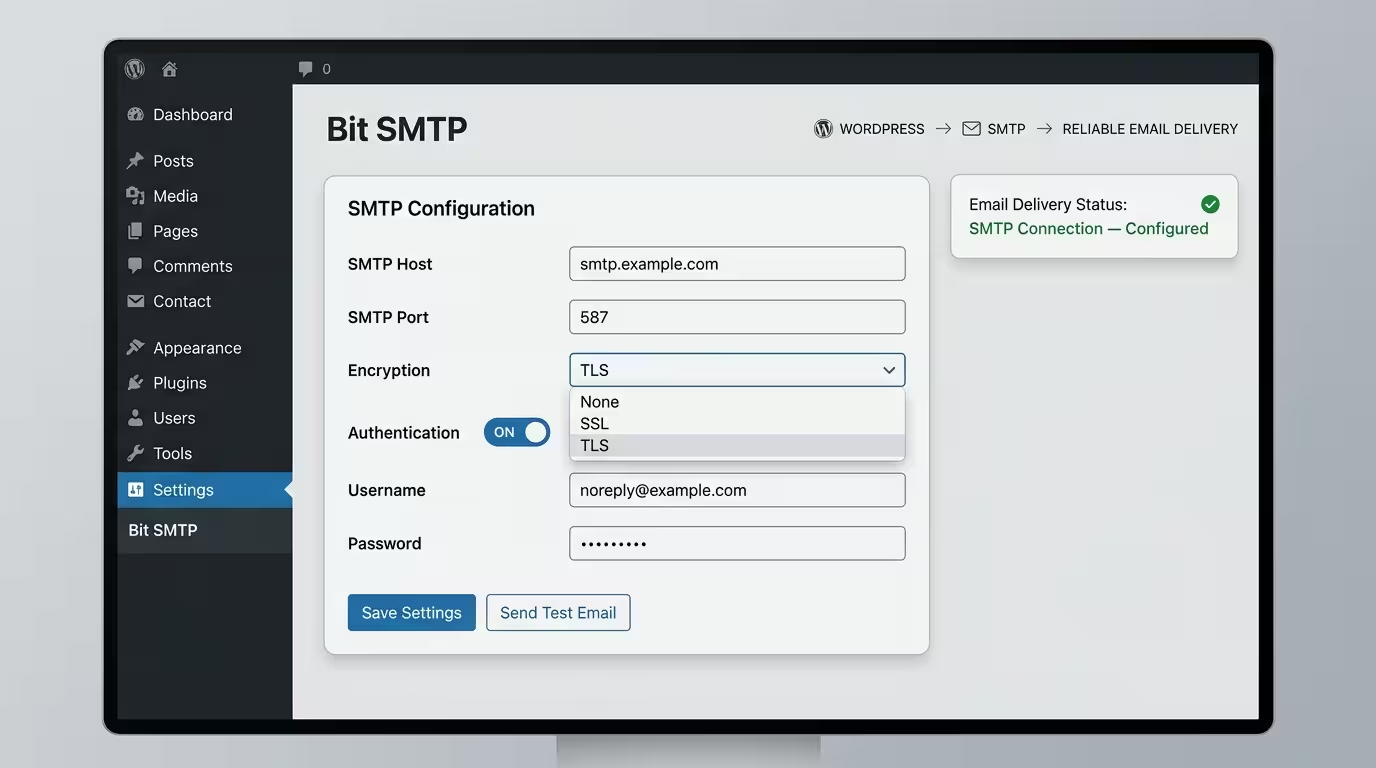
Bit SMTP solves one of the most persistent and underappreciated problems in WordPress: email deliverability. By default, WordPress sends emails using the PHP mail function, which most hosting servers do not authenticate properly. The result is transactional emails, contact form confirmations, password resets, and WooCommerce order receipts landing in spam folders or going undelivered entirely.
Bit SMTP replaces the default mail function with a properly authenticated SMTP connection to your chosen email service. Gmail, Outlook, SendGrid, Mailgun, Amazon SES, and other SMTP providers are all supported.
Why This Matters
Poor email deliverability is a hidden killer for businesses that rely on WordPress forms and eCommerce. If your client’s order confirmation is going to spam, or your lead magnet download link never arrives, you are losing trust and revenue without knowing the cause. Bit SMTP addresses this at the infrastructure level with minimal setup.
The plugin is lightweight, free on WordPress.org, and straightforward to configure. The 2025 review noted consistent praise for reliability and for being a stronger alternative to more widely known SMTP plugins at no additional cost.
Bit SMTP Pricing
- Free version: Available on WordPress.org
- Pro plans: Available via bitapps.pro
Verdict: Every WordPress site that sends transactional email should have an SMTP plugin. Bit SMTP is free, effective, and worth installing today.
Bit File Manager Review: Your WordPress File Cabinet, Simplified
What It Does
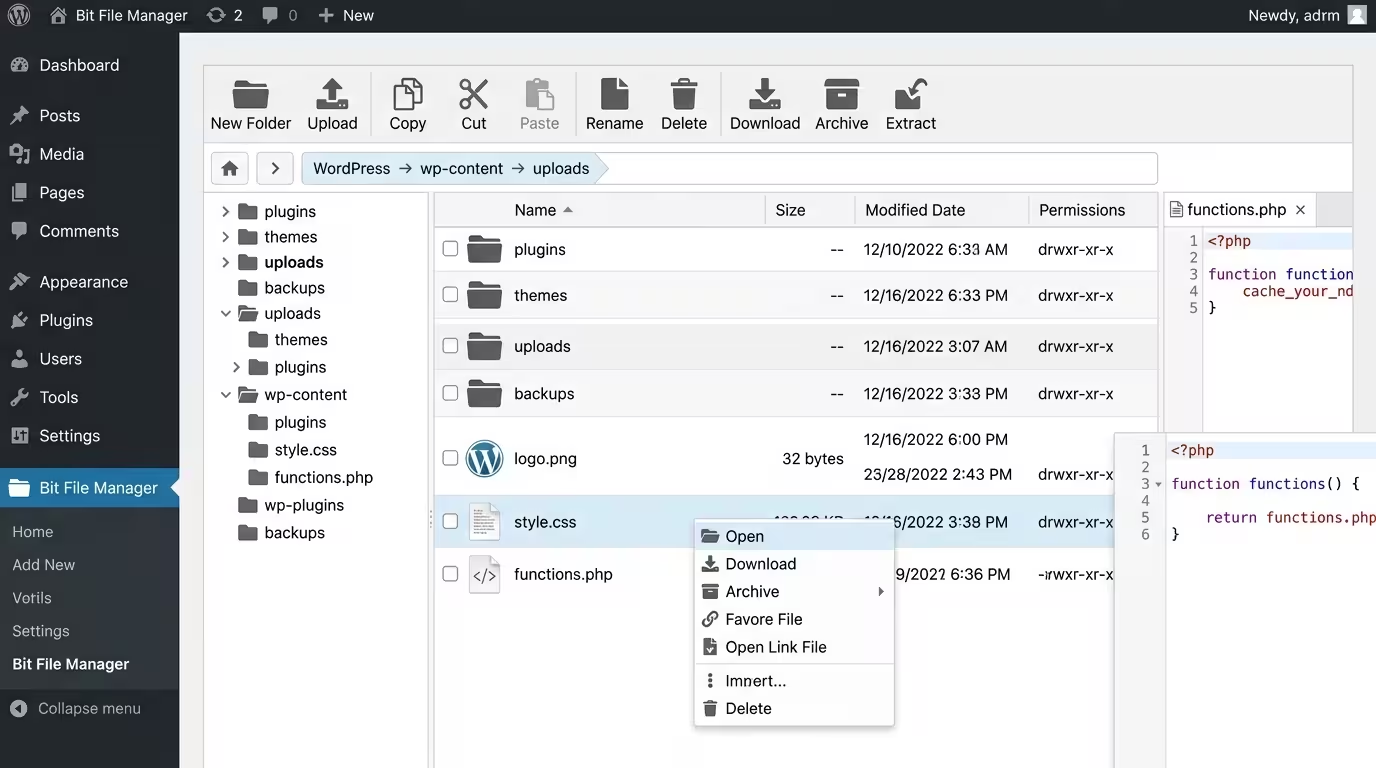
Bit File Manager gives you full access to your WordPress server’s file system from inside the WordPress admin panel, no FTP client, no cPanel file manager, no separate software required. You can upload, download, edit, rename, move, delete, compress, and extract files directly through the WordPress dashboard.
This is a practical tool for developers, site administrators, and technically confident users who need to make quick edits to theme files, upload custom plugins, or manage server-side assets without the friction of external tools.
Standout Features
- Upload, download, and replace files without FTP
- View and edit code files directly in the browser
- Compress and extract ZIP archives
- Change file permissions
- Access files outside the standard WordPress directory structure
- Works independently of the database (non-database-dependent file access)
When You Need It
The use case is clearest when your server is behind a firewall or when managed hosting restricts direct FTP access. Bit File Manager bypasses that friction entirely. It is also the plugin of choice for staging site management and for quick plugin file edits during development.
Bit Apps took ownership of the file manager plugin in 2022, and the consistent update track record since then reflects the same quality standards applied across the rest of the suite.
Bit File Manager Pricing
- Free version: Available on WordPress.org (comprehensive feature set)
- Pro plans: Available via bitapps.pro
Verdict: An indispensable utility for anyone managing WordPress sites at an administrative level. The free version covers the vast majority of use cases.
Bit Apps Pricing: Individual Plans vs Agency Lifetime Bundle
Individual Plugin Pricing
Each plugin is available with a free version on WordPress.org. Pro upgrades are available annually or as a lifetime purchase:
| Plugin | Starting Annual Price |
| Bit Form | From $29/year |
| Bit Integrations | From $39/year |
| Bit Social | Included in suite deals |
| Bit Flows | Included in suite deals |
| Bit Assist | Included in suite deals |
The Agency Lifetime Bundle
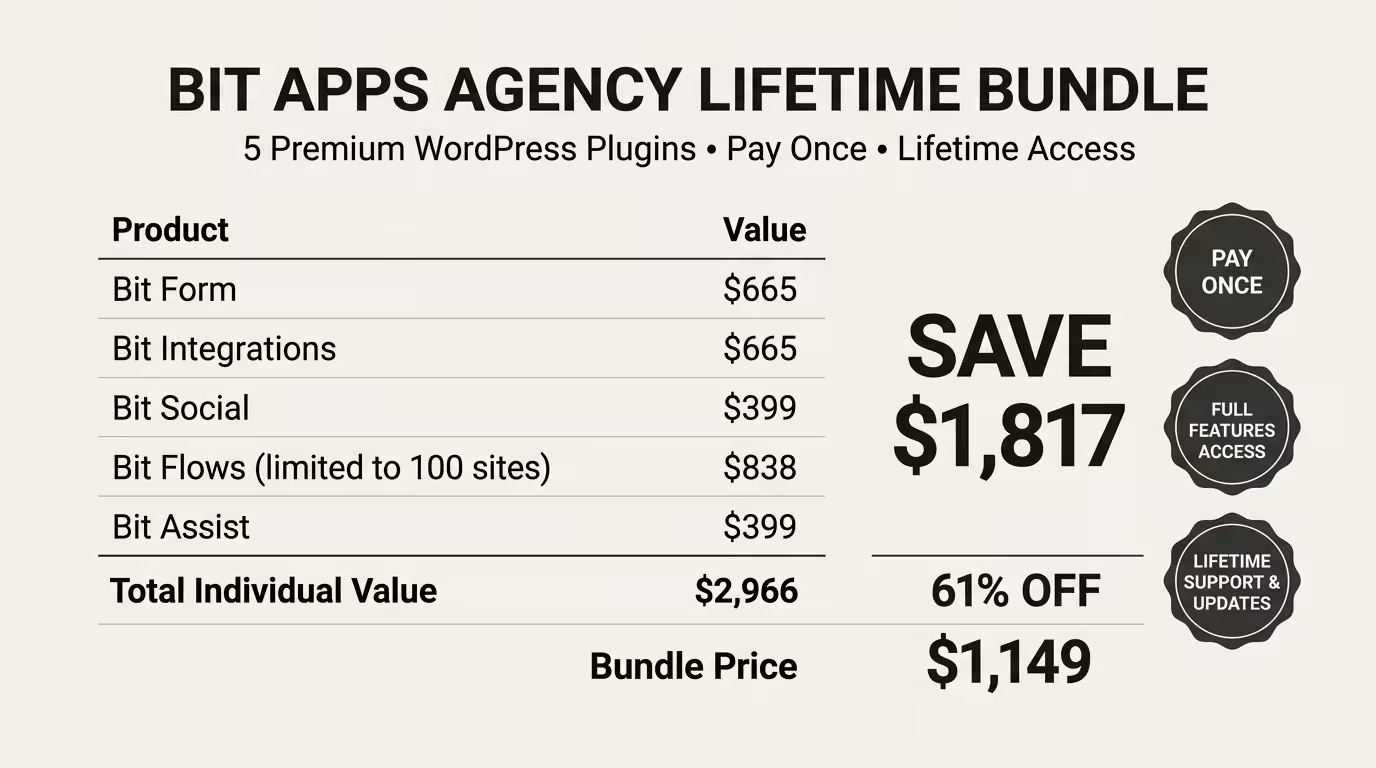
For agencies and established creators who want full access to all five core products with no recurring subscription, the Agency Lifetime Bundle is the standout offer.
| What’s Included | Individual Price | Bundle Price |
| Bit Form | $665 | |
| Bit Integrations | $665 | |
| Bit Social | $399 | |
| Bit Flows | $838 | |
| Bit Assist | $399 | |
| Total | $2,966 | $1,239 (58% off) |
The bundle also includes a split payment option: three monthly payments of $466 rather than a single upfront investment.
This is a one-time payment for lifetime access, lifetime support, and lifetime updates across all five plugins. For a business running multiple client sites or a creator who relies on these tools daily, the maths are clear.
Access the Bit Apps Agency Lifetime Bundle here
14-Day Refund Policy
Bit Apps offers a 14-day refund policy on all purchases. This gives you two full weeks to test any plugin in your live environment before committing.
Who Is Bit Apps Best For?
Bit Apps is designed for the serious WordPress user. Not the hobbyist running a personal blog, and not the enterprise organisation with a dedicated development team and budget for Salesforce. The sweet spot is:
Independent consultants and coaches who need professional-grade forms, CRM integrations, and client communication tools without paying enterprise prices.
Content creators and bloggers who publish regularly and want automated social distribution, reliable email delivery, and form-based lead capture that connects to their chosen email marketing platform.
Educators and course creators are building learning experiences on WordPress-based LMS platforms. Bit Form handles enrolment and intake. Bit Integrations syncs to their email and CRM. Bit Flows can automate onboarding sequences. Bit Assist keeps students and prospects in touch.
Small business owners who have outgrown free tools but cannot justify the cost of Zapier, a separate form builder, a social media tool, and a live chat platform. Bit Apps consolidates those costs into a single, well-supported suite.
Digital agencies managing multiple client sites. The Agency Lifetime Bundle is built directly for this use case: unlimited site usage, agency-level features, lifetime updates.
What Real Users Are Saying
The review data across WordPress.org is extensive. Across 900+ five-star reviews, a few consistent themes emerge.
On Bit Integrations: Users consistently compare it favourably to Zapier, praising the absence of task-based pricing. One WordPress.org reviewer described it as “Zapier-like integrations without the fees”, the ability to connect the rich WordPress ecosystem without paying escalating subscription costs.
On Bit Form: Multiple reviewers highlight the calculation field as a decisive advantage over competing form builders. Support quality is a recurring theme that the team has been cited for creating personalised tutorial videos for individual user issues and logging into users’ sites directly to resolve complex configuration problems.
On Bit Assist: The multi-channel approach receives specific praise from businesses serving customers across different communication preferences. The ability to route visitors to WhatsApp, Messenger, or a contact form from a single button is described as “mind-blowing” in its simplicity.
On Bit Flows: Early adopters in 2025 called it “the N8N of WordPress”, a reference to the popular self-hosted automation platform. The visual canvas and AI integration capabilities received the strongest praise.
The support team at Bit Apps has resolved over 36,000+ tickets with 24/7 live chat availability. In 2025, the team resolved 3,200+ support tickets and 2,585+ live chat sessions. These are not numbers that suggest a company that disappears after the sale.
Bit Apps vs the Competition
| Feature | Bit Apps Suite | Gravity Forms + Zapier | WP Forms + Make |
| Form builder | ✅ Bit Form | ✅ Gravity Forms | ✅ WP Forms |
| App integrations | ✅ Bit Integrations | ✅ Zapier (task-priced) | ✅ Make (operation-priced) |
| AI workflow automation | ✅ Bit Flows | ❌ | ❌ |
| Social media auto-posting | ✅ Bit Social | ❌ | ❌ |
| Multi-channel chat widget | ✅ Bit Assist | ❌ | ❌ |
| SMTP email | ✅ Bit SMTP | ❌ | ❌ |
| File manager | ✅ Bit File Manager | ❌ | ❌ |
| Pricing model | One-time lifetime option | Annual + per-task fees | Annual + per-operation fees |
| Runs on your server | ✅ | ❌ (Zapier is cloud) | ❌ (Make is cloud) |
The key competitive advantage Bit Apps holds is scope, combined with a pricing model. A comparable stack using Gravity Forms, Zapier, a social media tool, a chat widget, and an SMTP plugin could easily cost $500–$1,000+ per year in recurring subscriptions, with automation costs scaling upward as your business grows. The Bit Apps Agency Lifetime Bundle delivers comparable or superior functionality as a one-time investment.
Explore the full Bit Apps product suite here.
FAQ
Is Bit Apps a legitimate company?
Yes. Bit Apps is a registered company headquartered in Bangladesh, founded in 2019. The team of 45+ professionals has participated in WordCamp Asia 2025 and WordCamp Dhaka 2025 as sponsors and contributors. Their plugins are available on the official WordPress.org repository with millions of downloads.
Are Bit Apps plugins available for free?
Every core Bit Apps plugin, Bit Form, Bit Integrations, Bit Assist, Bit SMTP, Bit File Manager, Bit Flows, and Bit Social, has a free version available on WordPress.org. Pro upgrades unlock advanced features, integrations, and multi-site licensing.
Does Bit Apps offer a refund policy?
Yes. Bit Apps offers a 14-day refund policy on all pro purchases. This gives you sufficient time to test the plugin in your environment before the purchase becomes final.
What is the Agency Lifetime Bundle?
The Agency Lifetime Bundle is a one-time payment deal that gives you lifetime access to Bit Form, Bit Integrations, Bit Social, Bit Flows, and Bit Assist’s five core plugins with full features, lifetime updates, and lifetime support. At the time of writing, the bundle is priced at $1,239 (58% off the combined individual price of $2,966). A split payment option of three monthly instalments of $466 is available.
Can Bit Apps replace Zapier?
For WordPress-centric workflows, yes, Bit Integrations and Bit Flows together cover the core use cases that most WordPress users rely on Zapier for, without task-based pricing. For cross-platform automations involving non-WordPress triggers, Zapier may still serve certain specific needs. However, for the majority of creators, consultants, and small business owners building on WordPress, Bit Apps provides a more cost-effective and server-native alternative.
Does Bit Flows support AI automation?
Yes. Bit Flows includes native integration with OpenAI, Google Gemini, Claude, and Perplexity AI as actions within your automation workflows. You can use AI to process form data, generate content, classify responses, and more, all within a visual no-code canvas running on your WordPress server.
How many social media platforms does Bit Social support?
As of 2026, Bit Social supports 13 platforms: Facebook, Instagram, LinkedIn, Twitter (X), Pinterest, TikTok, Bluesky, LINE, Telegram, Threads, YouTube, Google Business Profile, and more.
Is Bit Apps suitable for non-developers?
Yes. All Bit Apps products are designed with non-technical users in mind. The drag-and-drop interfaces, visual workflow canvases, and step-by-step configuration panels mean you do not need coding skills to get significant value from any plugin in the suite. That said, developer hooks and custom API support are available for technically advanced users who want to extend functionality.
Does Bit Apps work with WooCommerce?
Yes. Bit Form supports WooCommerce payments. Bit Integrations connects WooCommerce to 300+ external platforms. Bit Social includes WooCommerce smart tags for product-based social posting. Bit Assist supports WooCommerce order status lookups through the chat widget.
Where can I get support for Bit Apps plugins?
Support is available through 24/7 live chat, email at support@bitapps.pro, the WordPress.org forum, and the official Bit Apps Facebook community group. The team maintains a 36,000+ resolved ticket track record.
The case for Bit Apps is straightforward: it is one of the most comprehensive, affordable, and actively developed WordPress plugin suites available today.
For any WordPress site owner spending money on Zapier, a separate form builder, a social media scheduler, and a chat tool, the arithmetic points clearly toward consolidation. Bit Apps provides a better-integrated, server-native, more cost-effective alternative with a development team that ships updates relentlessly and a support crew that actually shows up.
The Agency Lifetime Bundle is the headline offer and a serious value proposition for creators and consultants who are building on WordPress for the long term. The 14-day refund policy removes the risk from that decision.
The standout products in the current lineup are Bit Form (for its calculation capabilities and integration depth), Bit Integrations (for its Zapier-rivalling scope without task-based pricing), and Bit Flows (for its AI-powered automation canvas that is genuinely ahead of what most WordPress users expect to find in a plugin).
If you are building a professional operation on WordPress, Bit Apps deserves a serious evaluation.
Visit Bit Apps and explore the full plugin suite here
If this review helped you make a more confident decision, share it with a fellow creator or business owner who is still piecing together an expensive, disconnected WordPress tool stack. And if you are already using any Bit Apps plugin, share your experience in the comments. We want to hear what is working.