




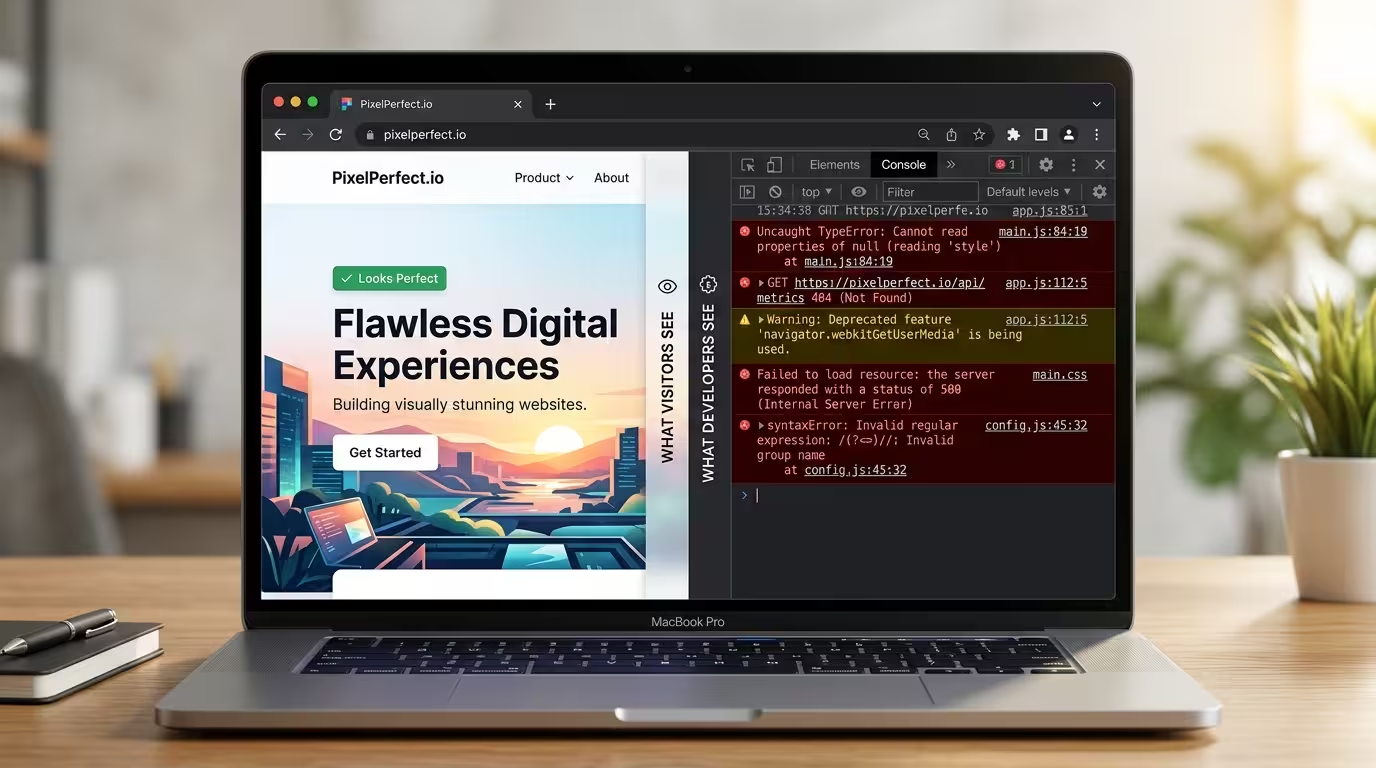
What if your website looked perfect on screen, but underneath, the code was quietly failing, pushing Google’s crawlers away, triggering accessibility errors, and loading more slowly than it should? That is not a hypothetical. It is the daily reality for thousands of websites, and it has a single root cause: unvalidated markup.
Markup validation is the process of checking your website’s HTML, CSS, and other code against established standards set by the World Wide Web Consortium (W3C). When your markup passes validation, your code is clean, structured, and compliant. When it fails, the errors accumulate silently in the background, invisible to the naked eye, but deeply consequential for your rankings, your users, and your credibility.
This matters even more now that AI-generated code is everywhere. Tools like ChatGPT, Claude, GitHub Copilot, and dozens of website builders are producing HTML and CSS at scale. That code can look polished. It can even work fine in most browsers. But without markup validation, you have no reliable way of knowing whether it actually meets the standards that browsers, search engines, and assistive technologies depend on.
This guide will give you a complete, practical understanding of markup validation, what it is, why it matters, how to do it, which tools to use, and what to do when errors appear. If you have never touched a line of code in your life, this guide was written with you in mind. If you are a developer or consultant reviewing AI-assisted builds, this guide will sharpen your QA process considerably.
Let us start from the beginning.
Table of Contents
Disclosure: Our content is engineered to help you make informed, data-driven decisions. Digital Solutions Edge is reader-supported; when you engage with our recommendations or click certain links, we may receive a commission. This support allows us to continue delivering the digital solutions you rely on. Thank you for being part of our community.
What Is Markup Validation?
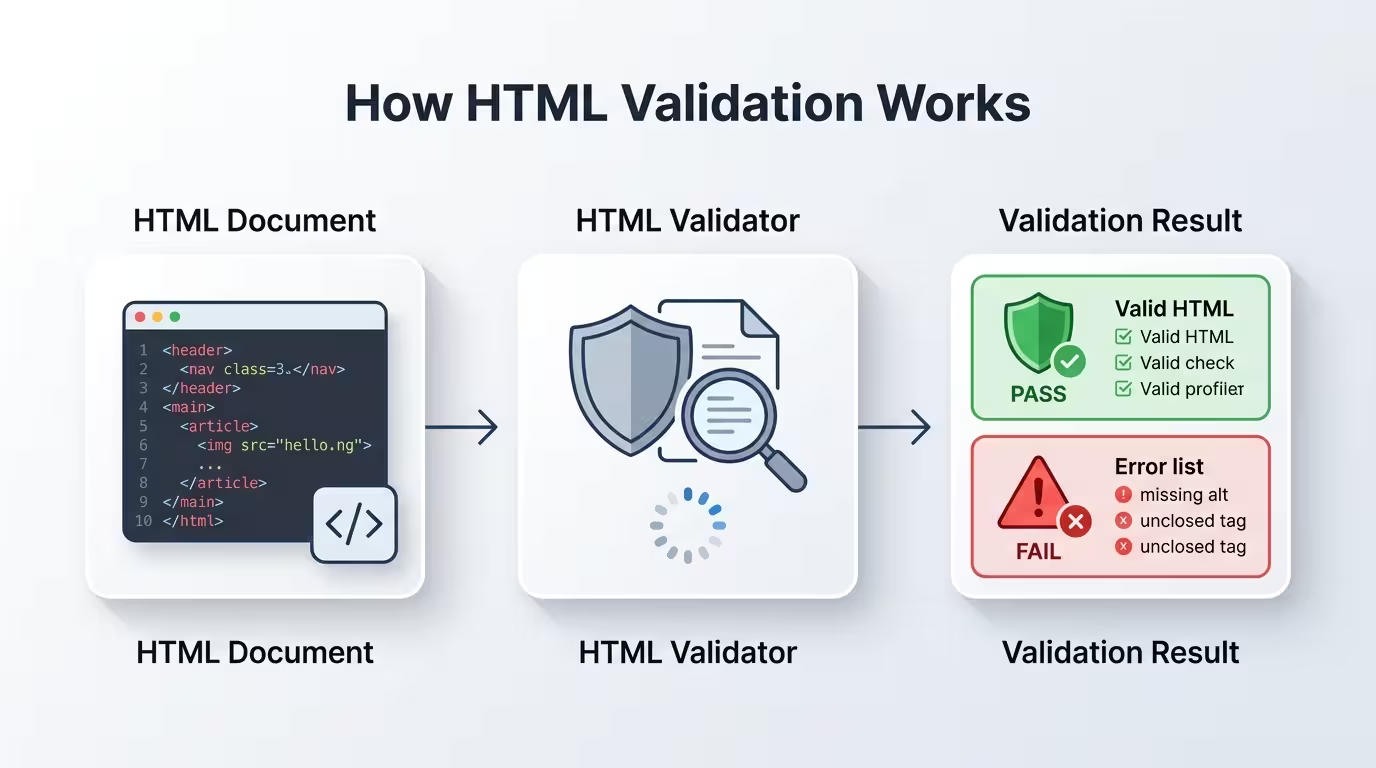
Think of your website as a document written in a formal language, HTML (HyperText Markup Language). HTML has a specific grammar, a precise set of rules that govern how every element should be written, opened, closed, and nested inside other elements. Markup validation is the act of checking whether your document follows those rules correctly.
The “markup” in markup validation refers to the tags and attributes that structure a web page. Tags like <html>, <head>, <body>, <p>, <a>, and <img> are the building blocks of every page you have ever visited. Each one has a defined purpose, a set of allowed attributes, and rules governing how it can be used in relation to other elements.
A markup validator is a tool that reads your code and compares it against those rules. It reports back with a list of errors (things that definitely break the rules), warnings (things that could cause problems), and in some cases, informational notes (things that are technically fine but worth reviewing).
The validating body: The W3C, founded by Tim Berners-Lee, the inventor of the World Wide Web, is the international organisation that sets these standards. Their Nu Html Checker and CSS Validation Service are the most authoritative free tools available.
What gets validated? Markup validation typically covers:
- HTML — the structure and content of your page
- CSS — the styling rules applied to your page
- XML — used in sitemaps, RSS feeds, and data formats
- SVG — scalable vector graphics embedded in pages
- ARIA attributes — accessibility labels that assistive technologies rely on
What does a validation error look like in practice? Here are three examples that show the difference between valid and invalid markup:
Invalid (missing closing tag):
<p>This paragraph was never closed.
<p>Now the browser has to guess where the first one ends.
Valid:
<p>This paragraph is correctly closed.</p>
<p>And so is this one.</p>
Invalid (wrong nesting):
<b><i>This text is bold and italic.</b></i>
Valid:
<b><i>This text is bold and italic.</i></b>
Invalid (missing required attribute):
<img src=”logo.png”>
Valid (with required alt text):
<img src=”logo.png” alt=”Digital Solutions Edge logo”>
These might look like small matters, but their cumulative effect on your site’s performance, accessibility, and SEO is significant. The next section explains exactly why.
Why Markup Validation Matters More Than You Think
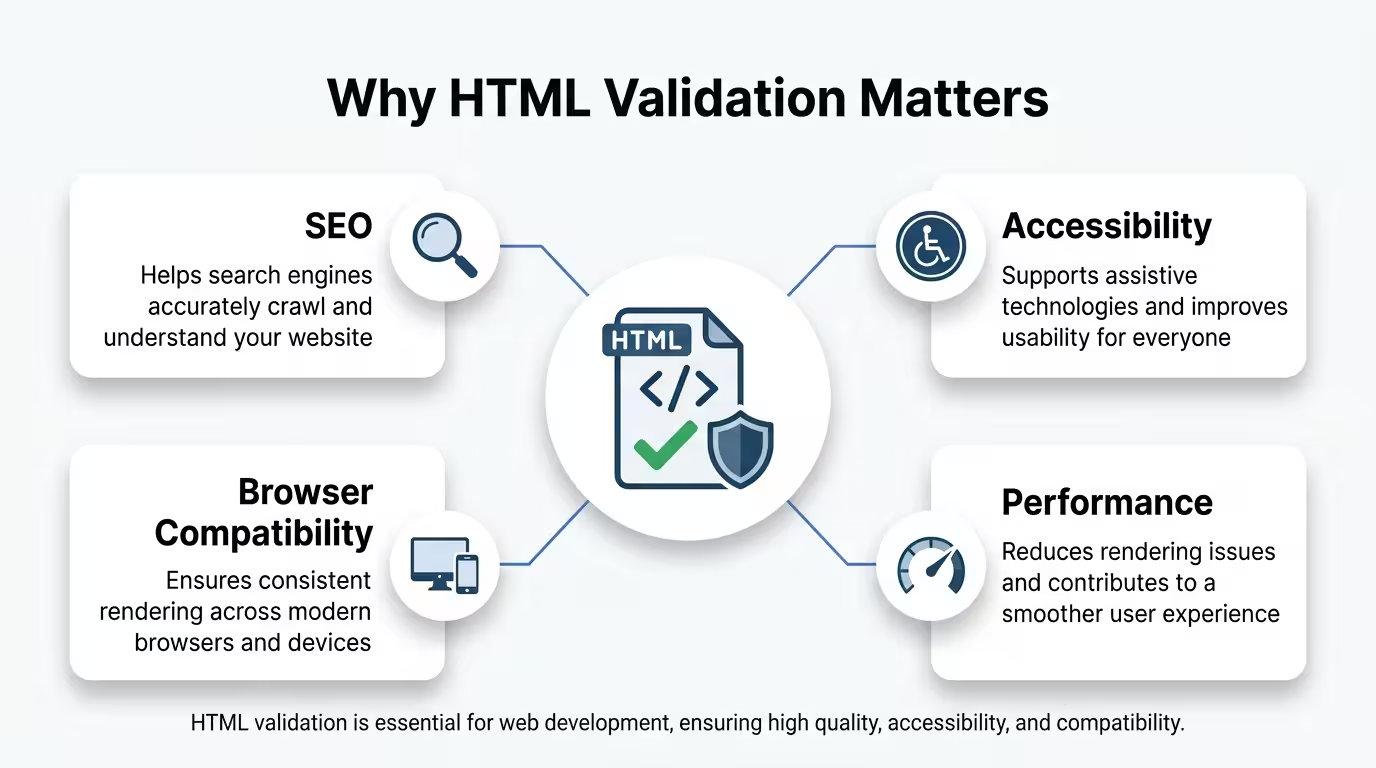
Markup validation is beyond a developer’s housekeeping task. It is a quality assurance framework that affects your site’s visibility, usability, speed, and legal compliance simultaneously. Here are the key reasons to take it seriously.
Search Engine Optimisation (SEO)
Google’s web crawlers read your code, not your design. When your HTML contains structural errors, those crawlers can misread or fail to process your content correctly. Duplicate content signals, improperly nested headings, broken link structures, and missing semantic elements can all degrade your rankings even when your written content is excellent.
A 2023 analysis of over 11.8 million web pages by Ahrefs found that 84.6% of all pages had at least one on-page HTML error. Pages with fewer structural errors tended to have stronger crawl efficiency and indexation rates (Ahrefs, 2023). While Google has publicly stated that HTML errors do not directly cause ranking penalties, the indirect impact on crawlability, Core Web Vitals, and content comprehension is well-documented.
Correctly structured semantic HTML with proper heading hierarchy, valid schema markup, clean meta tags, and well-formed open graph data gives search engines a reliable map of your content. Invalid markup breaks that map.
Accessibility Compliance
Approximately 1.3 billion people globally live with some form of disability, many of whom rely on assistive technologies like screen readers, braille displays, and keyboard navigation to access the web (World Health Organisation, 2023). These technologies depend almost entirely on clean, valid, semantically correct HTML to interpret and communicate content.
Invalid markup, such as missing ARIA roles, improperly labelled form fields, broken heading structures, or images without alt text, can render entire sections of your site inaccessible. In many jurisdictions, including the UK (under the Equality Act 2010), the EU (under the European Accessibility Act), and the United States (under the ADA and Section 508), web accessibility is not optional. It is a legal obligation for public-facing businesses and institutions.
Markup validation is the first line of defence in an accessibility audit. A clean validation report does not guarantee full accessibility, but a failed validation report is a strong indicator of accessibility gaps.
Browser Compatibility
Modern browsers, Chrome, Firefox, Safari, and Edge, are remarkably good at interpreting broken HTML. They include sophisticated error-recovery mechanisms that attempt to render pages even when the code is flawed. This creates a dangerous illusion: your page looks fine in your browser, so you assume the code is fine.
The problem surfaces in:
- Older browsers that have less forgiving parsers
- Non-standard environments like TV browsers, in-app browsers, and embedded webviews
- Rendering inconsistencies where different browsers make different guesses about how to fix the same error
- JavaScript frameworks that depend on a predictable DOM structure and break when the underlying HTML is malformed
Valid markup gives you a consistent, predictable experience across every environment your users might access your site from.
Page Speed and Performance
Invalid markup increases page weight and parse time. Browsers that encounter malformed code must run additional error-correction processes before they can render your page. This happens in milliseconds, but those milliseconds accumulate especially on mobile devices with slower processors.
Google’s Core Web Vitals framework, which directly influences search rankings, measures metrics like Largest Contentful Paint (LCP), Interaction to Next Paint (INP), and Cumulative Layout Shift (CLS). All three of these can be negatively impacted by structural HTML errors that cause the browser’s layout engine to recalculate as it processes malformed code.
Code Maintainability
For developers and technical teams, validated markup is far easier to maintain, debug, and hand over to colleagues or contractors. When every element is properly formed and the structure is consistent, future edits carry less risk of unintended breakage. For agencies and consultants managing client websites, delivering validated code is a mark of professional quality that protects both parties.
AI-Generated Code and the Validation Crisis No One Is Talking About

The integration of AI into web development has been one of the most significant productivity shifts in the industry. Tools like GitHub Copilot, ChatGPT, Claude, Cursor, and Bolt.new can generate entire web pages, components, and templates in seconds. For non-developers, especially, these tools feel like a superpower. Type a prompt, get a page. Done.
Except it is rarely done.
The core problem with AI-generated markup is not that AI tools write bad code; most of the time, they write surprisingly good code. The problem is that AI models are trained on vast datasets of human-written code, including enormous quantities of flawed, outdated, and non-compliant code. AI tools reproduce the patterns they have learned, which means they reproduce errors alongside correct patterns. They do so confidently, without a red underline or a warning message.
Here are the specific markup issues that appear most frequently in AI-generated code:
1. Obsolete HTML Attributes and Elements
AI models trained on older datasets will occasionally produce deprecated HTML, such as:
- <center> tags (deprecated since HTML 4.01)
- <font> tags for styling text (replaced by CSS)
- align, bgcolor, and border attributes on elements where CSS is the correct approach
- <b> and <i> used purely for visual styling rather than semantic meaning (<strong> and <em> are the correct alternatives)
None of these will necessarily break a page visually. All of them will flag as errors in a validator and can create rendering inconsistencies.
2. Missing or Incorrect ARIA Attributes
AI tools often generate interactive components, dropdown menus, modal windows, tabs, and accordions without the correct ARIA roles, labels, or state attributes. A navigation menu generated without role=”navigation” and appropriate aria-label values might look and function perfectly for a sighted user clicking through with a mouse. For a screen-reader user, it is invisible noise.
Similarly, AI-generated forms frequently omit aria-required, aria-describedby, and for attribute connections between labels and inputs, creating forms that are structurally invalid and functionally inaccessible.
3. Heading Hierarchy Violations
AI tools generating page layouts sometimes produce heading structures that reflect visual hierarchy rather than semantic hierarchy. You might receive code where the main page title is an <h2> styled to look large, a section title is an <h4> positioned above it visually, and an <h1> appears somewhere in the middle of the page. This is a common W3C error and a significant SEO and accessibility problem.
The correct rule is that every page should have exactly one <h1>, and headings should descend in order: <h1>, then <h2>, then <h3>, without skipping levels.
4. Self-Closing Tag Inconsistencies
In HTML5, void elements (elements with no content, like <img>, <br>, <input>, <hr>) do not need a closing slash. In XHTML, they do. AI tools mixing conventions from different eras produce inconsistent patterns like <br /> and <br> in the same document, or <input type=”text”> next to <img src=”x.jpg” />. These inconsistencies do not always produce errors, but they signal undisciplined markup and can cause issues in strict XML contexts.
5. Duplicate IDs
Every id attribute in an HTML document must be unique. AI models frequently generate component templates and then assemble them into full pages without checking for ID collisions. This creates multiple elements sharing the same id, which breaks JavaScript targeting, CSS specificity, and anchor navigation.
6. Unclosed or Improperly Nested Tags
When AI generates large blocks of HTML, it can lose track of open tags, particularly inside conditionally generated content, template loops, or nested card layouts. The result is structural errors where elements are left open, closed in the wrong order, or nested in ways the HTML specification does not allow (for example, a <div> nested inside a <p>, which is invalid).
Why Validation Is Especially Critical for AI-Generated Code
When a human developer writes code, their IDE (code editor) usually flags errors in real time. They also have an intuitive understanding of why a particular structure is correct. AI tools bypass both of these safeguards. They deliver code that looks polished and coherent, but the validation layer is absent unless you add it back yourself.
The practical implication: every piece of AI-generated markup should be validated before it goes live, without exception. This is not a criticism of AI tools; it is simply a recognition that confidence and correctness are not the same thing, whether the author is human or artificial.
Non-AI Code Is Not Safe Either: The Human Error Factor
The problems with AI-generated code are real and worth taking seriously. What should equally be taken seriously is that human-written code has always carried its own catalogue of markup errors, and the rate of those errors in production websites is high.
Research from the W3C’s own validation crawls has consistently found that the majority of publicly accessible web pages contain HTML errors, even on enterprise and government websites. A 2022 analysis by WebAIM of the top one million websites found significant accessibility violations on 96.8% of home pages, the overwhelming majority of which were rooted in HTML structure problems, not design choices (WebAIM Million, 2022).
The human error patterns are distinct from the AI error patterns:
Copy-paste errors — developers copy a component from an existing project and paste it into a new context without checking whether its IDs, class names, or structural assumptions still apply.
Template drift — a theme or template is modified over months and years by multiple hands. Each modification introduces small inconsistencies that accumulate until the markup is structurally degraded.
Framework-generated output — content management systems like WordPress, Drupal, and Joomla generate HTML automatically. Plugin conflicts, theme overrides, and editor formatting can all introduce markup errors that the developer never directly writes and therefore never reviews.
The “it looks fine” trap — a developer tests in Chrome, the page looks correct, and the work is considered done. Browser error correction means Chrome happily renders the page despite the errors. The errors remain.
Rushed delivery — under timeline pressure, validation is skipped. The errors accumulate in production and are not discovered until an accessibility audit, a crawl report, or a support ticket from a user with assistive technology needs.
The lesson is consistent: markup validation is a discipline that must apply to all code, regardless of origin. AI generated it. A junior developer wrote it. A senior architect built it. A CMS generated it. The validation step does not care who wrote it. Neither should you.
The Most Common Markup Errors and What They Mean
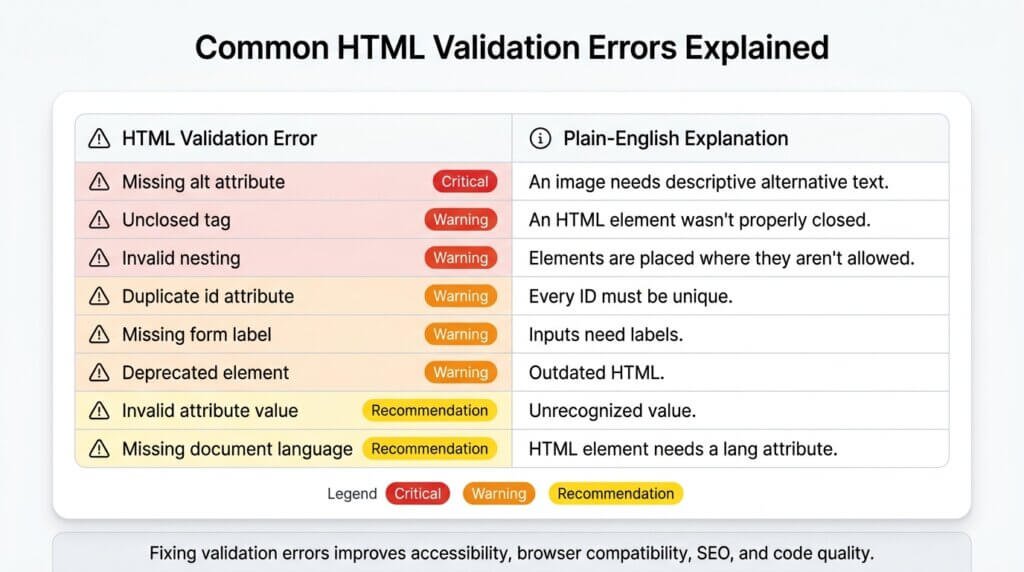
Before you start validating, it helps to know what you are looking for. Here are the most frequently occurring markup errors, explained without jargon.
Error: “Element X not allowed as child of element Y”
What it means: You have placed an HTML element inside a parent element that does not allow it. The most common example is placing a <div> inside a <p>. In HTML, <p> is an inline container and cannot hold block-level elements.
Why it matters: Browsers attempt to fix this by closing the <p> early, which can shift your page layout in unpredictable ways and confuse screen readers.
Error: “Duplicate ID”
What it means: Two or more elements on the page have the same id attribute value. For example, two elements with id=”main-header”.
Why it matters: JavaScript and CSS rely on IDs being unique. When two elements share an ID, scripts may target the wrong one, and anchor links may jump to the wrong location on the page.
Error: “An img element must have an alt attribute”
What it means: An image on your page has no alternative text description.
Why it matters: Screen readers use the alt attribute to describe images to visually impaired users. Missing alt text is one of the top accessibility violations on the web. It is also an SEO factor that search engines use alt text to understand images.
Error: “Stray end tag”
What it means: A closing tag appears in the code without a corresponding opening tag. For example, </div> appears where no <div> was ever opened.
Why it matters: It signals that the document structure is off-balance and that the browser must make assumptions about the intended layout.
Error: “Attribute X not allowed on element Y at this point”
What it means: You have applied an HTML attribute to an element that does not support it. Common examples include applying href to an element that is not an <a> tag, or using a custom data attribute without the required data- prefix.
Warning: “Section lacks heading”
What it means: A <section> element has no heading (<h2>, <h3>, etc.) inside it to label the section.
Why it matters: Headings give sections their semantic identity for both search engines and assistive technologies. A section without a heading is structurally undefined.
Error: “Bad value for attribute type on element input“
What it means: A form input has an invalid or unrecognised type value, such as a typo or an outdated value not supported in the current HTML version.
Error: “Element head is missing a required instance of child element title“
What it means: Your page’s <head> section has no <title> tag.
Why it matters: The <title> is the text that appears in browser tabs and in search engine results pages. A missing title is both a usability failure and an SEO issue.
The 9-Step Markup Validation Process (Built for Non-Developers) {#9-step-process}
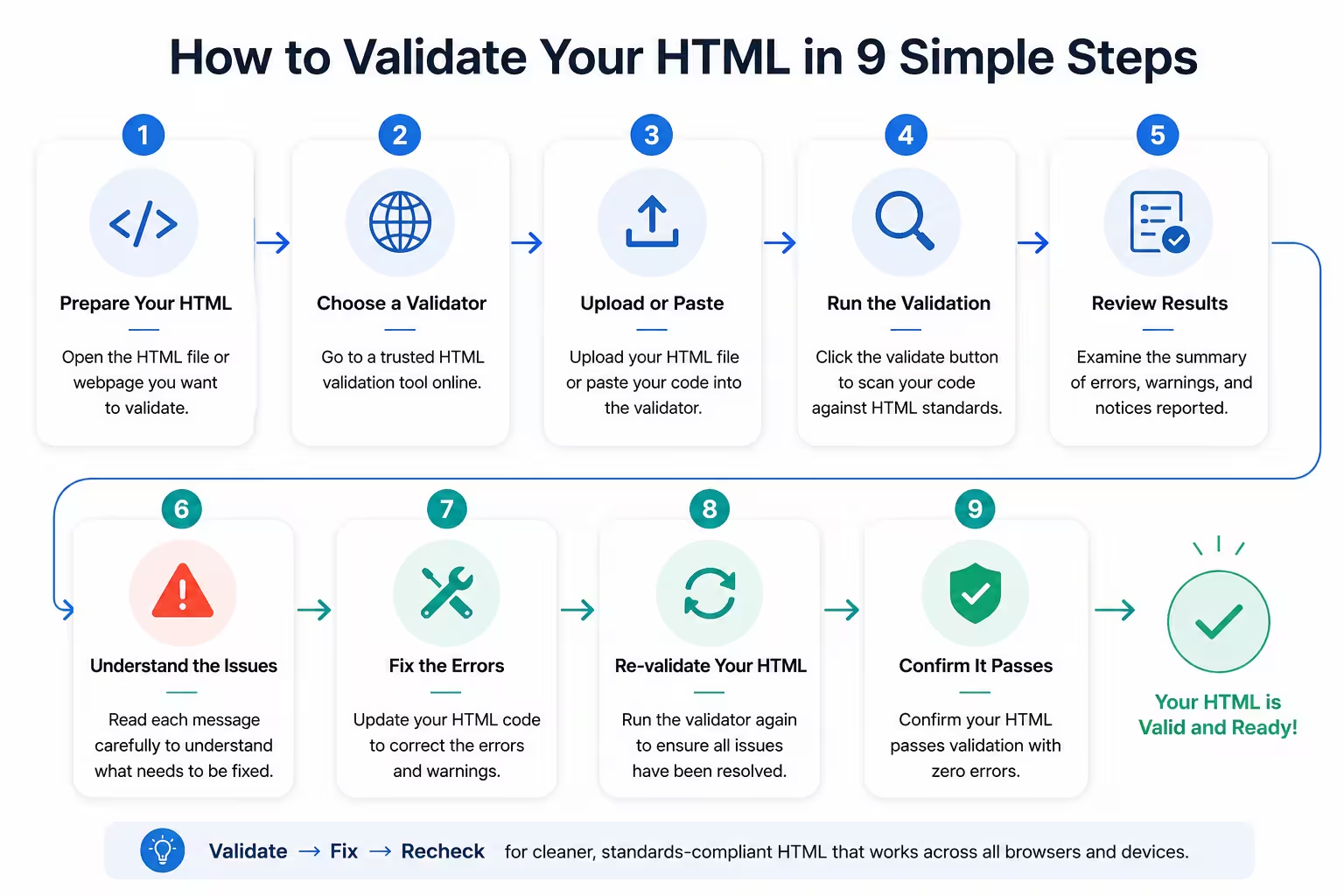
You do not need to be a developer to validate your markup. You do need a process. Here is a repeatable nine-step workflow that works for individuals, small teams, and agencies alike.
Step 1: Take Stock of Your Site’s Structure
Before you start validating, know what you are validating. List the key page templates on your site: homepage, blog post, service page, landing page, contact page, product page. Each template generates a different class of markup errors. Validating one example of each template type gives you a representative picture of your site’s code health.
If your site uses a CMS like WordPress, you likely have fewer unique templates than you think. Validating six to ten pages typically surfaces 80–90% of your structural issues.
Step 2: Choose Your Validation Method
There are three ways to feed your pages to a validator:
a) URL-based validation: You paste your live page URL into the validator, and it fetches and analyses the code. This is the simplest approach for live websites.
b) File upload: You upload a saved HTML file directly. This is useful for pages that are not yet live, or for validating exported CMS templates.
c) Direct input: You paste the raw HTML code into the validator’s text area. This is ideal for validating AI-generated code before publishing it.
Step 3: Validate Your HTML with the W3C Nu Html Checker
Go to https://validator.w3.org/nu/. Enter your URL, upload your file, or paste your code. Click “Check”. The validator will return a list of errors and warnings.
Do not be alarmed if you see dozens of errors on your first run. This is entirely normal for websites that have never been validated. The goal is not perfection in one session. The goal is systematic reduction.
Step 4: Read and Categorise Your Results
Errors appear in red. Warnings appear in orange or yellow. Both deserve attention, but prioritise errors first. For each error, the validator will:
- Tell you the line number where the error occurs
- Quote the specific code that triggered it
- Explain what rule was violated
Copy or screenshot your results for reference. Group errors by type, and you will often find the same error repeated across multiple lines, which means a single fix in your template will resolve many instances at once.
Step 5: Validate Your CSS
CSS validation is a separate step. Go to https://jigsaw.w3.org/css-validator/. Enter your URL or paste your CSS. Run the check.
Common CSS errors include undefined property names, invalid values, missing units (writing font-size: 16 instead of font-size: 16px), and duplicate declarations that override each other unintentionally.
Step 6: Check Accessibility-Specific Markup
Run your pages through WAVE (Web Accessibility Evaluation Tool), a free tool from WebAIM that checks for accessibility-related markup issues, including missing alt text, empty headings, poor contrast ratios, and missing form labels.
WAVE presents its results as visual overlays on your actual page, making it intuitive even for non-technical users. Each icon is clickable and explains the issue.
Step 7: Use a Structured Data Validator
If your site uses schema markup (structured data for rich snippets in search results), validate it at Google’s Rich Results Test or Schema.org’s validator. Schema markup is a form of markup itself, and errors in it prevent your rich results from appearing in Google Search.
Step 8: Automate Ongoing Validation
Manual validation is a starting point. For ongoing quality assurance, integrate automated validation into your workflow. Options include:
- Browser extensions that flag validation errors as you browse your own site (see the tools section below)
- CI/CD pipeline integration for developer teams using tools like HTMLProofer or html-validate in their build process
- Site auditing tools like Screaming Frog, Sitebulb, or Semrush that crawl your site and surface HTML errors as part of a broader technical SEO audit
Step 9: Document, Fix, and Revalidate
Create a simple error log, even a spreadsheet works, listing each error type, the pages it appears on, the fix applied, and the date resolved. After making fixes, revalidate the affected pages to confirm the errors are gone. This documentation serves as a quality assurance record and helps you track progress over time.
The Best Markup Validation Tools Available Today
The ecosystem of markup validation tools has expanded significantly in recent years. Here is a curated breakdown of the best options, categorised by use case and technical skill level.
Free Online Validators (No Installation Required)
W3C Nu Html Checker (validator.w3.org/nu) is the gold standard for HTML validation. Maintained by the W3C, it implements the full HTML5 parsing algorithm and checks against the official specification. Accepts URLs, file uploads, and direct code input. Free, authoritative, and the first tool you should use for any validation task.
W3C CSS Validation Service (jigsaw.w3.org/css-validator) The CSS equivalent of the Nu Html Checker. Enter your URL or paste your stylesheet. Returns errors and warnings with line numbers and explanations. Useful for validating both internal and external stylesheets.
WAVE Web Accessibility Evaluation Tool (wave.webaim.org) Excellent for accessibility-specific markup checking. The visual overlay interface makes it accessible to non-developers. Identifies missing alt text, heading structure problems, empty links, and contrast issues. Developed by WebAIM, one of the leading accessibility research organisations.
Google Rich Results Test (search.google.com/test/rich-results) for validating structured data markup. Essential if your site uses schema.org markup for reviews, recipes, products, events, or FAQs. Shows exactly what rich results Google can generate from your page’s schema.
Validator.nu (validator.nu) is an alternative implementation of the W3C HTML validator that is slightly faster and offers additional output formats, including JSON, which is useful for automated pipelines.
Browser Extensions (Validate As You Browse)
Web Developer (Chrome and Firefox) A comprehensive browser extension that includes HTML and CSS validation options alongside dozens of other web development utilities. You can trigger a validation check on any page you are currently viewing without leaving your browser.
axe DevTools (Chrome and Firefox). From Deque Systems, axe is the industry-leading accessibility testing browser extension. It integrates with your browser’s developer tools and identifies WCAG-compliant markup failures with severity ratings and remediation guidance.
HeadingsMap (Chrome and Firefox) A focused extension that visualises the heading hierarchy of any page you visit. Instantly shows heading order violations and skipped heading levels, one of the most common markup errors in both AI-generated and human-written code.
Code Editor Integrations (Validate As You Write)
HTMLHint (VS Code, WebStorm, Sublime Text) is an open-source HTML linter that checks your code in real time as you write it. Configurable rule sets allow you to enforce your own coding standards in addition to W3C compliance. Available as a VS Code extension and as an npm package for build pipeline integration.
Prettier (VS Code and most major editors) A code formatter that enforces consistent markup structure. While it is not a validator in the strict W3C sense, it catches many structural inconsistencies and enforces clean, consistently nested code that is far less likely to produce validation errors.
ESLint with jsx-a11y (for React and JSX developers). For those working with JavaScript frameworks that generate HTML dynamically, the jsx-a11y plugin for ESLint checks for accessibility violations in JSX code at the point of writing. Particularly valuable when AI tools are generating React components.
Technical SEO and Site Audit Tools (Validate at Scale)
Screaming Frog SEO Spider (screaming frog.co.uk). The most widely used technical SEO crawler in the industry. Crawls your entire site and surfaces missing meta tags, duplicate title tags, missing alt text, broken links, and other HTML structure issues across every page. The free version crawls up to 500 URLs. The licensed version (£199/year at the time of writing) crawls unlimited pages.
Sitebulb (sitebulb.com) A premium site auditing tool with excellent visualisations of HTML structure issues. Particularly strong on accessibility and Core Web Vitals reporting. More approachable for non-technical users than Screaming Frog.
Semrush Site Audit (semrush.com) For users already in the Semrush ecosystem, the Site Audit feature crawls your site and flags HTML issues, broken markup, and structured data errors alongside a full SEO health score. Integrates markup validation findings directly into an actionable priority queue.
For AI-Generated Code Specifically
CodePen (codepen.io) A browser-based code sandbox where you can paste AI-generated HTML, CSS, and JavaScript, preview it instantly, and use the integrated console to spot errors. Extremely useful for testing and debugging AI output before committing it to your live site.
Replit (replit.com) A more fully-featured online coding environment. Paste AI-generated code here to run it in a controlled environment, review the output, and validate before publishing.
Both tools allow you to catch obvious rendering failures before they reach your live site, giving you a validation-adjacent layer of quality assurance even before a formal validator run.
How to Fix the Errors Your Validator Finds
Running a validator is the easy part. What comes next is where most people stall. Here is a practical approach to fixing the most common errors, written for non-developers.
If You Use a CMS (WordPress, Squarespace, Webflow, Wix)
Most markup errors in CMS-based sites originate from one of three sources: the theme, a plugin, or the page content editor.
Theme errors are best resolved by updating to the latest theme version (the developer may have already fixed the issue), switching to a better-coded theme, or contacting your theme developer. For WordPress users, the HTML Validator plugin integrates W3C validation results directly into your admin dashboard.
Plugin errors require identifying which plugin generates the problematic code. Deactivate plugins one at a time while re-validating to isolate the source. Once identified, you can update the plugin, replace it with a better-coded alternative, or contact the developer.
Content editor errors are often caused by copy-pasting content from Word documents, Google Docs, or external sources. These paste operations typically bring formatting markup (spans, divs, inline styles) that conflict with your site’s structure. Always use your editor’s “Paste as Plain Text” option and reformat within the editor. In WordPress, the Gutenberg block editor is less prone to this than the Classic Editor with the old TinyMCE.
If You Have Direct Access to Code
For each error type, here is the fix:
Unclosed tags: Add the missing closing tag. Your validator’s line number reference takes you directly to the problem.
Duplicate IDs: Rename one of the duplicate elements. If the ID is referenced in JavaScript or CSS, update those references too.
Missing alt text on images: Add a descriptive alt attribute to every <img> tag. For purely decorative images, use an empty alt attribute: alt=””. For images that convey information, write a concise, descriptive phrase.
Wrong nesting: Reorder the tags so that opening and closing tags match correctly and block-level elements are not inside inline elements.
Missing page title: Add a <title> element inside your <head> section with a descriptive, keyword-relevant page title.
Deprecated elements: Replace < centre> with CSS text-align: centre. Replace <font> tags with CSS font-family, font-size, and colour properties. Replace <b> with <strong> and <i> with <em> where semantic meaning applies.
When to Call a Developer
If your validator returns more than 50 unique errors across your main templates, you are likely dealing with systemic structural issues that go beyond quick fixes. This is the point to bring in a developer, a technical SEO consultant, or an accessibility specialist. Provide them with your validator report as a starting document; it will save significant diagnosis time and give them a clear remediation list to work from.
The Real Benefits of Regular Markup Validation
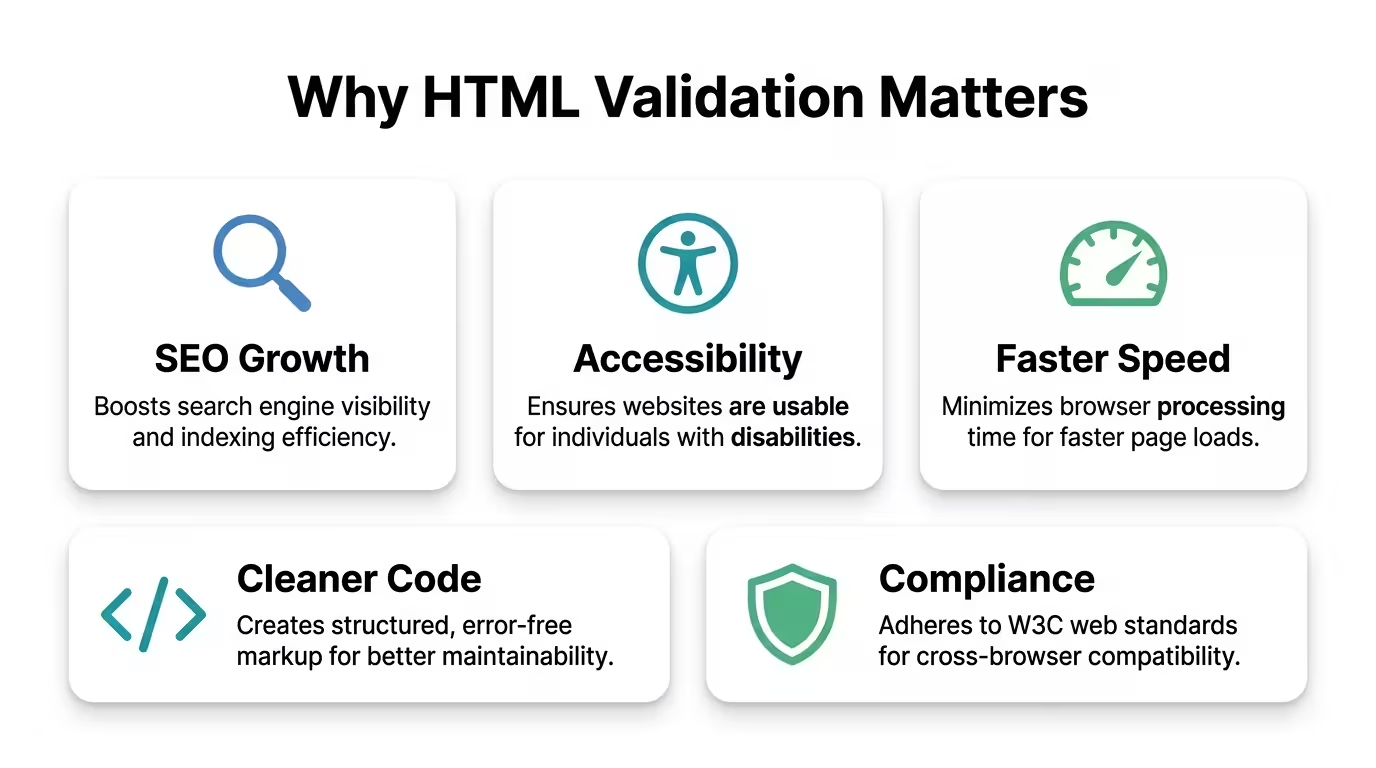
Treating markup validation as a regular practice rather than a one-time fix delivers compounding returns across every dimension of your website’s performance.
Better Search Rankings
Clean, valid markup communicates clearly with search engine crawlers. Proper heading structure helps Google understand your content hierarchy. Valid schema markup enables rich snippets that increase your click-through rate from search results. Correct canonical tags prevent duplicate content penalties. Every structural improvement in your markup is a direct investment in your organic visibility.
Reduced Accessibility Risk
Regular validation keeps your accessibility baseline high, reducing the risk of complaints, legal action, or audit failures under accessibility regulations. For UK businesses, compliance with WCAG 2.1 Level AA is increasingly expected as a standard of care. For public sector bodies, it is a legal requirement under the Public Sector Bodies Accessibility Regulations 2018.
Faster Load Times
Validated markup is leaner markup. Removing deprecated elements, redundant attributes, and malformed code reduces page weight. Consistent, valid structure reduces the browser’s error-correction overhead. Both improvements contribute to faster Core Web Vitals scores.
Stronger User Experience
Users do not see your markup. They experience the result of it. Valid markup means consistent rendering across devices, reliable interactive elements, forms that work as expected, and navigation that assistive technology users can actually navigate. A better experience for every user, on every device, in every context.
Higher Professional Credibility
For agencies, consultants, and freelancers, delivering validated code is a mark of quality and due diligence. It protects you from client complaints, demonstrates technical rigour, and differentiates you from providers who ship without a QA process.
A Cleaner Development Pipeline
Teams that validate as part of their development workflow, catching errors before code is committed, rather than after it is live, spend significantly less time in reactive debugging. Errors caught in a validator take seconds to fix. The same errors discovered after a client complaint or a crawl failure take hours.
Markup Validation for Non-Developers: Your Practical Playbook
If you manage a website without a technical background, this section is written directly for you. You do not need to understand code to keep your site’s markup in order. You need a process and the right tools.
Your Starter Validation Kit
- Bookmark validator.w3.org/nu — your primary HTML validator. Use it monthly.
- Bookmark wave.webaim.org — your accessibility checker. Use it on every new page before publishing.
- Install the Web Developer browser extension — gives you one-click access to validation from your own browser.
- Set a monthly validation date — block 60 minutes in your calendar on the first Monday of each month to run your five or six key templates through the W3C validator and WAVE.
What to Do With Your Results
You will see errors. Accept that. Your goal is not to achieve zero errors overnight; it is to understand what you have, track your progress, and systematically reduce the count over time.
Create a simple spreadsheet with four columns:
- Page validated
- Error description
- Fix applied
- Date resolved
Share this with your developer, your CMS support contact, or your hosting provider’s support team. Most of the errors you find will have straightforward fixes that a developer can resolve quickly, especially if you provide a clear, documented list.
Non-Technical Things You Can Fix Right Now
Even without coding knowledge, you can immediately address several common errors:
- Add alt text to images through your CMS’s image editor (available in WordPress, Squarespace, Webflow, and most major platforms)
- Fix your page titles through your SEO plugin settings (Yoast SEO or RankMath in WordPress)
- Correct your heading structure in your page editor by ensuring each page starts with a single H1, followed by H2s for main sections and H3s for subsections, and never skipping levels
- Remove inline font styling from old copy-pasted content by highlighting it in your editor and clearing all formatting
These four actions alone will resolve a significant proportion of the errors found on most CMS-based websites.
Markup Validation Answered
What is the difference between an error and a warning in a markup validator?
An error represents a direct violation of the HTML or CSS specification. It means the code is genuinely non-compliant. A warning flags something that is not technically invalid but could cause practical problems, such as using a deprecated feature that still works today but may not in future. Both should be addressed, but errors take priority.
Does fixing HTML validation errors directly improve my Google rankings?
Not always directly. Google has stated that it does not use W3C validation as a direct ranking signal. The indirect effects are real and significant, though: cleaner markup improves crawlability, enables structured data, speeds up page load, and reduces accessibility violations, all of which do influence rankings.
How often should I validate my website?
At a minimum, validate every time you launch a new page or significantly update an existing one. For active websites publishing new content regularly, a monthly site-wide validation pass using a tool like Screaming Frog is best practice. For enterprise sites, validation should be integrated into the continuous deployment pipeline.
Can AI tools validate their own code?
Some AI coding tools include linting and validation features or can be prompted to check their output for errors. This is improving rapidly. ChatGPT with code interpreter capability, for example, can run HTML through an HTML parser and report basic structural errors. These self-checks are useful but not exhaustive; they do not replace running code through the W3C Nu Html Checker, which implements the full specification.
My website looks perfect. Why do I still need to validate the markup?
Because browsers are extraordinarily forgiving. Chrome, Firefox, and Safari all include sophisticated error-recovery algorithms that render broken markup as if it were correct. This means a site can look perfect in a browser while containing dozens of structural errors that affect crawlers, screen readers, and alternative browsers that apply stricter parsing.
Is markup validation the same as accessibility testing?
They overlap significantly but are not identical. Markup validation checks your code against the HTML and CSS specifications. Accessibility testing checks whether your code meets WCAG (Web Content Accessibility Guidelines). Valid markup is a necessary but not sufficient condition for accessibility. A page can be technically valid and still fail accessibility tests for reasons like poor colour contrast, insufficient text alternatives, or keyboard navigation issues.
What is XHTML, and does it require different validation?
XHTML is an older, stricter variant of HTML that follows XML syntax rules. If your site uses an XHTML doctype (<!DOCTYPE html PUBLIC “-//W3C//DTD XHTML 1.0 Strict//EN” …>), it must comply with stricter rules than standard HTML5, including mandatory self-closing slashes on void elements and lowercase tag names. The W3C Nu Checker validates XHTML pages appropriately when it detects the XHTML doctype. Most modern sites use HTML5 and do not need to concern themselves with XHTML.
How do I validate a website that requires a login?
You cannot validate password-protected pages using the URL method the validator cannot authenticate. Instead, log in to the page in your browser, use your browser’s “View Source” or “Save Page As” feature to save the rendered HTML, and upload that file directly to the W3C Nu Html Checker’s file upload option.
What does “Character encoding” error mean in a validator result?
Character encoding tells the browser what system was used to encode the text in your document. The standard for modern websites is UTF-8. An encoding error typically means your HTML document is either missing the <meta charset=”UTF-8″> declaration inside its <head>, or the actual file encoding does not match the declared one. Add <meta charset=”UTF-8″> as the first element inside your <head> section.
Are there paid tools that are better than free validators?
The free W3C tools are the most authoritative for specification compliance. Paid tools like Screaming Frog, Sitebulb, and Semrush add value through scale (crawling entire sites), integration with other SEO data, and reporting workflows that make findings actionable for teams. They are complementary to the free validators, not replacements for them.
Clean Code Is a Business Decision
Markup validation is one of the few technical practices with a direct, measurable impact on every major dimension of website performance: search visibility, accessibility compliance, load speed, user experience, and code maintainability. It applies equally to code written by developers, designers, content managers, CMS platforms, and AI tools because the HTML specification does not change based on who or what wrote the code.
The good news is that you do not need to be a developer to begin. You need a process, a small set of free tools, and a commitment to checking your work. Start with the W3C Nu Html Checker and WAVE. Validate your five most important pages today. Document what you find. Fix what you can. Bring in help for what you cannot.
If AI tools are part of your website-building or content workflow, and for most people reading this, they add markup validation as a mandatory QA step before publishing anything. The code may look clean. The page may render beautifully. The validator is the only way to know for certain.
Your website is your most visible digital asset. It deserves the same quality assurance you would apply to any other deliverable representing your brand. Start validating.
Ready to go deeper? Subscribe to the Digital Solutions Edge newsletter for practical, jargon-free guides to building websites that work harder for your business.